dsh-my-plugins
Run the following command in DeepSeek Harness:
dsh plugin install I-am-shy/dsh-my-plugins
Paste the following prompt into your AI chat to install this plugin:
Run dsh plugin install I-am-shy/dsh-my-plugins in your DeepSeek Harness terminal; the source repository is https://github.com/I-am-shy/dsh-my-plugins .
About this plugin
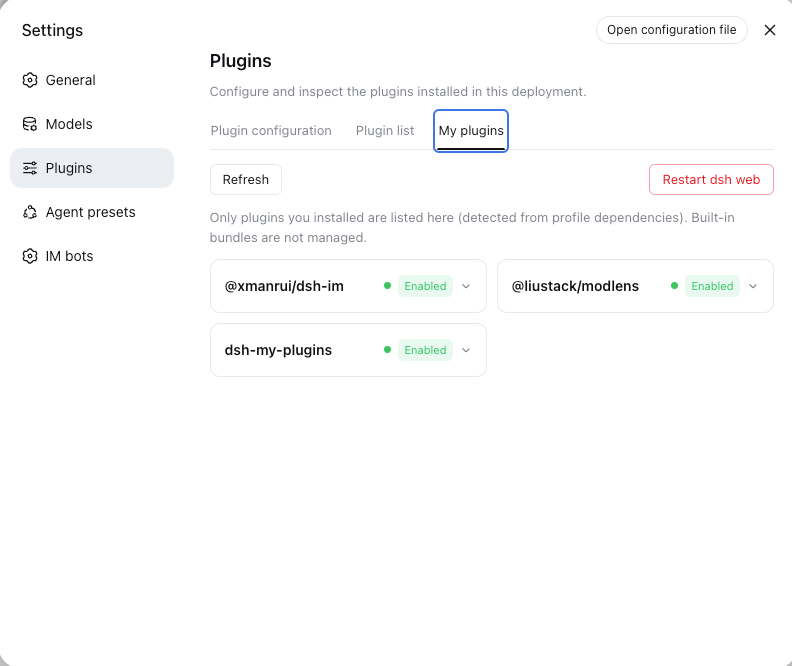
In DSH's plugin inventory, built-in packages and third-party plugins share the same list, yet there is no built-in way to manage only the ones you installed yourself. The My Plugins panel fills that gap: a dedicated tab under Settings → Plugins that lists exclusively the plugins in your profile dependencies, while built-in entries are never shown and never offer any action buttons.
Every day-to-day operation lives on a single card — check version and runtime phase, enable or disable with one click, uninstall and clean up leftover bundles, or restart dsh web so changes take full effect. Disabled state persists in a managed block inside cordis.patch.yml and survives restarts; on startup the panel cross-checks against the live Loader tree and auto-heals stale keys pointing to entries that no longer exist. All actions are written to an audit log, HTTP endpoints accept only loopback and same-origin requests, and the browser receives a scrubbed list with no credentials ever returned.
If you have installed one or more third-party plugins for DSH and want a clean, persistent place to manage them without ever touching built-in packages, this panel is built for exactly that daily workflow.
Screenshots
Use Cases
- View, toggle, and uninstall your installed third-party DSH plugins from a single settings tab
- Disable a plugin, then restart dsh web so the change sticks across sessions
- Uninstall a plugin and restart dsh web in one flow to remove leftover bundles
Best For
- Individual users who have installed several third-party plugins and want one place to manage them
- Developers who manage their own plugins without ever touching built-in packages
- Users who need hot enable/disable with persistent state across restarts
Related Plugins
A service-oriented sidebar framework for DSH, offering a full workbench with file explorer, embedded browser, real terminal, Git panel, and extensible plugin services.

A beautiful, practical Claude Code-style TUI plugin with pixel whale top bar, flowing glow title, real-time status line, streaming thought expansion, time rewind, context progress bar and TPS gauge — zero core changes.

The plugin market for DeepSeek Harness: browse/search/one-click install community plugins and themes, with updates, backup/restore, hot disable, diagnostics, and AI fix.

A persistent whale widget on the DSH web UI that shows DeepSeek balance, today's usage, and per-turn cost, with drag-and-snap and sound effects.