dsh-effort-slider
Run the following command in DeepSeek Harness:
dsh plugin install SmailPang/dsh-effort-slider
Paste the following prompt into your AI chat to install this plugin:
Run dsh plugin install SmailPang/dsh-effort-slider in your terminal; the source repository is https://github.com/SmailPang/dsh-effort-slider. After installation, restart dsh web to activate the plugin.
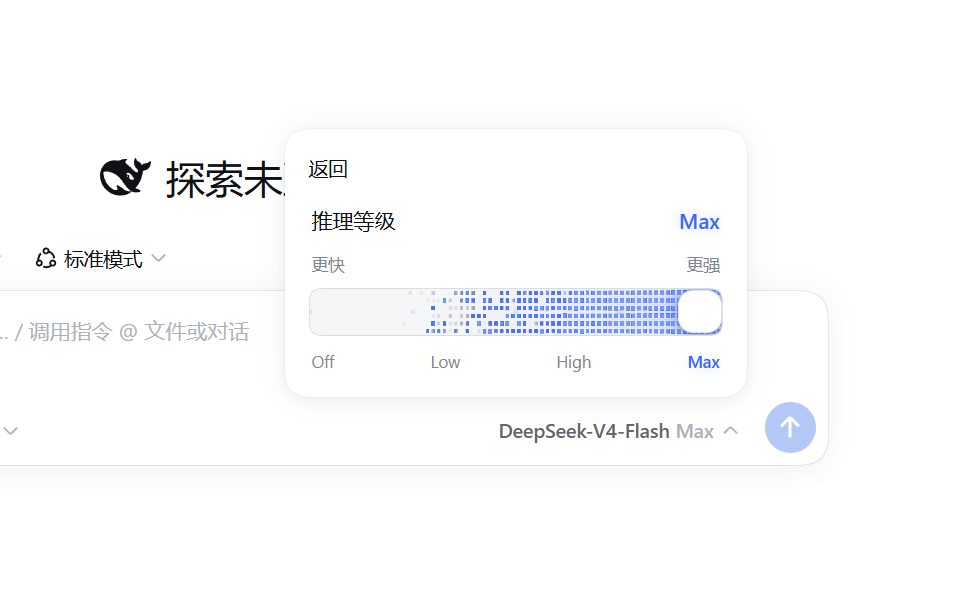
About this plugin
The native Reasoning Level panel in DSH Web is a set of plain radio rows—functional, but visually underwhelming. dsh-effort-slider does one thing well: the moment that panel opens, it swaps those five radio rows in place for a single drag-to-select slider card, borrowing the design language of the Claude Effort card while respecting DSH's own typography, spacing, border radius, and CSS theme variables.
The most delight-inducing detail lives at the Max stop: drag the slider fully right and a DeepSeek-blue WebGL flame ignites inside the track (a vanilla port of a 4-pass particle simulation). The engine idles after 180 frames and silently falls back to a CSS glow when WebGL is unavailable. Selection still travels through DSH's official selectModel pipeline, so next-turn activation, default saving, and seat-label updates behave exactly as native—except the panel stays open without flicker or snap-back.
Built for DSH Web users who want reasoning-level adjustment to feel more tactile and visually polished. The plugin is zero-dependency, ships no build step, never patches DSH source code, and preserves the original UI intact whenever panel detection fails or the model lacks reasoning capability.
Screenshots
Use Cases
- Frequently toggling reasoning effort from Off to Max in DSH Web
- Upgrading the plain radio rows in the Effort panel to a single drag-to-select slider card
- Enjoying consistent dark or light theme polish and a blue flame at the Max stop
Best For
- Day-to-day users of the DSH Web interface
- Developers with high expectations for interaction quality and UI detail
- Tech enthusiasts who enjoy front-end visual enhancement plugins
Related Plugins
A service-oriented sidebar framework for DSH, offering a full workbench with file explorer, embedded browser, real terminal, Git panel, and extensible plugin services.

A beautiful, practical Claude Code-style TUI plugin with pixel whale top bar, flowing glow title, real-time status line, streaming thought expansion, time rewind, context progress bar and TPS gauge — zero core changes.

The plugin market for DeepSeek Harness: browse/search/one-click install community plugins and themes, with updates, backup/restore, hot disable, diagnostics, and AI fix.

A persistent whale widget on the DSH web UI that shows DeepSeek balance, today's usage, and per-turn cost, with drag-and-snap and sound effects.