dsh-plugin-desktop-notice
Run the following command in DeepSeek Harness:
dsh plugin install zhaoxuejie/dsh-plugin-desktop-notice
Paste the following prompt into your AI chat to install this plugin:
Run dsh plugin install zhaoxuejie/dsh-plugin-desktop-notice in the DeepSeek Harness terminal to install it; source code is available at https://github.com/zhaoxuejie/dsh-plugin-desktop-notice
About this plugin
Your AI is grinding through a batch of tasks, and your attention has already drifted to a chat app, a design doc, or the next meeting. The most maddening moment: the AI stopped five minutes ago waiting for a permission prompt, and you only realize it has been sitting idle long before that when you finally glance back. dsh-plugin-desktop-notice pushes DSH key events straight to your operating system notification center, turning you from a screen-watcher into someone who gets notified.
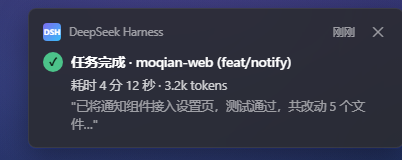
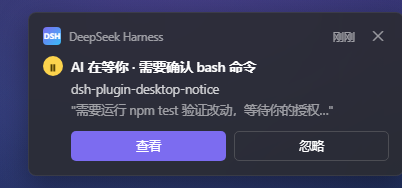
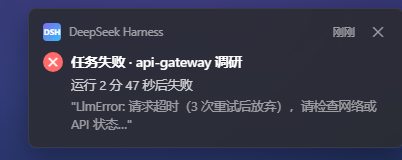
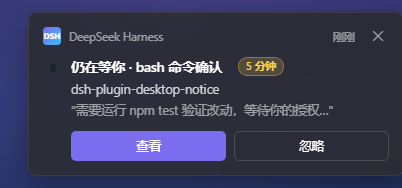
Three event types drive everything: task completed, awaiting input, and task failed, each with its own toggle and sound. Notifications carry the project name, git branch, elapsed time, token usage, and a result summary so a quick glance tells you whether to switch back. Do-not-disturb is the default posture: no pop-up while DSH is in the foreground, events queue silently during fullscreen or screen-share, and you can schedule quiet hours (with midnight-crossing support). Awaiting-input events are exempt from DND by default, because a blocked AI is burning your time, not its own. Similar events within ten seconds auto-merge to prevent spam, and an unacknowledged input prompt re-sends itself after five minutes as an escalating reminder. On the mobile side, Bark, ntfy, or a custom webhook delivers completion and failure alerts to your phone. A bottom-right history panel lets you review past notifications and check the signature stat: how many minutes the AI waited on you today.
Built for developers who interact with AI frequently and constantly context-switch between tasks. Zero extra configuration out of the box: install, restart DSH, done. Works on Windows, macOS, and Linux desktops; headless or server environments automatically degrade to log-only mode without breaking anything.
Screenshots
Use Cases
- AI pauses mid-task waiting for a permission prompt while you are in a meeting
- Running batch tasks in the background without babysitting the terminal
- Juggling multiple projects and needing a quick signal on which AI is stuck
Best For
- Developers who collaborate with AI frequently and context-switch often
- Productivity-oriented users who prefer notification-driven workflows over staring at screens
- Tech leads juggling multiple AI sessions or projects simultaneously
Related Plugins
A service-oriented sidebar framework for DSH, offering a full workbench with file explorer, embedded browser, real terminal, Git panel, and extensible plugin services.

A beautiful, practical Claude Code-style TUI plugin with pixel whale top bar, flowing glow title, real-time status line, streaming thought expansion, time rewind, context progress bar and TPS gauge — zero core changes.

The plugin market for DeepSeek Harness: browse/search/one-click install community plugins and themes, with updates, backup/restore, hot disable, diagnostics, and AI fix.

A persistent whale widget on the DSH web UI that shows DeepSeek balance, today's usage, and per-turn cost, with drag-and-snap and sound effects.