dsh-plugin-internet-meme
Run the following command in DeepSeek Harness:
dsh plugin install zhaoxuejie/dsh-plugin-internet-meme
Paste the following prompt into your AI chat to install this plugin:
Install this plugin in DeepSeek Harness. Source: https://github.com/zhaoxuejie/dsh-plugin-internet-meme
About this plugin
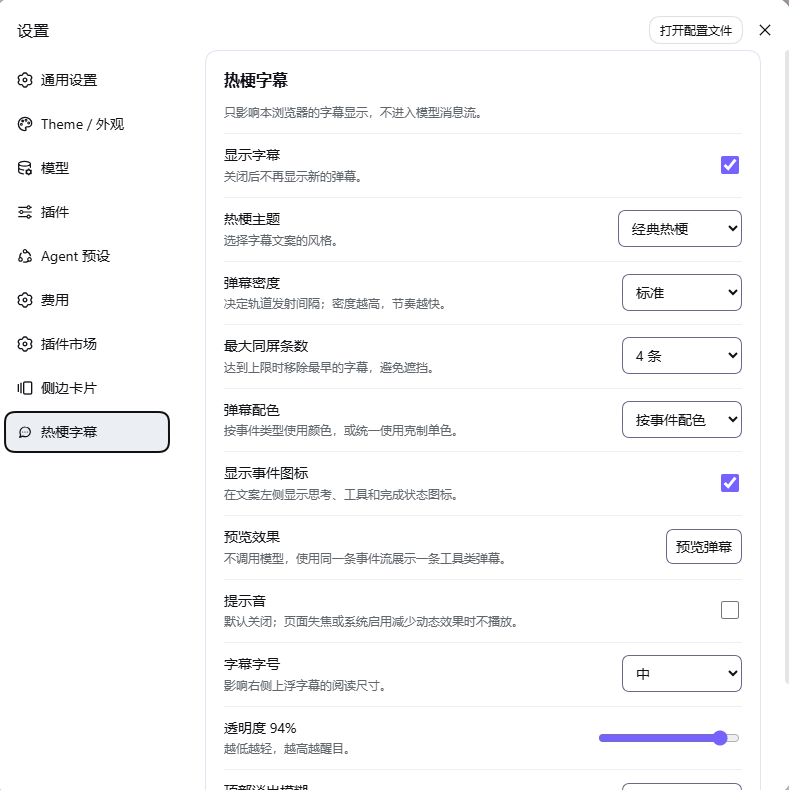
When running an Agent in DSH Web, the page shows only chat bubbles scrolling while intermediate states like thinking, tool calls, tool results, and turn completion receive no visual feedback. dsh-plugin-internet-meme overlays a lightweight meme-subtitle layer on the right so the Agent execution rhythm becomes visible, without touching model dialogue, tool-call logic, or session records.
The plugin listens to five lifecycle events (turn/start, step/start, tool/call, tool/result, turn/end) via the standard Bundle Host entry and projects them through SSE to an independent browser-side renderer. It ships four built-in themes, a customizable copy pool, and appearance controls for density, font size, opacity, blur, and on-screen cap. An optional local synthesized sound cue requires no network audio. All settings persist only in browser localStorage and never enter the model message stream.
Ideal for DSH Web users who want to perceive Agent pacing at a glance without polluting their transcripts, for teams that prefer local audible cues over external files, and for anyone who wants a swappable, customizable UI garnish that can be toggled on or off without affecting core functionality.
Screenshots
Use Cases
- Perceive thinking, tool calls, and turn completion in real time via floating subtitles on the right
- Match execution feedback to your team style with a custom copy pool and four built-in themes
- Confirm key events with locally synthesized sound cues in a quiet workspace, no network audio needed
Best For
- DSH Web users who want visible Agent pacing without polluting chat transcripts
- Teams that prefer locally synthesized audio with zero network dependency
- Developers who want customizable copy, themes, and appearance without touching the model or tool pipeline
Related Plugins

whale-girl is a desktop pet in the DSH Web GUI (bottom-right for instant companionship) — draggable, feedable, playable; completed tasks, sessions and companionship time accrue into seniority levels, titles, and memories.

Renders your local Wallpaper Engine wallpapers as the DSH web background, supporting video, web, and scene wallpapers with a liquid-glass effect and rich customization.

A WebGPU ocean skin for DeepSeek Harness with five-wave Gerstner waves, translucent theme, day/night cycle, and quick controls, installable as plugin or extension.

A Galgame-style conversation view and visual scene editor for DSH web sessions, with a real-time editing mode.