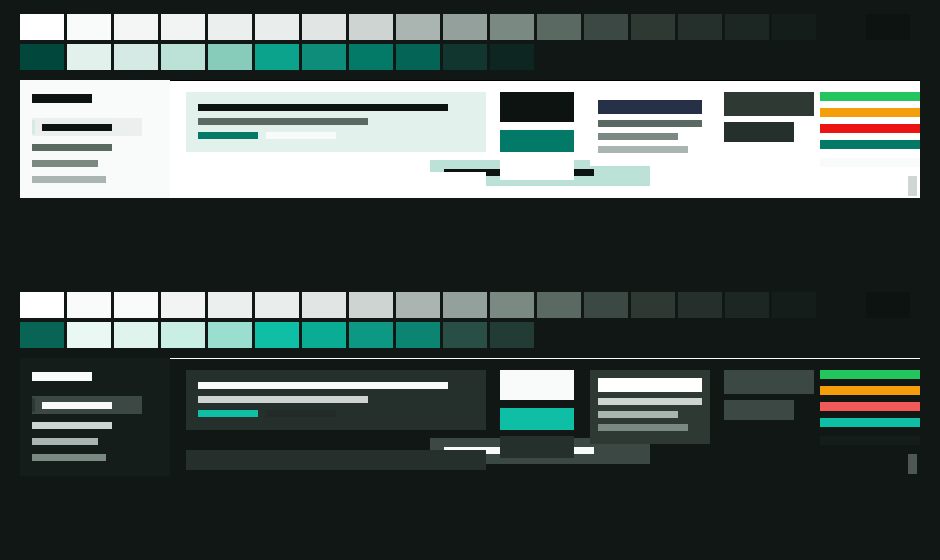
dsh-theme-inkstone
Run the following command in DeepSeek Harness:
dsh plugin install xerxescom/dsh-theme-inkstone
Paste the following prompt into your AI chat to install this plugin:
In DeepSeek Harness, open a terminal and run dsh plugin install xerxescom/dsh-theme-inkstone to install the Inkstone theme plugin; the source is at https://github.com/xerxescom/dsh-theme-inkstone .
About this plugin
The DSH web client ships a complete default palette, but if what you want is a quieter mineral tone—green-grey carrying structure, jade providing accent—without touching layout, typography, or any interactive element, Inkstone is built for that. It registers no settings, introduces no new components, and its entire footprint is a 119-token CSS custom-property override stacked on top of whichever light or dark mode you already chose. Switching modes swaps every colour pair to its mode-appropriate value; no side ever becomes unreadable.\n\nThe palette is computed, not chosen by eye. A generator lifts the baseline scale into OKLCH, shifts only hue and chroma while preserving perceptual lightness L: neutral slides to 168° green-grey, jade to 178°, secondary accent to 198° cyan-blue. Chroma follows a curve that converges at both extremes, so pure white stays pure white and the deepest surface stays near-black; mineral tint lives only in the mid-tones. Accent families receive a mode-inverted lightness tilt so text remains legible on its own fill. All 28 WCAG contrast pairs show zero regression, with link and accent-button text in light mode improving from 4.23 to 5.33. Semantic status colours (green, amber, red) are left fully baselined—re-colouring a warning is a meaning change, not a theme.\n\nFor developers who find the built-in palette serviceable but slightly flat and want a touch of ink and jade character; and for teams that enforce a strict colour-only theme boundary and want the generator to fail loudly the moment DSH upgrades alter the token surface, rather than silently producing a wrong palette.
Screenshots
Use Cases
- Wants a quieter mineral palette without touching layout or typography
- Needs a theme with zero WCAG contrast regression
- Wants loud failures when DSH upgrades change the token surface
Best For
- Frontend developers who find the default palette flat and want subtle character
- Teams that enforce a strict colour-only boundary and never touch UI structure
- Product and design teams that require WCAG contrast validation
Related Plugins
A service-oriented sidebar framework for DSH, offering a full workbench with file explorer, embedded browser, real terminal, Git panel, and extensible plugin services.

A beautiful, practical Claude Code-style TUI plugin with pixel whale top bar, flowing glow title, real-time status line, streaming thought expansion, time rewind, context progress bar and TPS gauge — zero core changes.

The plugin market for DeepSeek Harness: browse/search/one-click install community plugins and themes, with updates, backup/restore, hot disable, diagnostics, and AI fix.

A persistent whale widget on the DSH web UI that shows DeepSeek balance, today's usage, and per-turn cost, with drag-and-snap and sound effects.