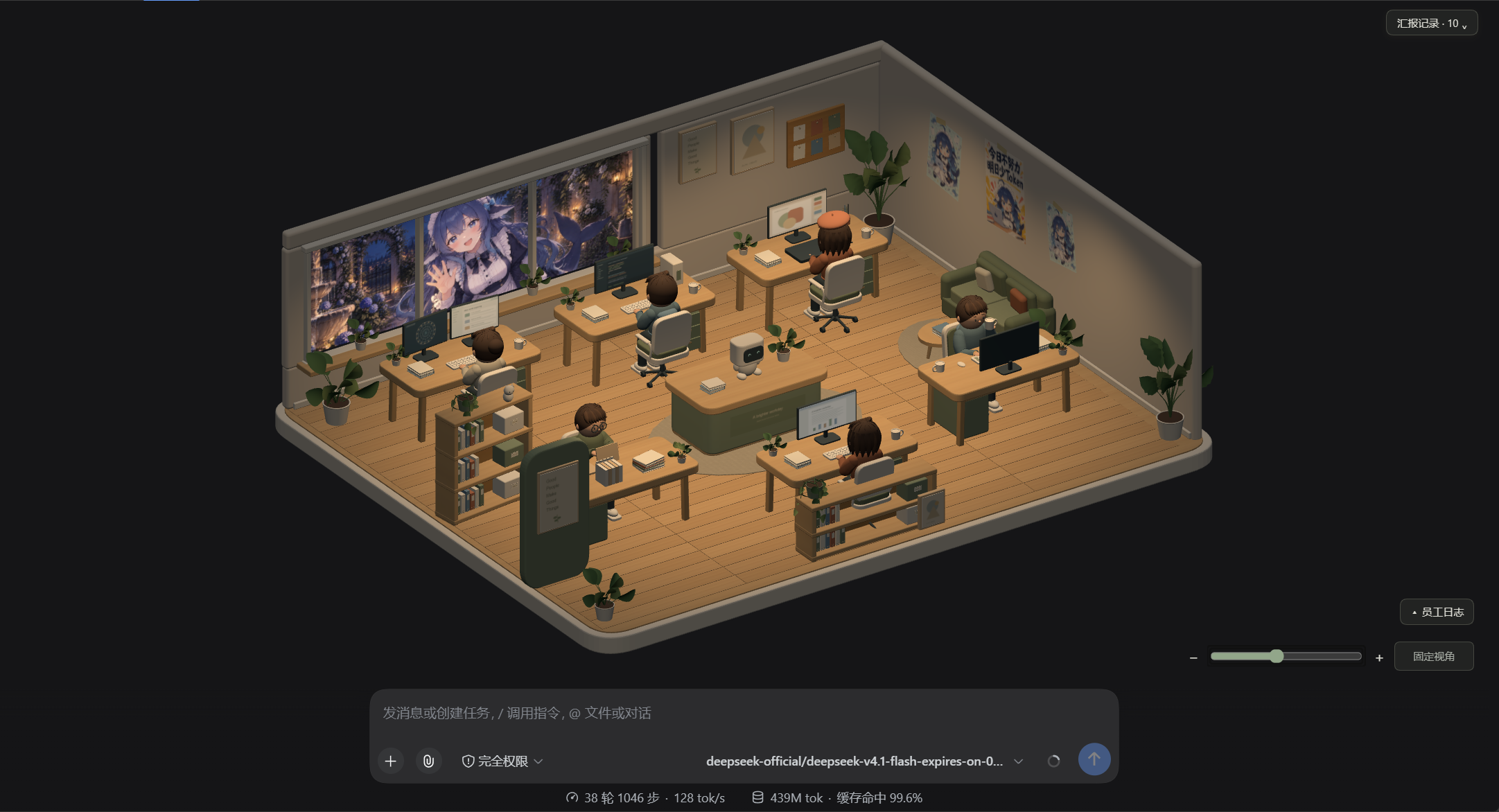
Toolfolk-for-DSH
Run the following command in DeepSeek Harness:
dsh plugin install zkl22492-star/Toolfolk-for-DSH
Paste the following prompt into your AI chat to install this plugin:
Run dsh plugin install zkl22492-star/Toolfolk-for-DSH inside DeepSeek Harness to install this plugin; the full source is available at https://github.com/zkl22492-star/Toolfolk-for-DSH .
About this plugin
In a DSH session, plugins fire in the background and model reasoning stays hidden behind a wall of terminal logs. You can see a tool got called, but who called it, why the model took that path, and what it ultimately delivered are questions only answered by scrolling through thousands of lines. Toolfolk-for-DSH turns the entire invocation pipeline into a 3D digital office where plugins become employees, desk stations become fixed roles, and every call becomes a visible task at a glance.
The office ships with six fixed stations covering retrieval, drafting, web research, session memory, shell execution, and orchestration. Above each employee a thought bubble displays the raw model reasoning text for the current task in real time, fading out once the work is done. When a response ends, a slightly crumpled A4 delivery sheet slides into view—scrollable for the full text, dismissible by tapping the red seal. The lower-left employee log lists every invocation event in reverse chronological order, and the upper-right report panel can even replay session history that predates the plugin launch. A central Coordinator robot on the console performs scripted animations in step with each call phase, and the light-dark theme follows the host automatically.
If you run multiple tool plugins concurrently and want to see at a glance who is working, why the model made a particular call, and what it handed back, this office is far more intuitive than a log window. It also doubles as a natural demo for walking a colleague or a student through a complete model-call chain: switch to the 3D Studio view and start talking—no code reading required. The plugin is strictly read-only on host events, makes no network requests, uploads nothing, and writes state only to local files, so there are no extra privacy considerations.
Screenshots
Use Cases
- See at a glance which plugin is working and what it delivered during concurrent calls
- Walk a colleague or student through a full model-call chain without reading code
- Replay raw reasoning text in thought bubbles when debugging a plugin call
Best For
- DSH users running several tool plugins at once
- Developers explaining agent call flows to a team
- AI learners curious about model-call visualization and demos
Related Plugins

whale-girl is a desktop pet in the DSH Web GUI (bottom-right for instant companionship) — draggable, feedable, playable; completed tasks, sessions and companionship time accrue into seniority levels, titles, and memories.

Renders your local Wallpaper Engine wallpapers as the DSH web background, supporting video, web, and scene wallpapers with a liquid-glass effect and rich customization.

A WebGPU ocean skin for DeepSeek Harness with five-wave Gerstner waves, translucent theme, day/night cycle, and quick controls, installable as plugin or extension.

A Galgame-style conversation view and visual scene editor for DSH web sessions, with a real-time editing mode.