
dsh-image-settings
Run the following command in DeepSeek Harness:
dsh plugin install americanjeff/dsh-image-settings
Paste the following prompt into your AI chat to install this plugin:
Run dsh plugin install americanjeff/dsh-image-settings in DeepSeek Harness to install the plugin; the full source is available at https://github.com/americanjeff/dsh-image-settings . Restart dsh web once after the first install.
About this plugin
When working through read_image results in a dsh web session, images can become awkward to inspect — too large, too small, or buried in raw output. dsh-image-settings renders those results inline at the available width of the current row and auto-unrolls them, so you can glance at what was returned without extra clicks or pop-outs.
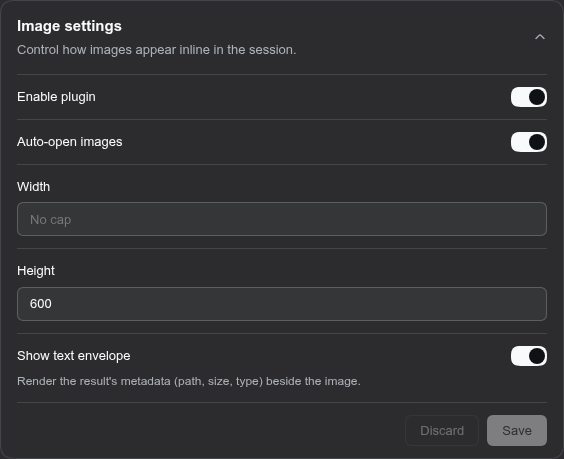
The display is not locked down. A dedicated Image settings card exposes every field from the image-settings section of settings.yaml one-to-one, letting you tweak rendering live from the UI or persist changes by editing the config file directly. Either route writes to the same parameters and takes effect immediately.
If you frequently review image-read results in dsh web sessions and want full control over size, layout, and appearance without restarting anything, this lightweight client plugin slots in exactly where you need it.
Screenshots
Use Cases
- Review read_image results inline at the row's available width in dsh web
- Live-tune image size and layout from the Image settings card
- Map UI fields one-to-one to the image-settings section in settings.yaml
Best For
- Developers who frequently inspect read_image results in dsh web
- Users who want images auto-fitted to row width without pop-outs
- People who prefer a visual settings card over pure config editing
Related Plugins
A service-oriented sidebar framework for DSH, offering a full workbench with file explorer, embedded browser, real terminal, Git panel, and extensible plugin services.

A beautiful, practical Claude Code-style TUI plugin with pixel whale top bar, flowing glow title, real-time status line, streaming thought expansion, time rewind, context progress bar and TPS gauge — zero core changes.

The plugin market for DeepSeek Harness: browse/search/one-click install community plugins and themes, with updates, backup/restore, hot disable, diagnostics, and AI fix.

A persistent whale widget on the DSH web UI that shows DeepSeek balance, today's usage, and per-turn cost, with drag-and-snap and sound effects.