
dsh-api-balance
Run the following command in DeepSeek Harness:
dsh plugin install wwwwangpengggg/dsh-api-balance
Paste the following prompt into your AI chat to install this plugin:
In the terminal bundled with the DSH desktop app, run dsh plugin install wwwwangpengggg/dsh-api-balance to install the plugin; the full source is at https://github.com/wwwwangpengggg/dsh-api-balance. Fully quit the DSH instance that owns the target profile before installing, otherwise pnpm will fail with ERR_PNPM_EPERM on the locked native modules.
About this plugin
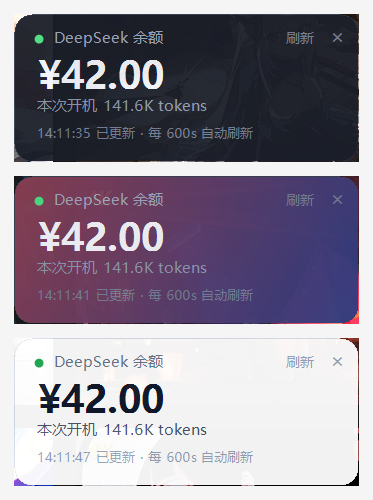
If you write code against the DeepSeek API, you know the small ritual: you are mid-thought, you need to know how many tokens you have burned today or how much balance is left, so you alt-tab to the browser, load the dashboard, glance, and come back. dsh-api-balance removes that round-trip. The moment your DSH desktop session launches, a borderless topmost widget appears in the corner of your screen. One click on the amount cycles through three pages: account balance with the day total token count, the dollar amount spent since the daily reset (with live balance beside it), and whether you are inside a peak or a half-price off-peak window plus how long until the next switch. Three views, one click, no tab switch.
The widget is a standalone native window that never steals focus. Drag it anywhere and it remembers the spot across restarts. Seven colour themes work instantly with no restart; you can also drop in your own image as a background with an adjustable scrim so numbers stay legible over bright or busy wallpapers. The close button tucks the window into the system tray while timers keep running, so recalling it shows fresh data. A /balance chat command toggles it on the fly. Rendering is native at 125 and 150 percent scaling, so text stays crisp on high-DPI displays.
The daily window starts at 8 am local time and rolls over 24 hours later, so a late-night coding session is not split in half by midnight. The spending figure is derived from the balance delta: deposits do not subtract from the total, the counter persists across reboots, and it resets at the day boundary. The page labels this clearly, so when the number looks lower than the website billing page, you know why: the API only exposes a balance endpoint, there is no itemised invoice to pull, and the widget only counts what it observes while running. Treat it as a dashboard, not a ledger.
This is for developers who call the DeepSeek API frequently enough to care about a few cents, who want a glance at cost and pricing tier without leaving the keyboard, and who would rather see a little green dot saying off-peak than discover a peak-hour surcharge at the end of the day. It is not a finance tool; it is a small, always-visible instrument pin to your desktop corner.
Screenshots

Use Cases
- Glance at today's token spend and balance mid-coding without switching to a browser dashboard
- Check whether the current hour is peak or half-price before kicking off a batch job to save fifty percent
- Pin the widget to a screen corner and keep an eye on API cost without leaving the IDE
Best For
- Developers who call the DeepSeek API frequently and care about per-token pricing
- Programmers who want real-time balance and spend visibility without leaving their dev environment
- Cost-conscious heavy API users who schedule batch jobs around peak and off-peak pricing windows
Related Plugins
A service-oriented sidebar framework for DSH, offering a full workbench with file explorer, embedded browser, real terminal, Git panel, and extensible plugin services.

A beautiful, practical Claude Code-style TUI plugin with pixel whale top bar, flowing glow title, real-time status line, streaming thought expansion, time rewind, context progress bar and TPS gauge — zero core changes.

The plugin market for DeepSeek Harness: browse/search/one-click install community plugins and themes, with updates, backup/restore, hot disable, diagnostics, and AI fix.

A persistent whale widget on the DSH web UI that shows DeepSeek balance, today's usage, and per-turn cost, with drag-and-snap and sound effects.