dsh-mobile-topbar
Run the following command in DeepSeek Harness:
dsh plugin install pureexe/dsh-mobile-topbar
Paste the following prompt into your AI chat to install this plugin:
Grab the plugin from https://github.com/pureexe/dsh-mobile-topbar and run dsh plugin install pureexe/dsh-mobile-topbar to add it to your current DeepSeek Harness profile, then restart DSH to pick it up.
About this plugin
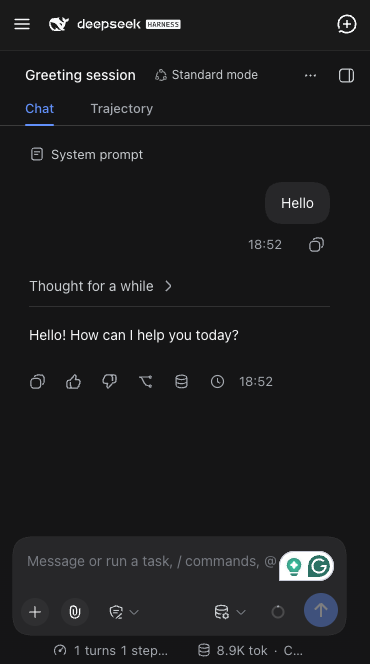
The DSH left sidebar, with its session list, workspaces, and settings, reserves a full grid column even in the collapsed rail state. On a phone, that means a meaningful chunk of a small screen is permanently given over to a sidebar that sits idle most of the time. dsh-mobile-topbar exists to reclaim exactly that space on narrow viewports, replacing the reserved column with a compact top bar.
On screens 768px wide or narrower, the sidebar stops occupying grid space and becomes an off-canvas drawer that appears only when the hamburger button is tapped. The top bar places the hamburger on the left, the DeepSeek Harness brand mark and wordmark in the center, and a new-session button on the right. The right-side file or document preview panel and the Settings modal are both repositioned so they never render underneath the top bar. If the right panel is open when the drawer is requested, it closes first so the drawer is what actually becomes visible. Screens wider than 768px are completely unaffected.
If you regularly use DSH on a phone or tablet and want the session list and other sidebar features within reach without sacrificing main content width, this plugin is built for that scenario. It does not fork or duplicate any sidebar internals; it injects scoped CSS overrides and reuses the built-in icon components and layout services of the app itself, keeping the footprint small and the risk low.
Screenshots
Use Cases
- Using DSH on a phone where the sidebar eats into screen space
- Switching sessions or starting new chats quickly on a small screen
- Adapting layout when rotating a tablet between portrait and landscape
Best For
- Users who frequently use DSH on a phone
- Developers needing a full DSH experience on small-screen devices
- Anyone wanting to improve DSH mobile layout without code changes
Related Plugins
A service-oriented sidebar framework for DSH, offering a full workbench with file explorer, embedded browser, real terminal, Git panel, and extensible plugin services.

A beautiful, practical Claude Code-style TUI plugin with pixel whale top bar, flowing glow title, real-time status line, streaming thought expansion, time rewind, context progress bar and TPS gauge — zero core changes.

The plugin market for DeepSeek Harness: browse/search/one-click install community plugins and themes, with updates, backup/restore, hot disable, diagnostics, and AI fix.

A persistent whale widget on the DSH web UI that shows DeepSeek balance, today's usage, and per-turn cost, with drag-and-snap and sound effects.