dsh-file-explorer
Run the following command in DeepSeek Harness:
dsh plugin install jaxzhou/dsh-file-explorer
Paste the following prompt into your AI chat to install this plugin:
Install it in DeepSeek Harness by running dsh plugin install jaxzhou/dsh-file-explorer; the source is at https://github.com/jaxzhou/dsh-file-explorer.
About this plugin
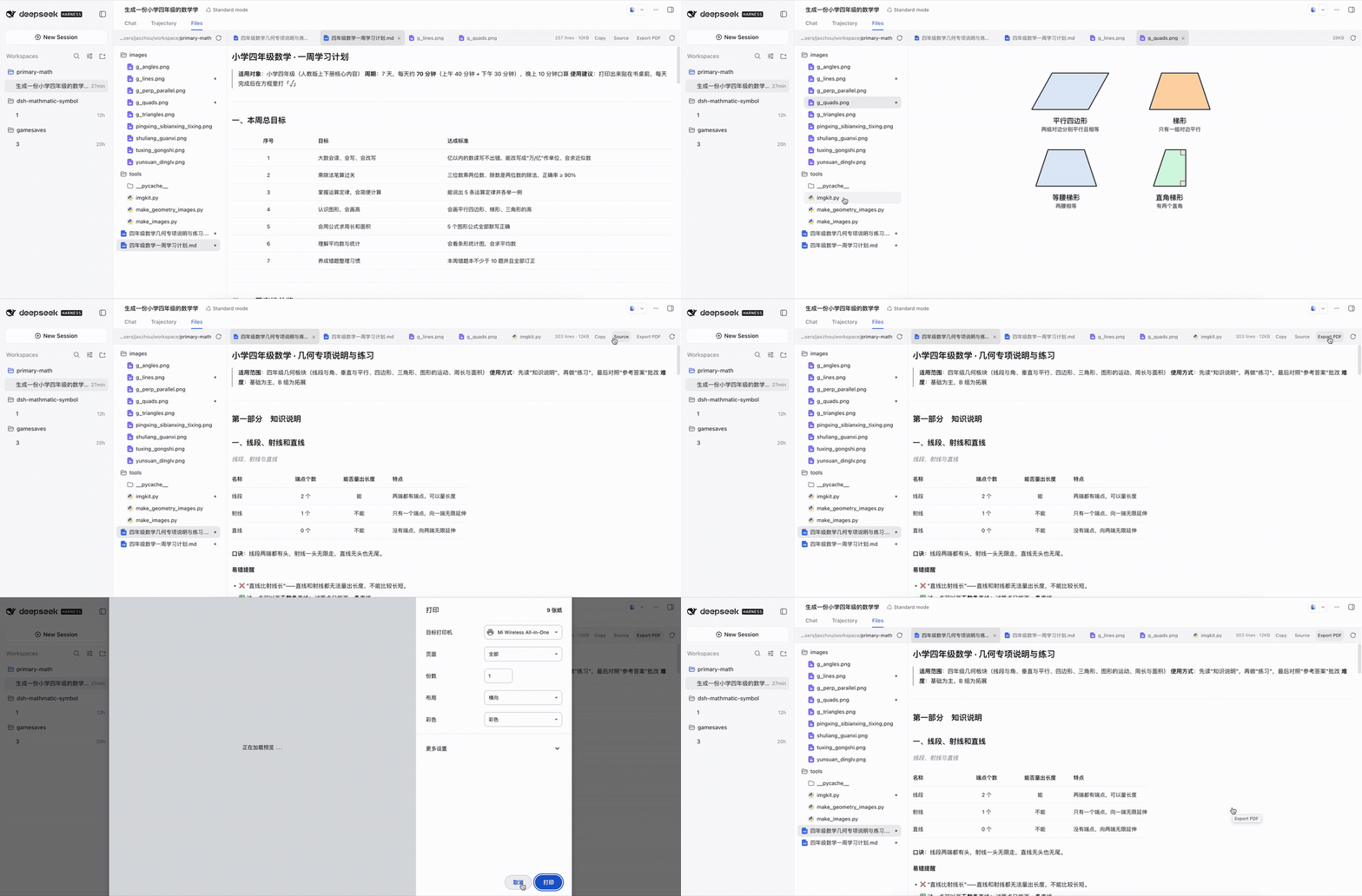
DeepSeek Harnasss Web surface ships with only the Chat and Trajectory tabs, leaving session workspace files with no home. dsh-file-explorer adds a Files tab: the left pane is a directory tree rooted at the working folder, expanded level by level with directories first, while the right pane hosts an independent tab per open file. Multiple files stay open side by side, and expanded levels persist as you switch tabs. The preview adapts to each file automatically — Markdown renders as full GFM with tables, task lists, math, code fences, and local images; JSON becomes a collapsible tree with per-value copy; source code gets syntax highlighting, line numbers, and a copy button across 24 grammars; images from PNG to SVG draw directly into the pane; anything else falls back to numbered plain text rather than guessing. Every text body carries a Copy control, and Markdown or HTML documents additionally offer a Source toggle plus an Export menu that downloads a standalone PDF (A4 sliced) or a real .docx with selectable text (Chinese included), bundling the document's local images and stylesheets.
The plugin is strictly read-only, requires no configuration, and persists nothing on disk. HTML previews run inside a sandboxed frame with an opaque origin; SVGs render through a safe pipeline so their scripts never execute. All file reads go through the harness's own workspaceFiles namespace, meaning the host filesystem — not the plugin — decides what is visible.
It is best suited to developers who need to glance at workspace documents, config files, or code snippets without leaving a Harness session, and to teams that want to hand a Markdown or HTML document to a non-terminal audience as a neatly laid-out PDF or an editable Word file. Privacy-conscious users will also appreciate that the plugin holds no credentials, writes no session log, and registers no server-side services, tools, or prompts.
Screenshots
Use Cases
- Quickly review workspace Markdown docs and source files mid-session
- Export a technical document as PDF or Word for non-terminal readers
- Compare multiple config files and code snippets without opening an external editor
Best For
- Developers who frequently inspect workspace files during a Harness session
- Technical writers who need to share docs with non-terminal colleagues
- Privacy-sensitive teams that demand zero-config, zero-persistence plugins
Related Plugins
A service-oriented sidebar framework for DSH, offering a full workbench with file explorer, embedded browser, real terminal, Git panel, and extensible plugin services.

A beautiful, practical Claude Code-style TUI plugin with pixel whale top bar, flowing glow title, real-time status line, streaming thought expansion, time rewind, context progress bar and TPS gauge — zero core changes.

The plugin market for DeepSeek Harness: browse/search/one-click install community plugins and themes, with updates, backup/restore, hot disable, diagnostics, and AI fix.

A persistent whale widget on the DSH web UI that shows DeepSeek balance, today's usage, and per-turn cost, with drag-and-snap and sound effects.