dsh-plugin-browser
Run the following command in DeepSeek Harness:
dsh plugin install TEGONG00/dsh-plugin-browser
Paste the following prompt into your AI chat to install this plugin:
To install this plugin in DeepSeek Harness, make sure the repository https://github.com/TEGONG00/dsh-plugin-browser is reachable, then run dsh plugin install TEGONG00/dsh-plugin-browser to load the built-in browser panel.
About this plugin
One of the most tedious loops in frontend development is bouncing between the IDE and the browser after every UI tweak: eyeball the result, guess a selector, patch the code, repeat. Even worse, telling the model exactly which element you mean means writing vague descriptions with no screenshot and no precise selector to anchor on. dsh-plugin-browser embeds a Playwright Chromium instance directly into the DeepSeek Harness web-client sidebar. A CDP screencast streams the page in real time, and navigation, clicks, typing, scrolling, and keyboard input are all handled in place, eliminating the window-switching ritual entirely.
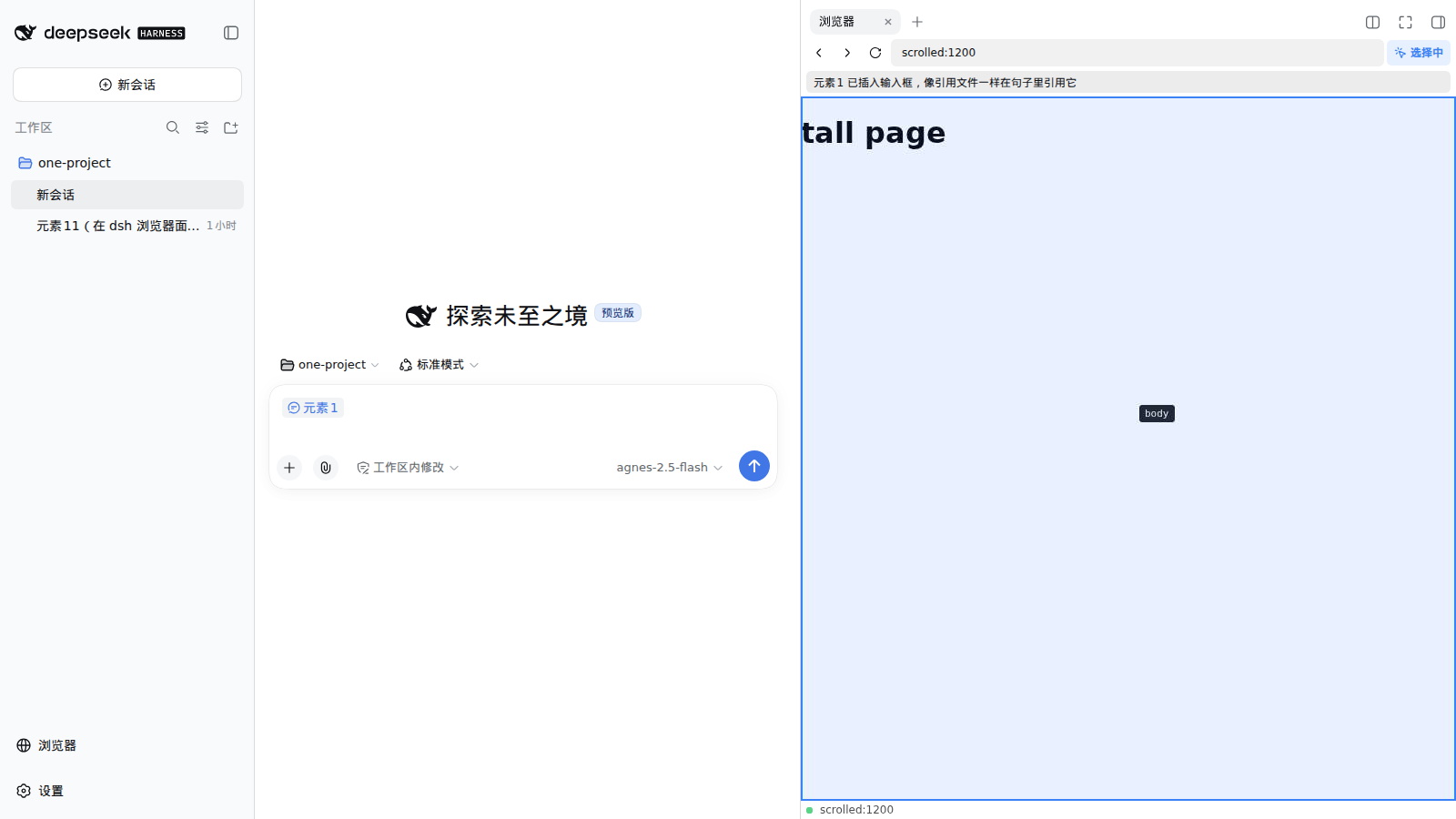
The standout feature is the element-picker mode. Toggle it on, click any element on the page, and its screenshot, CSS selector, tag name, visible text, outerHTML, and page URL are captured instantly as reference chips (Element 1, Element 2, and so on) inserted into the chat input using the same Lexical chip mechanism as @file references. Chips are deletable, undoable, and persist with the draft. Write a natural sentence such as swap Element 1 and Element 2, and on send each chip expands into its full structured context so the model can target the exact DOM node instead of guessing from a vague description.
A set of model-facing browser tools (browser_navigate, browser_screenshot, browser_snapshot, browser_click, browser_type) completes the loop, letting the model open a page, capture a verification screenshot rendered as an inline image card, and interact with elements by index. The workflow becomes edit code, open the page, screenshot to confirm, without any human hand-off. This plugin is ideal for developers working in the dsh web client on frontend or full-stack projects who want AI to participate directly in UI verification and bug fixing. WSL2 users get a bundled script that injects libnspr4 and libnss3 without sudo, making setup genuinely zero-friction.
Screenshots
Use Cases
- Let the model open a page and take a verification screenshot after code changes
- Click a page element to attach its selector and screenshot as a reference chip in the prompt
- Have the model autonomously navigate, click, and type to complete multi-step interaction checks
Best For
- Frontend engineers using the dsh web client who want AI to join UI verification
- WSL2 developers looking for a zero-sudo Chromium panel inside the IDE
- Full-stack developers who need the model to target exact DOM elements instead of vague descriptions
Related Plugins
A service-oriented sidebar framework for DSH, offering a full workbench with file explorer, embedded browser, real terminal, Git panel, and extensible plugin services.

A beautiful, practical Claude Code-style TUI plugin with pixel whale top bar, flowing glow title, real-time status line, streaming thought expansion, time rewind, context progress bar and TPS gauge — zero core changes.

The plugin market for DeepSeek Harness: browse/search/one-click install community plugins and themes, with updates, backup/restore, hot disable, diagnostics, and AI fix.

A persistent whale widget on the DSH web UI that shows DeepSeek balance, today's usage, and per-turn cost, with drag-and-snap and sound effects.