dsh-diff-review-likecodex
Run the following command in DeepSeek Harness:
dsh plugin install new-Beginner/dsh-diff-review-likecodex
Paste the following prompt into your AI chat to install this plugin:
Run dsh plugin install new-Beginner/dsh-diff-review-likecodex in the DeepSeek Harness terminal to install this plugin; source code: https://github.com/new-Beginner/dsh-diff-review-likecodex
About this plugin
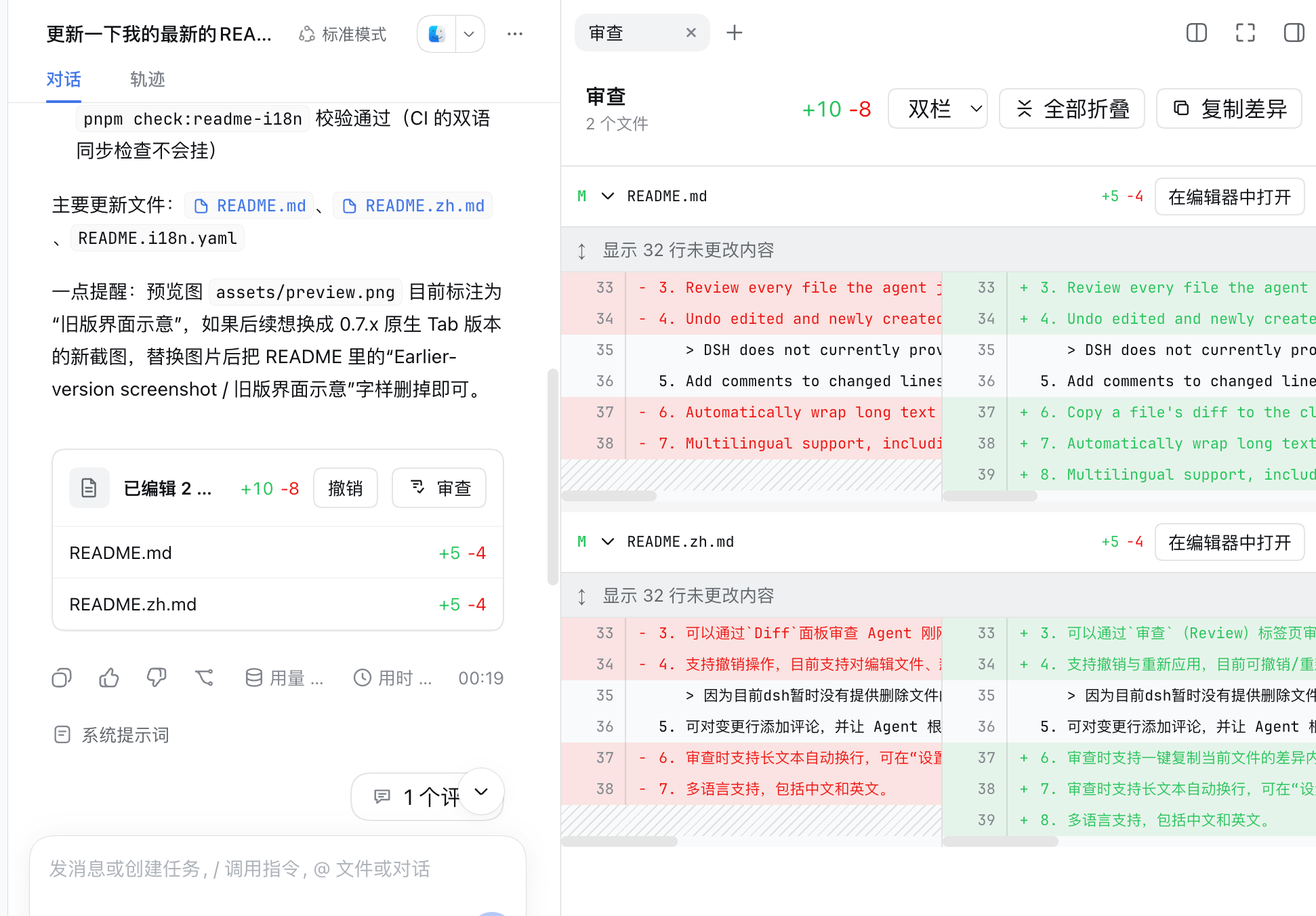
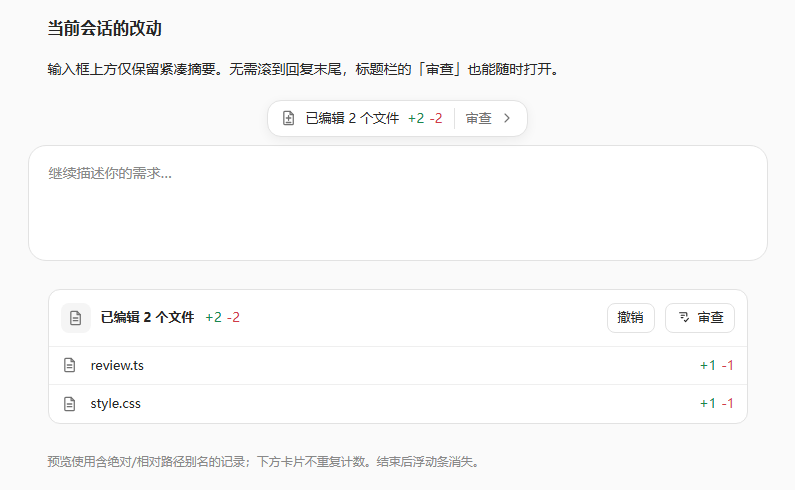
When an agent modifies several files in a single turn, developers typically have to leave the chat, open a terminal, and diff each file by hand to verify what actually changed. dsh-diff-review-likecodex brings that review directly into the DeepSeek Harness Web interface: after each conversation turn, you can browse every recorded file diff from the right sidebar or a compact floating bar without switching to any external tool.
Core capabilities include a turn picker that isolates edits strictly within one conversation turn to prevent multi-turn confusion; automatic merging of absolute and relative path aliases so the same workspace file is never double-counted; same-named files in different directories are disambiguated by their parent folders; each diff retains three real context lines before and after changes with no fabricated context; line-level comments that let the agent continue iterating based on your feedback; one-click undo for newly created and edited files; optional word-wrap for long lines; and a bilingual Chinese-English interface.
It is built for developers who frequently drive agents to write or refactor code inside DeepSeek Harness and want to review, annotate, and roll back file changes without ever leaving the Web session, especially teams that pair it with dsh-better-sidebar for a deeper integrated sidebar workflow.
Screenshots
Use Cases
- Quickly review every change after an agent batch-edits files
- Isolate edits by conversation turn to avoid multi-turn confusion
- Annotate changed lines and let the agent iterate on your feedback
Best For
- Developers who frequently drive agents to code inside DeepSeek Harness
- Teams that want to review and roll back changes without leaving the Web session
- Developers pairing it with dsh-better-sidebar for a deeper sidebar workflow
Related Plugins
A service-oriented sidebar framework for DSH, offering a full workbench with file explorer, embedded browser, real terminal, Git panel, and extensible plugin services.

A beautiful, practical Claude Code-style TUI plugin with pixel whale top bar, flowing glow title, real-time status line, streaming thought expansion, time rewind, context progress bar and TPS gauge — zero core changes.

The plugin market for DeepSeek Harness: browse/search/one-click install community plugins and themes, with updates, backup/restore, hot disable, diagnostics, and AI fix.

A persistent whale widget on the DSH web UI that shows DeepSeek balance, today's usage, and per-turn cost, with drag-and-snap and sound effects.