dsh-novel-launcher
Run the following command in DeepSeek Harness:
dsh plugin install unsiscon/dsh-novel-launcher
Paste the following prompt into your AI chat to install this plugin:
Run dsh plugin install unsiscon/dsh-novel-launcher to install this plugin. Source code is available at https://github.com/unsiscon/dsh-novel-launcher .
About this plugin
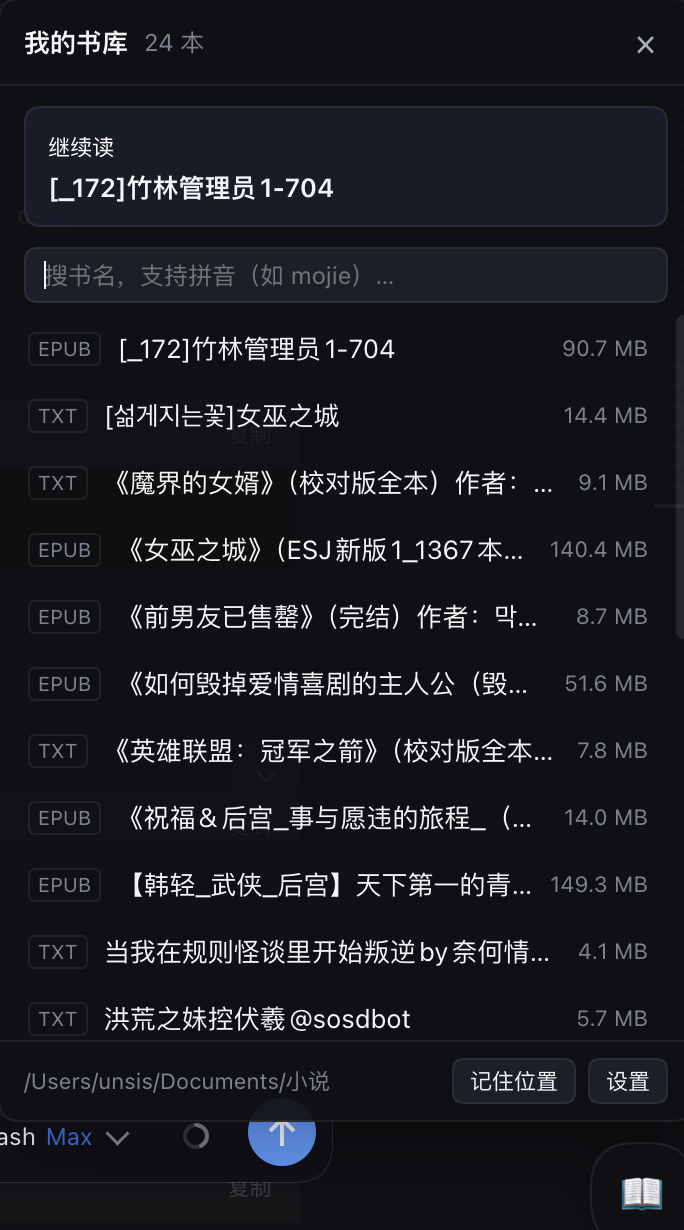
In the middle of a coding session you want a two-page break with a local novel, but you do not want to hunt through Finder, remember file paths, or reposition a reader window. dsh-novel-launcher adds a small floating ball to the bottom-right corner of DSH: click it, browse your local bookshelf, pick a title, and your preferred reader opens the book with the window already where you expect it to be-all without leaving DSH or copy-pasting a path.
Everything stays local. The plugin scans the folder you designate and lists only the e-book formats you care about. Search works in three modes at once: raw Chinese characters, full pinyin, and initials. A persistent continue-reading slot at the top detects your reader local database so you always resume where you stopped. On macOS it can also nudge the reader window back to a saved position and close the previous stale window with one motion. No network calls, no uploads.
Built for developers who work inside DSH and keep a personal e-book collection on disk. You need no cloud account, no third-party reader, and no extra tooling. The plugin handles nothing but the find-it-and-open-it step, so the path from code to story page is frictionless.
Screenshots

Use Cases
- Grab a quick local novel between coding tasks without switching windows or hunting files
- Fuzzy-search your bookshelf by pinyin or initials
- Auto-reposition the reader window and close the previous stale one after opening a new book
Best For
- Developers who code in DSH and maintain a local e-book collection
- Users who prefer a fully offline, no-upload reading workflow
- macOS users with dedicated reader apps who want window auto-positioning
Related Plugins
A service-oriented sidebar framework for DSH, offering a full workbench with file explorer, embedded browser, real terminal, Git panel, and extensible plugin services.

A beautiful, practical Claude Code-style TUI plugin with pixel whale top bar, flowing glow title, real-time status line, streaming thought expansion, time rewind, context progress bar and TPS gauge — zero core changes.

The plugin market for DeepSeek Harness: browse/search/one-click install community plugins and themes, with updates, backup/restore, hot disable, diagnostics, and AI fix.

A persistent whale widget on the DSH web UI that shows DeepSeek balance, today's usage, and per-turn cost, with drag-and-snap and sound effects.