dsh-model-picker-plus
Run the following command in DeepSeek Harness:
dsh plugin install objectyan/dsh-model-picker-plus
Paste the following prompt into your AI chat to install this plugin:
Run dsh plugin install objectyan/dsh-model-picker-plus in your terminal to install; source code is available at https://github.com/objectyan/dsh-model-picker-plus .
About this plugin
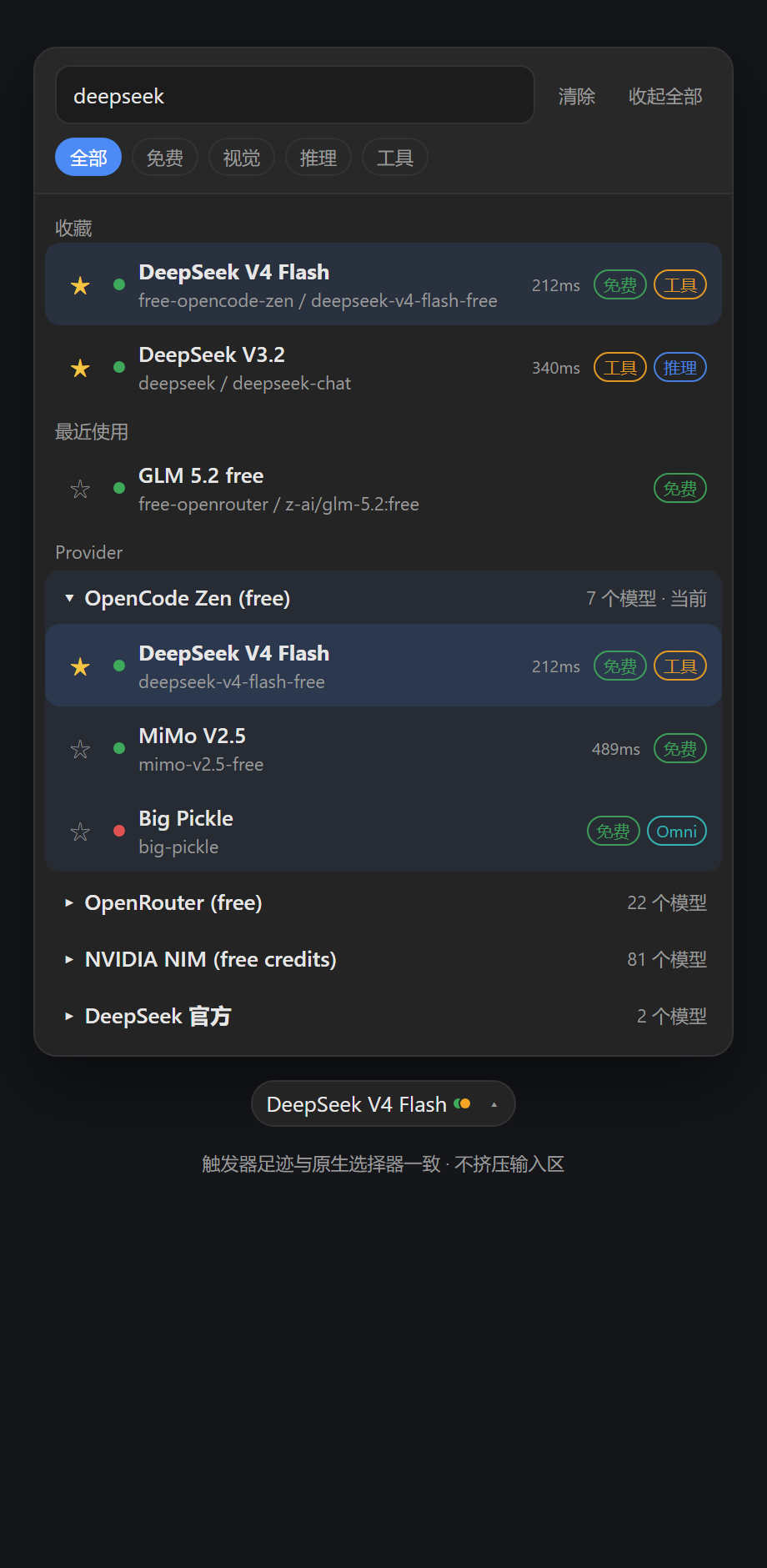
When you have plugged multiple providers into DeepSeek Harness and the model list keeps growing, the built-in selector starts to fall short. Finding the right model, telling vision-capable ones from reasoning-only ones, and remembering a shortlist all become friction. dsh-model-picker-plus swaps that piece of UI for a model library designed around multi-provider workflows, turning a long scroll into a targeted search.
The experience is built on three layers. Structure: models are grouped by provider with groups collapsed by default, so only the group containing the active model is expanded. Search and memory: fuzzy search across provider name, model name, model ID, and description; one-click favourites; and automatic recency tracking. Capability visibility: each model carries Free, Vision, Omni, Reasoning, or Tools badges, and a top filter bar narrows the list by free tier, vision, reasoning, or tool use. If dsh-model-health or dsh-model-hub is installed, the plugin also reads their stored health checks to show recent availability and latency at a glance.
It is aimed at heavy users who maintain several providers, switch models often, and depend on specific capabilities. The plugin is a pure client-side module that reuses DSHs own modelDirectories and sessions.selectModel APIs without modifying any provider plugin code. Disable or uninstall it and the native selector returns immediately, with zero migration and zero side effects.
Screenshots
Use Cases
- Filtering models by name or capability after connecting multiple providers
- Picking a model faster via favourites and recent history when switching
- Checking model availability and latency through dsh-model-health before committing
Best For
- DSH users maintaining several LLM providers at once
- Power users who filter models by vision, reasoning, or tool-use capability
- Anyone who wants a searchable, favouritable model picker with zero code changes
Related Plugins
A service-oriented sidebar framework for DSH, offering a full workbench with file explorer, embedded browser, real terminal, Git panel, and extensible plugin services.

A beautiful, practical Claude Code-style TUI plugin with pixel whale top bar, flowing glow title, real-time status line, streaming thought expansion, time rewind, context progress bar and TPS gauge — zero core changes.

The plugin market for DeepSeek Harness: browse/search/one-click install community plugins and themes, with updates, backup/restore, hot disable, diagnostics, and AI fix.

A persistent whale widget on the DSH web UI that shows DeepSeek balance, today's usage, and per-turn cost, with drag-and-snap and sound effects.