dsh-compose-panel
Run the following command in DeepSeek Harness:
dsh plugin install yizhixiaokong/dsh-compose-panel
Paste the following prompt into your AI chat to install this plugin:
Run dsh plugin install yizhixiaokong/dsh-compose-panel in the terminal; the plugin source is available at https://github.com/yizhixiaokong/dsh-compose-panel . Restart dsh web after installation to load the client bundle.
About this plugin
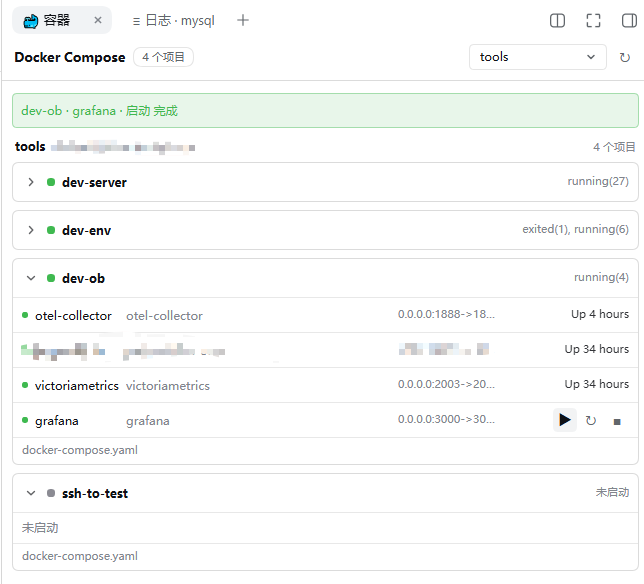
When a repository contains subdirectories that each own a compose.yaml, a single-file container viewer either collapses different stacks into one row or fails to show files that have never been brought up. dsh-compose-panel fixes this by grouping projects by directory rather than by compose project name, so -p flags, COMPOSE_PROJECT_NAME, and .env files can never merge two stacks into one entry.
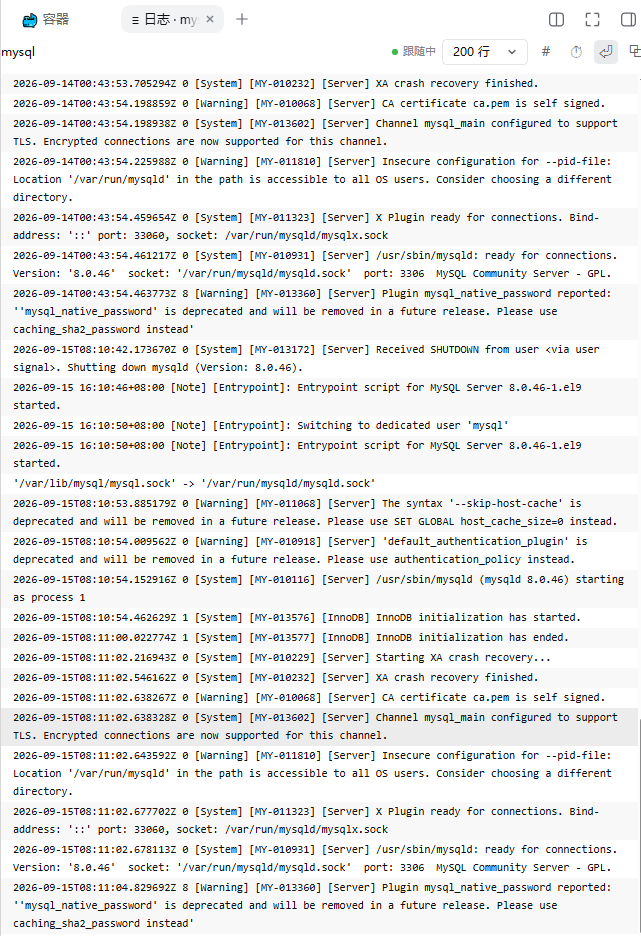
The panel covers three discovery sources at once: running and stopped containers, projects Docker already knows but that hold no container, and compose files that have never been started. A freshly cloned stack appears in the list immediately. Hovering a row swaps the status cell for start, stop, and restart buttons; clicking a row opens a streamed log tab for that service. The list refreshes silently every 45 seconds while idle or every 8 seconds while something is still starting, preserving scroll position, expanded groups, and the current selection, all while following the Harness light and dark themes and accent colour.
It suits developers who maintain multiple compose sub-projects within one repository and want to glance at container state, trigger actions, and read logs without leaving Harness. Requirements: DSH in a web profile, Docker CLI with the compose v2 plugin on the host PATH, and a POSIX host.
Screenshots
Use Cases
- Maintaining multiple compose sub-directories in one repo and needing a single glance at container status
- Hovering a service row to start, stop, or restart it without switching to a terminal for docker compose commands
- Clicking a service row to open a streamed log tab with timestamps, tail size, and line-wrap controls for real-time error tracking
Best For
- Back-end or full-stack developers maintaining multiple Docker Compose sub-projects in a single repository
- Engineers who prefer to keep container operations inside the Harness workspace
- Small to mid-size teams that need to tie service logs back to specific project directories for faster debugging
Related Plugins
A service-oriented sidebar framework for DSH, offering a full workbench with file explorer, embedded browser, real terminal, Git panel, and extensible plugin services.

A beautiful, practical Claude Code-style TUI plugin with pixel whale top bar, flowing glow title, real-time status line, streaming thought expansion, time rewind, context progress bar and TPS gauge — zero core changes.

The plugin market for DeepSeek Harness: browse/search/one-click install community plugins and themes, with updates, backup/restore, hot disable, diagnostics, and AI fix.

A persistent whale widget on the DSH web UI that shows DeepSeek balance, today's usage, and per-turn cost, with drag-and-snap and sound effects.