dsh-simple-restart
Run the following command in DeepSeek Harness:
dsh plugin install yizhixiaokong/dsh-simple-restart
Paste the following prompt into your AI chat to install this plugin:
Run dsh plugin install yizhixiaokong/dsh-simple-restart in the DeepSeek Harness terminal to install; the source code is at https://github.com/yizhixiaokong/dsh-simple-restart .
About this plugin
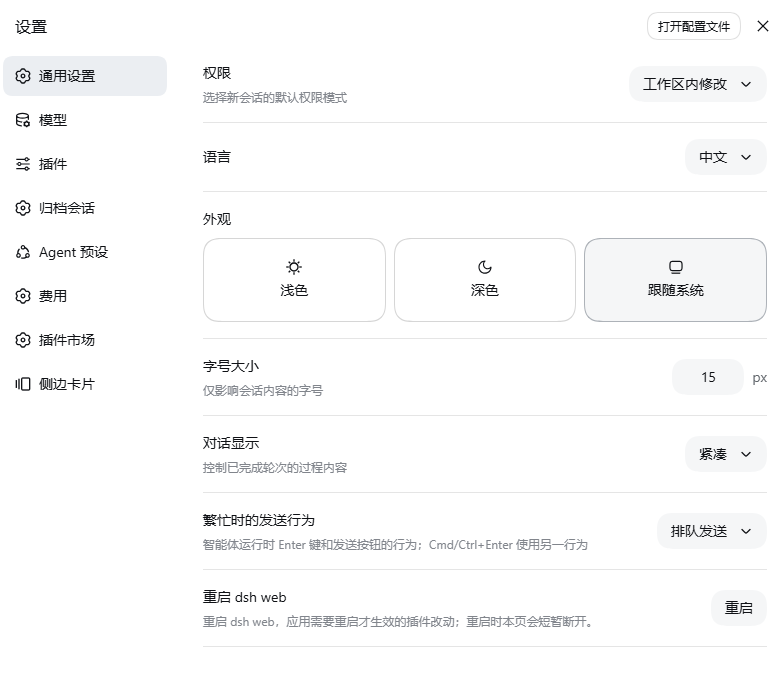
dsh-simple-restart addresses a very specific pain point: after you modify a client-side plugin bundle for dsh web, the change only takes effect once the host process restarts. Doing that from a terminal means hunting for the right window or wrestling with a systemd unit. This plugin adds a single row to Settings → General: a button that, after a confirming second click within five seconds, relaunches dsh web with the exact same boot arguments—entirely from the browser.
The implementation is worth a closer look. A process cannot replace itself; it can only stop, and the successor must start only after the listening port is genuinely free, or it dies with EADDRINUSE. So the restart is a two-process handshake: the host spawns a detached helper via node -e, hands it the full boot invocation (executable, argv array, working directory), and exits. The helper confirms the port is free by connecting to it—never by binding, which would itself hold the port at the exact moment the replacement needs it—then starts the replacement and watches for up to twenty seconds to confirm a successful bind. If anything goes wrong after the handoff, the helper writes diagnostics to .err.log and .out.log under $TMPDIR.
Security is enforced with several layers of fencing. The single HTTP route accepts only same-origin POST from loopback peers; any forwarding header, cross-origin Origin, or non-127.0.0.1 socket results in a 403. When a systemd supervisor is detected, restart is refused by default because KillMode=control-group would kill the helper along with the unit. An attached debugger is likewise detected and blocked. At most one restart may be in flight at a time; concurrent attempts receive a 409.
The plugin fits well for engineers actively developing dsh client-side plugins—edit, save, click, done, no terminal hunt. It also serves anyone who runs dsh web as a long-lived background process or under a service manager and finds manual restarts tedious or error-prone.
Screenshots

Use Cases
- Restart dsh web from the browser after editing a client plugin bundle, no terminal needed
- Relaunch a dsh web process managed by systemd or a background terminal without hunting for it
- Iterate on plugin changes by restarting repeatedly without manual process management
Best For
- dsh client-side plugin developers
- Engineers who work with dsh web daily
- Users whose dsh web process runs under a background terminal or service manager and is inconvenient to restart manually
Related Plugins
A service-oriented sidebar framework for DSH, offering a full workbench with file explorer, embedded browser, real terminal, Git panel, and extensible plugin services.

A beautiful, practical Claude Code-style TUI plugin with pixel whale top bar, flowing glow title, real-time status line, streaming thought expansion, time rewind, context progress bar and TPS gauge — zero core changes.

The plugin market for DeepSeek Harness: browse/search/one-click install community plugins and themes, with updates, backup/restore, hot disable, diagnostics, and AI fix.

A persistent whale widget on the DSH web UI that shows DeepSeek balance, today's usage, and per-turn cost, with drag-and-snap and sound effects.