dsh-session-usage-plugin
Run the following command in DeepSeek Harness:
dsh plugin install ewoowe/dsh-session-usage-plugin
Paste the following prompt into your AI chat to install this plugin:
Install the plugin in DeepSeek Harness by running dsh plugin install ewoowe/dsh-session-usage-plugin; source: https://github.com/ewoowe/dsh-session-usage-plugin.
About this plugin
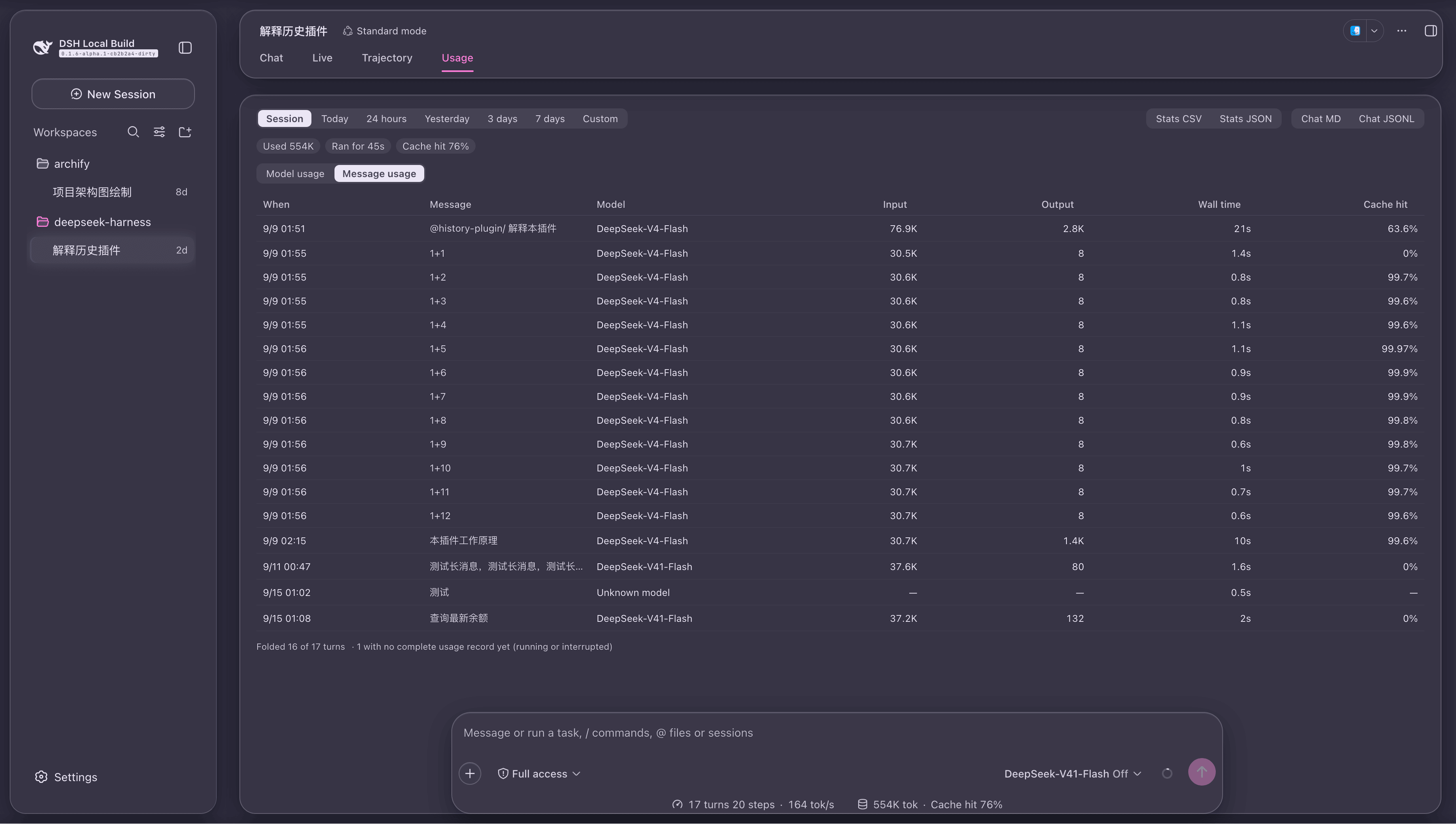
In a DeepSeek Harness session, token spend lives scattered across projection fields and event streams. There is no single place to see how much a conversation cost, which model burned the most, or which interaction was the priciest. dsh-session-usage-plugin gathers all of that into a dedicated Usage tab inside the session, so you can inspect the full picture without leaving the conversation or digging through raw logs.
The plugin offers two tables: model usage (one row per model, ordered by total tokens descending) and turn usage (one row per turn, sortable by any column). A row is a complete prompt-and-reply exchange, not an individual message, which eliminates the most common token-counting error of attributing the same exchange's usage once per message. You can filter by Session, Today, Yesterday, 3-day, 7-day, or custom time ranges; export figures as Stats CSV or Stats JSON and the full conversation as Chat Markdown or Chat JSONL; and five reader preferences (sort order, active leaf, scroll position, range, custom range) are remembered automatically across reloads.
Built for developers doing long iterative debugging in Harness, engineers who need per-turn cost accounting, and teams that want an exportable usage snapshot for review. The plugin installs as a standalone profile, leaves every file in deepseek-harness untouched, and reads only the host's settled projections and event window, so every number matches the status bar and session pills exactly.
Screenshots
Use Cases
- Review which models consumed the most tokens after a long debugging session
- Filter by time range and export usage data for cost review
- Inspect per-turn input, output, and cache hit to pinpoint expensive exchanges
Best For
- Engineers doing long iterative debugging in DeepSeek Harness
- Technical staff who need per-turn token cost accounting
- Tech leads who need an exportable usage snapshot for team review
Related Plugins
A service-oriented sidebar framework for DSH, offering a full workbench with file explorer, embedded browser, real terminal, Git panel, and extensible plugin services.

A beautiful, practical Claude Code-style TUI plugin with pixel whale top bar, flowing glow title, real-time status line, streaming thought expansion, time rewind, context progress bar and TPS gauge — zero core changes.

The plugin market for DeepSeek Harness: browse/search/one-click install community plugins and themes, with updates, backup/restore, hot disable, diagnostics, and AI fix.

A persistent whale widget on the DSH web UI that shows DeepSeek balance, today's usage, and per-turn cost, with drag-and-snap and sound effects.