dsh-skill-manager
Run the following command in DeepSeek Harness:
dsh plugin install SiriusWJ/dsh-skill-manager
Paste the following prompt into your AI chat to install this plugin:
Run dsh plugin install SiriusWJ/dsh-skill-manager in DeepSeek Harness to install this plugin; the source is at https://github.com/SiriusWJ/dsh-skill-manager — after installation, restart dsh web to see the skill management card in Settings.
About this plugin
Many DSH Web users have accumulated a large number of local skills scattered across user-level and project-level .dsh and .agents directories. Figuring out which skills have model auto-invocation enabled and which should be turned off usually means opening frontmatter files one by hand, a process that is tedious and error-prone. dsh-skill-manager was built to eliminate that repetitive work.
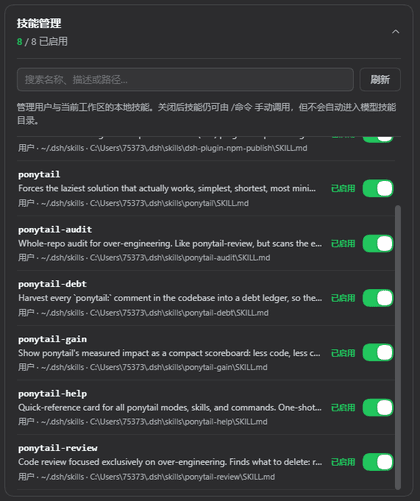
The plugin adds an expandable skill management card to the Settings > Plugins > Plugin Config page. It scans all four skill roots in one pass, lets you search by name, description, or path, and toggles the model auto-invocation switch per skill. Disabling a skill simply sets disable-model-invocation to true in its frontmatter, so the skill can still be invoked manually via its /command name. Every change is hot-reloaded through the DSH skill registry, so there is no need to restart the client.
It is well suited for DSH Web developers who manage many local skills and need to flip invocation policies between project-scoped and user-scoped settings on the fly, as well as for teams that want a single at-a-glance view of their entire skill inventory and auto-invocation status.
Screenshots
Use Cases
- Browse the full list of local skills and their auto-invocation status at a glance
- Toggle auto-invocation per skill with instant hot reload, no restart needed
- Manage invocation policies across project-level and user-level skill directories
Best For
- DSH Web developers with a large number of local skills
- Individual users who frequently adjust skill invocation policies
- Teams that need a unified view and management of their skill inventory
Related Plugins
A service-oriented sidebar framework for DSH, offering a full workbench with file explorer, embedded browser, real terminal, Git panel, and extensible plugin services.

A beautiful, practical Claude Code-style TUI plugin with pixel whale top bar, flowing glow title, real-time status line, streaming thought expansion, time rewind, context progress bar and TPS gauge — zero core changes.

The plugin market for DeepSeek Harness: browse/search/one-click install community plugins and themes, with updates, backup/restore, hot disable, diagnostics, and AI fix.

A persistent whale widget on the DSH web UI that shows DeepSeek balance, today's usage, and per-turn cost, with drag-and-snap and sound effects.