dsh-tool-manager
Run the following command in DeepSeek Harness:
dsh plugin install pan17/dsh-tool-manager
Paste the following prompt into your AI chat to install this plugin:
Run dsh plugin install pan17/dsh-tool-manager in your terminal to install this plugin; the source is hosted at https://github.com/pan17/dsh-tool-manager .
About this plugin
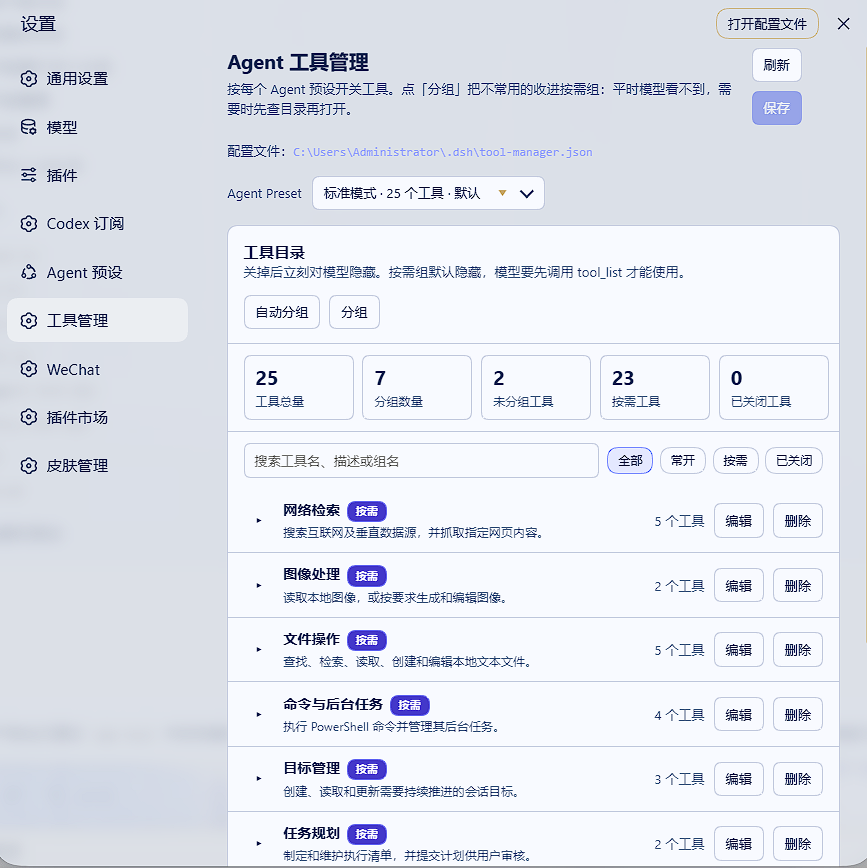
Once you have several MCP services or Cordis plugins wired in, every model request carries a long tail of tool definitions, eating up the context window and making tool selection error-prone. dsh-tool-manager solves this by letting you independently toggle tools per Agent Preset, bundle related tools into meaningful groups, and use an on-demand loading mechanism that keeps low-frequency tools out of view until they are actually needed.
On-demand loading is the most elegant part of the design. Tools placed in an on-demand group are hidden by default; the model sees only a group directory and a single tool_list helper. The directory lists each group tool count and full names, giving the model enough information to choose accurately. When a task requires a group capability, the model calls tool_list and those tools open for the duration of the current session, with no per-tool toggling and no leakage into other sessions. Groups can also be auto-named and described by the current default model, with prompt preview and editing before execution.
If you run DSH with multiple tool sources such as GitHub, file processing, web search, and image generation, and want a clean context window plus reliable tool selection, this plugin is worth trying. All configuration happens in the WebUI; no manual JSON editing is required.
Screenshots
Use Cases
- Multiple MCP services bloat the model context with too many tool definitions
- Different Agent Presets require independent tool subsets
- Infrequently used tools need on-demand access without permanent context cost
Best For
- DSH users running multiple MCP or Cordis tool sources
- Developers seeking per-Preset fine-grained tool visibility control
- Teams optimizing context windows and reducing tool-selection errors
Related Plugins
A service-oriented sidebar framework for DSH, offering a full workbench with file explorer, embedded browser, real terminal, Git panel, and extensible plugin services.

A beautiful, practical Claude Code-style TUI plugin with pixel whale top bar, flowing glow title, real-time status line, streaming thought expansion, time rewind, context progress bar and TPS gauge — zero core changes.

The plugin market for DeepSeek Harness: browse/search/one-click install community plugins and themes, with updates, backup/restore, hot disable, diagnostics, and AI fix.

A persistent whale widget on the DSH web UI that shows DeepSeek balance, today's usage, and per-turn cost, with drag-and-snap and sound effects.