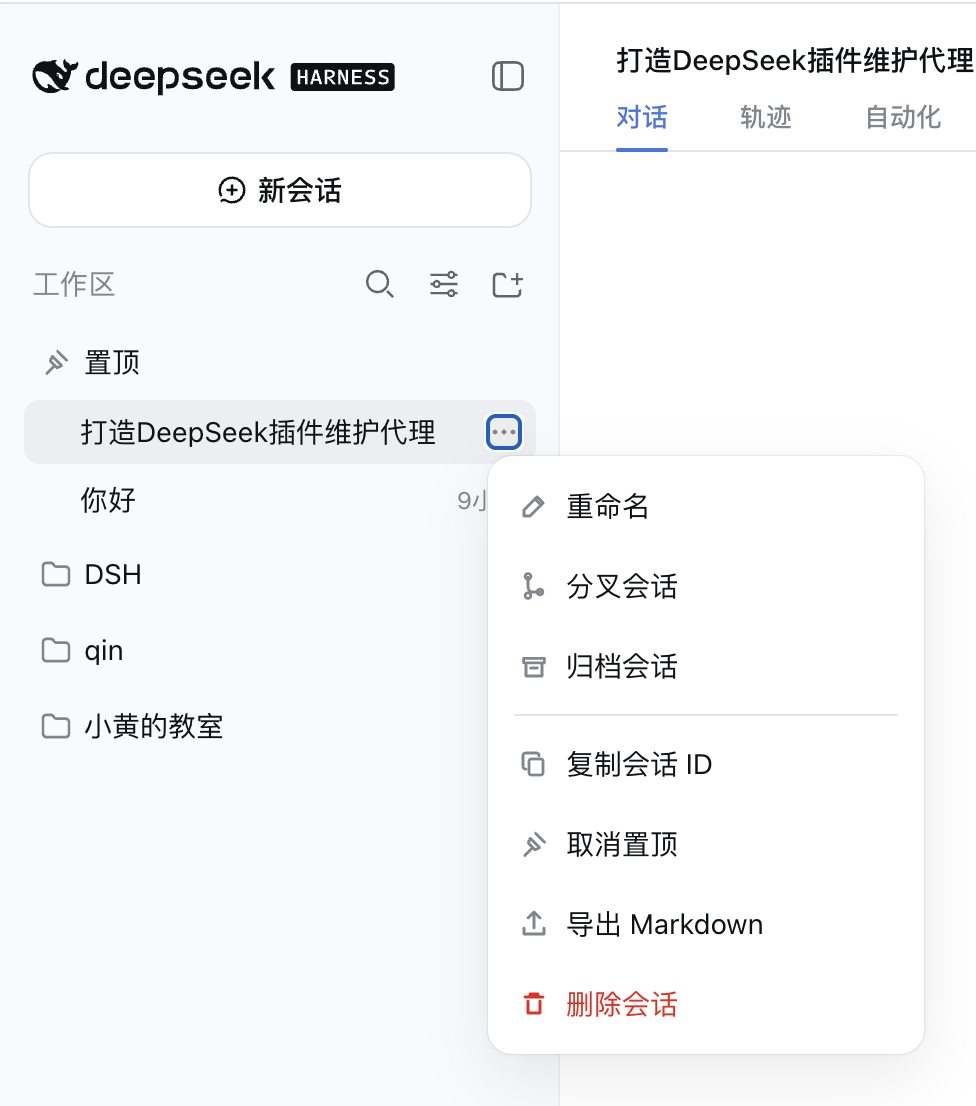
dsh-session-actions
Run the following command in DeepSeek Harness:
dsh plugin install xingyingyuzhui/dsh-session-actions
Paste the following prompt into your AI chat to install this plugin:
In DeepSeek Harness, install the plugin by running the command 'dsh plugin install xingyingyuzhui/dsh-session-actions', with the full source address at https://github.com/xingyingyuzhui/dsh-session-actions.
About this plugin
When using DeepSeek Harness Web for conversations, users often find the native session menu lacking in practical features. They may need to quickly copy a session ID for sharing or logging, want to pin important sessions for easy access, require exporting full dialogues as Markdown for archiving or analysis, or permanently delete sensitive or redundant sessions to maintain a tidy workspace. The dsh-session-actions plugin addresses these pain points effectively.
This plugin enhances session management by adding four key options to the end of the session menu: copy ID, pin, export Markdown, and permanent delete. The pinning feature not only creates a collapsible group in the sidebar to centralize important conversations but also supports drag-and-drop sorting, all without modifying official components to ensure compatibility. The exported Markdown structurally presents thoughts, tool calls, and text content, facilitating subsequent processing.
If you are an active DeepSeek Harness user who frequently needs efficient session management, exports content for knowledge organization, or prefers a clean workspace, this plugin is ideal for you. It makes session operations more intuitive and powerful, allowing you to handle daily management tasks without relying on external tools.
Screenshots
Use Cases
- Quickly copy session ID for sharing or logging purposes.
- Pin critical conversations to a sidebar group for frequent access.
- Export full dialogues as Markdown format for archiving or analysis.
Best For
- Daily users of DeepSeek Harness Web for routine conversations.
- Team members who need to efficiently manage multiple sessions for productivity.
- Content creators seeking to export dialogue content for knowledge organization or research.
Related Plugins
A service-oriented sidebar framework for DSH, offering a full workbench with file explorer, embedded browser, real terminal, Git panel, and extensible plugin services.

A beautiful, practical Claude Code-style TUI plugin with pixel whale top bar, flowing glow title, real-time status line, streaming thought expansion, time rewind, context progress bar and TPS gauge — zero core changes.

The plugin market for DeepSeek Harness: browse/search/one-click install community plugins and themes, with updates, backup/restore, hot disable, diagnostics, and AI fix.

A persistent whale widget on the DSH web UI that shows DeepSeek balance, today's usage, and per-turn cost, with drag-and-snap and sound effects.