dsh-thinking-token-stat
Run the following command in DeepSeek Harness:
dsh plugin install Six6stRINgs/dsh-thinking-token-stat
Paste the following prompt into your AI chat to install this plugin:
Run dsh plugin install Six6stRINgs/dsh-thinking-token-stat in your DeepSeek Harness terminal to install this plugin; the source code is available at https://github.com/Six6stRINgs/dsh-thinking-token-stat .
About this plugin
The DSH reply panel reports reasoning tokens per turn, but model providers differ widely in how they expose thinking tokens: some report a count, some return only the thinking text, and some provide neither. After a long multi-turn conversation there is no session-level view that answers how much thinking was spent overall, what share it represents of total output, or how many turns actually reasoned. dsh-thinking-token-stat fills that gap by adding a clickable thinking-token total to the statistics line under the message box, with an expandable detail panel that shows the reasoning-output share, the share against all billed tokens, the number of turns that thought, and which figures are estimates rather than reported values.
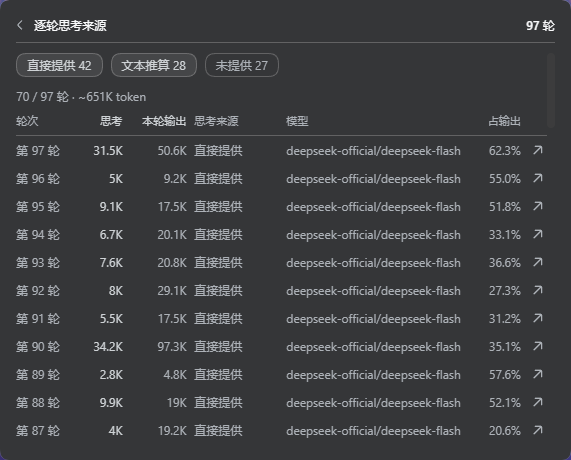
Clicking the statistic opens a detail panel with clearly labelled rows for every metric. At the bottom, a link leads to the turn-by-turn table, newest first, showing each turn thinking tokens, its full output, where the figure came from, the model that ran it, and the share of thinking within that turn output. Three filter switches isolate reported, estimated, or no-thinking turns; the table renders in pages of 100 rows and every row ends with a jump button that scrolls to the corresponding reply in the conversation. When a provider does not report a count, the plugin estimates from the thinking text using script-aware character density, and every estimated figure carries a tilde mark with an expandable explanation.
Under the hood the host side folds the session event log once and registers the result as a DSH session projection, so the numbers cover the entire conversation by construction, stay stable across windowing and compaction, and survive a reload. The browser side reads that single projection value and draws the UI; it makes no network requests, writes no local storage, and keeps no plugin-level state. If you want a complete, session-wide thinking-token ledger without modifying the conversation, issuing extra requests, or installing background processes, this plugin is the lightest path to get it.
Screenshots
Use Cases
- Review session-wide thinking-token cost after a long conversation
- Compare reasoning-output share of total output across models
- Identify turns where the provider did not report a token count
Best For
- Daily DSH users who want to track thinking-token spend
- Developers benchmarking reasoning efficiency across models
- Privacy-sensitive users requiring zero network calls and zero local storage
Related Plugins
A service-oriented sidebar framework for DSH, offering a full workbench with file explorer, embedded browser, real terminal, Git panel, and extensible plugin services.

A beautiful, practical Claude Code-style TUI plugin with pixel whale top bar, flowing glow title, real-time status line, streaming thought expansion, time rewind, context progress bar and TPS gauge — zero core changes.

The plugin market for DeepSeek Harness: browse/search/one-click install community plugins and themes, with updates, backup/restore, hot disable, diagnostics, and AI fix.

A persistent whale widget on the DSH web UI that shows DeepSeek balance, today's usage, and per-turn cost, with drag-and-snap and sound effects.