
dsh-whale-pet
Run the following command in DeepSeek Harness:
dsh plugin install MoonlitDropOfBlood/dsh-whale-pet
Paste the following prompt into your AI chat to install this plugin:
Run dsh plugin install MoonlitDropOfBlood/dsh-whale-pet in your terminal; the source code is available at https://github.com/MoonlitDropOfBlood/dsh-whale-pet
About this plugin
Once DSH is running, the terminal usually just shows a blinking cursor while you wonder whether the agent is executing a tool, waiting for your approval, or has silently thrown an error. dsh-whale-pet turns that black-box uncertainty into a small, transparent whale character that sits in a corner of your screen—no focus stealing, no main-window real estate taken—yet performs every state change with expressions and animation.
The look is built from 13 PNG parts layered in the DOM and animated entirely with CSS keyframes: breathing drift, blinks, ahoge sway, sweat-drip slides, and celebratory bounces all run at 60 fps with lossless scaling. Eight distinct moods each get their own bit: while busy the whale bobs quickly and bubbles report the active tool name in real time; an approval wait raises a red exclamation badge with a tilted ahoge; an error triggers XX eyes, high-frequency shudder, and an orange cross badge; a smooth hand-off from busy to idle earns a triple-bounce with star-and-heart confetti for six seconds; and three consecutive minutes of idleness send the whale into a slow-breathing nap with closed eyes and floating Z z z. Subagent clones appear as little fish in the lower-right corner (up to six), and a bubble sidebar tracks tool calls this session, cumulative busy minutes, and poke count.
If you run DSH under the WhaleHarbor desktop shell and want a lightweight status indicator you can drag anywhere, resize via a right-click menu, and inspect on hover, this plugin fits the bill. The core is pure DOM plus CSS animation, so the moment the shell ships a new platform build the whale follows you automatically. Missing parts fall back to a placeholder fish rather than a blank window, an unreachable bridge means the plugin idles silently with zero side effects, and teardown—whether from uninstall, HMR, or a core restart—closes floats, clears the tray section, and shuts down the event server so no orphan windows are left behind.
Screenshots
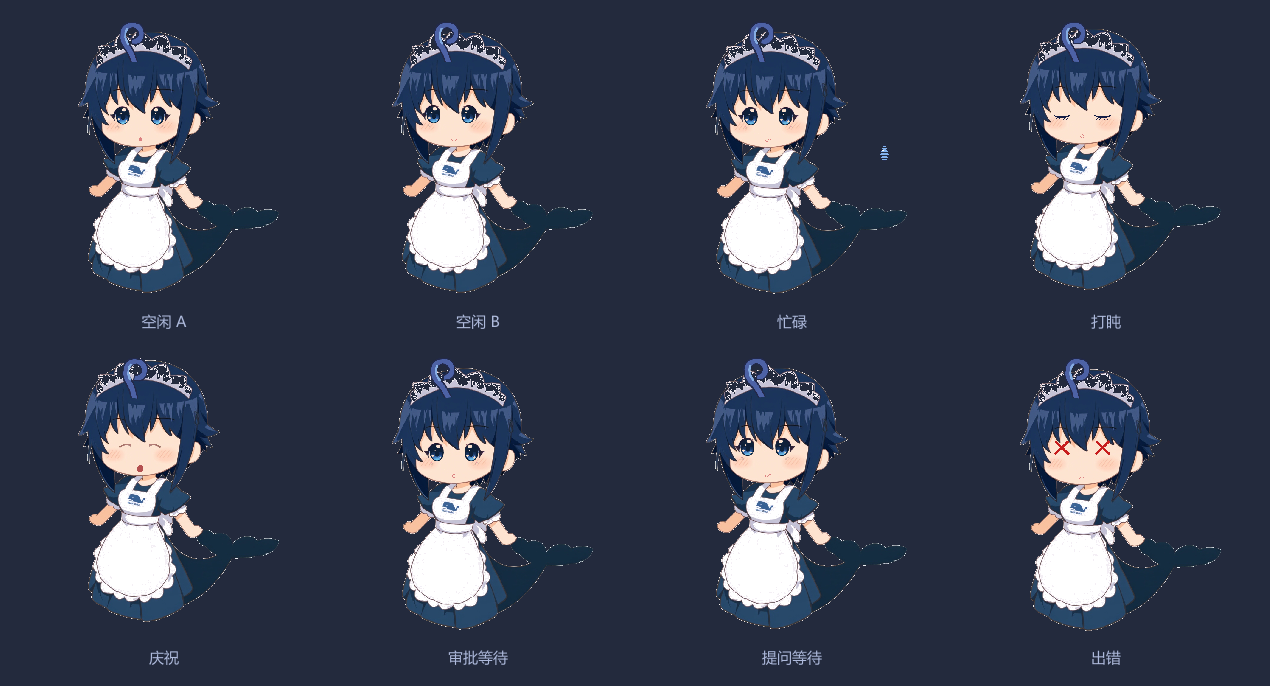

Use Cases
- Glance at the whale's expression to instantly tell whether DSH is busy, awaiting approval, or errored during long workflows.
- Track concurrent subagent clones at a glance via the little-fish icons in the corner instead of switching back to the terminal.
- Let the whale drift into a sleepy nap after prolonged idleness as a gentle visual palate-cleanser.
Best For
- Developers who run DSH daily under the WhaleHarbor desktop shell.
- Users who enjoy desktop mascots and want at-a-glance tool status without spawning another window.
- Creative developers curious about CSS-driven 2D paper-doll animation and part-layered DOM techniques.
Related Plugins

whale-girl is a desktop pet in the DSH Web GUI (bottom-right for instant companionship) — draggable, feedable, playable; completed tasks, sessions and companionship time accrue into seniority levels, titles, and memories.

Renders your local Wallpaper Engine wallpapers as the DSH web background, supporting video, web, and scene wallpapers with a liquid-glass effect and rich customization.

A WebGPU ocean skin for DeepSeek Harness with five-wave Gerstner waves, translucent theme, day/night cycle, and quick controls, installable as plugin or extension.

A Galgame-style conversation view and visual scene editor for DSH web sessions, with a real-time editing mode.