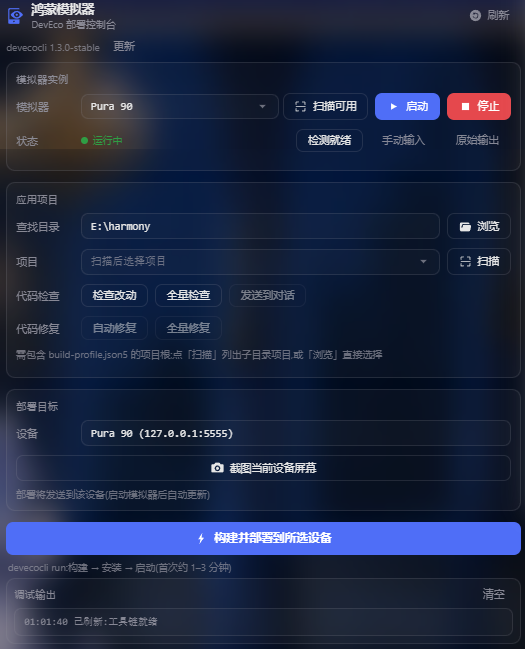
dsh-hmos-emulator
Run the following command in DeepSeek Harness:
dsh plugin install momo20012002/dsh-hmos-emulator
Paste the following prompt into your AI chat to install this plugin:
Install the plugin in DeepSeek Harness by running dsh plugin install momo20012002/dsh-hmos-emulator, source: https://github.com/momo20012002/dsh-hmos-emulator
About this plugin
In HarmonyOS development, starting the emulator, picking a project, building, deploying, and reading logs often scatter across DevEco Studio, a terminal, and the browser—fragmented and repetitive. dsh-hmos-emulator consolidates these steps into a DeepSeek Harness sidebar panel: launch or stop the emulator with one click, browse or scan for HarmonyOS projects, build and deploy to the target device with real-time output, and automatic readiness detection after a cold start.
Beyond the panel, the plugin exposes six AI tools—instance management, screen-structure interaction, build-deploy, code linting, device log filtering, and official documentation search—so you can drive the emulator and deployment flow directly from conversation. Interface state is read as a node tree by default rather than a screenshot, giving higher precision at lower cost; screenshots are auto-saved on white-screen or crash events and support baseline comparison to detect visual changes.
It is built for HarmonyOS developers on Windows or macOS who use DevEco Studio as their primary IDE, as well as engineers on Linux relying on Command Line Tools for deployment verification. If your daily loop follows the start-build-deploy-inspect-logs path, this plugin compresses it into a single conversation or a single panel click.
Screenshots
Use Cases
- Launch a HarmonyOS emulator and build-deploy a project to it from the sidebar with one click
- Trigger emulator interaction, build-deploy, linting, and log queries directly in AI conversation
- Auto-detect device readiness after cold start and stream real-time build and install output
Best For
- HarmonyOS developers who build apps with DevEco Studio
- Engineers on Linux using Command Line Tools for HarmonyOS deployment
- Developers who want to fold emulator workflows into AI-driven conversations
Related Plugins
A service-oriented sidebar framework for DSH, offering a full workbench with file explorer, embedded browser, real terminal, Git panel, and extensible plugin services.

A beautiful, practical Claude Code-style TUI plugin with pixel whale top bar, flowing glow title, real-time status line, streaming thought expansion, time rewind, context progress bar and TPS gauge — zero core changes.

The plugin market for DeepSeek Harness: browse/search/one-click install community plugins and themes, with updates, backup/restore, hot disable, diagnostics, and AI fix.

A persistent whale widget on the DSH web UI that shows DeepSeek balance, today's usage, and per-turn cost, with drag-and-snap and sound effects.