dsh-im
Run the following command in DeepSeek Harness:
dsh plugin install xmanrui/dsh-im
Paste the following prompt into your AI chat to install this plugin:
Run the command dsh plugin install xmanrui/dsh-im in DeepSeek Harness to install this plugin from the GitHub repository https://github.com/xmanrui/dsh-im.
About this plugin
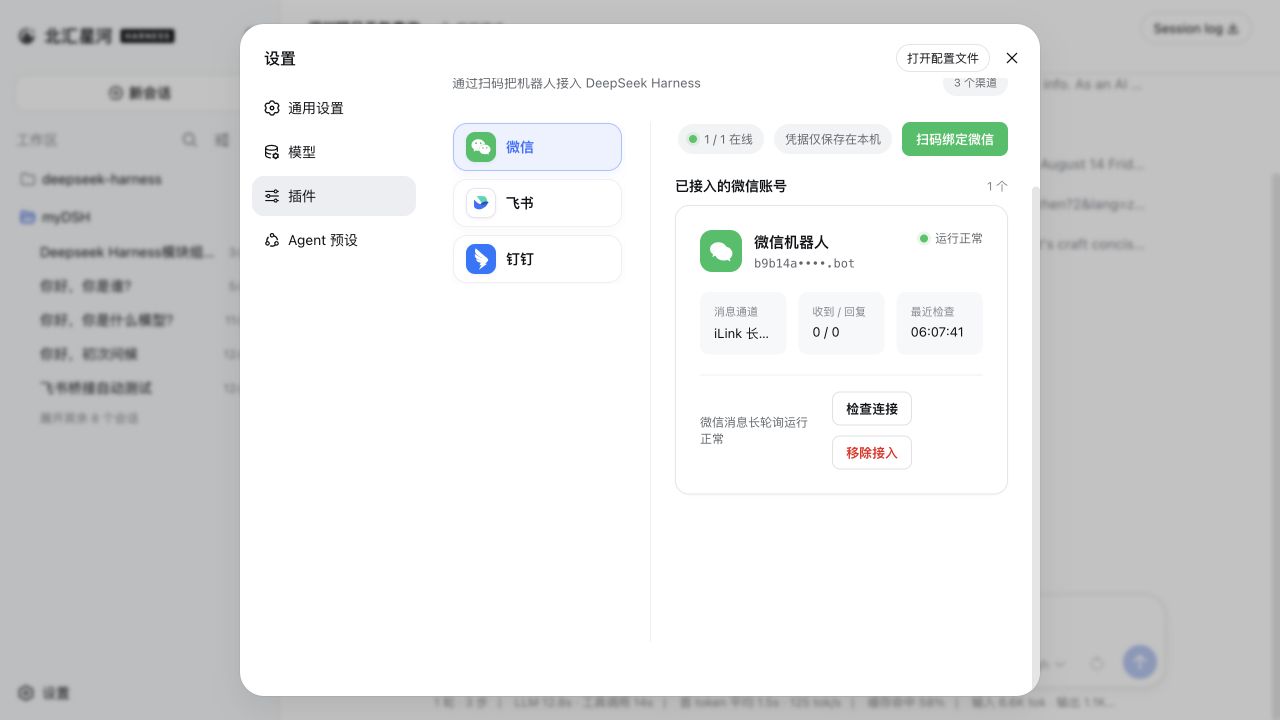
DeepSeek Harness usually runs on your local machine, but everyday conversations and team collaboration happen in instant messaging apps. dsh-im bridges that gap: you can use Harness directly from Feishu, WeChat, DingTalk, WeCom, QQ, Slack, Telegram, Discord, and WhatsApp, without opening a terminal or web UI. All nine channels are unified under a single "IM Robots" settings page, and each channel supports multiple bots. Each bot keeps its own credentials, connection state, workspace, and session bindings, so management stays independent and isolated.
Connecting is flexible: scan a QR code to create a bot, or manually bind an existing App Manifest, Bot Token, or App Secret. Every channel uses native long connections or long polling, and replies can show "thinking", tool progress, and streaming output. Platforms without native streaming fall back to editing messages or updating cards. Image understanding and file delivery are built in: you can send JPEG, PNG, WebP, GIF (as an image file), plus any file Harness can read, as a native attachment to users.
The plugin also includes AI Office Connector, which lets your local Harness proactively connect to a public AI Office without needing a public IP or port forwarding. Device Tokens are stored in the Harness credential vault, and the Office only sees aliases—never local paths. The connector supports heartbeat auth, SSE streaming, task leases, and automatic reconnection. Approvals and follow-up questions initiated by Harness appear in the Office human panel. Combined with rich bot commands (/model, /reasoning, /preset, /new, /stop, /steer, /session, and more), you can switch models, manage presets, compact context, and rebind workspaces or sessions right inside chat.
Who is it for? If you want DeepSeek Harness to become a helpful assistant inside the IM tools your team already uses; if you need a secure, controllable remote entry so a local Harness can be safely invoked through a public Office; or if you are building IM-based AI workflows and want to manage multiple bots with independent workspaces and Agent Presets per chat—dsh-im is a plugin worth trying.
Screenshots
Use Cases
- Call DeepSeek Harness directly from Feishu, WeChat, DingTalk, and other IM apps without switching to a terminal or web UI
- Let a local Harness connect outward to a public AI Office, accepting remote tasks and returning results without a public IP
- Configure multiple bots for different teams or projects, each with its own workspace, Agent Preset, and sessions for isolated collaboration
Best For
- Developers and teams who want DeepSeek Harness integrated into their daily messaging apps
- Ops or backend users who need secure remote access to a local Harness without public port forwarding
- Product and technical leads building IM-based AI workflows who need unified multi-bot management
Related Plugins
A service-oriented sidebar framework for DSH, offering a full workbench with file explorer, embedded browser, real terminal, Git panel, and extensible plugin services.

A beautiful, practical Claude Code-style TUI plugin with pixel whale top bar, flowing glow title, real-time status line, streaming thought expansion, time rewind, context progress bar and TPS gauge — zero core changes.

The plugin market for DeepSeek Harness: browse/search/one-click install community plugins and themes, with updates, backup/restore, hot disable, diagnostics, and AI fix.

A persistent whale widget on the DSH web UI that shows DeepSeek balance, today's usage, and per-turn cost, with drag-and-snap and sound effects.