dsh-diff-card
Run the following command in DeepSeek Harness:
dsh plugin install WongYuYe/dsh-diff-card
Paste the following prompt into your AI chat to install this plugin:
Run dsh plugin install WongYuYe/dsh-diff-card in your terminal to install the diff-review card plugin from https://github.com/WongYuYe/dsh-diff-card.
About this plugin
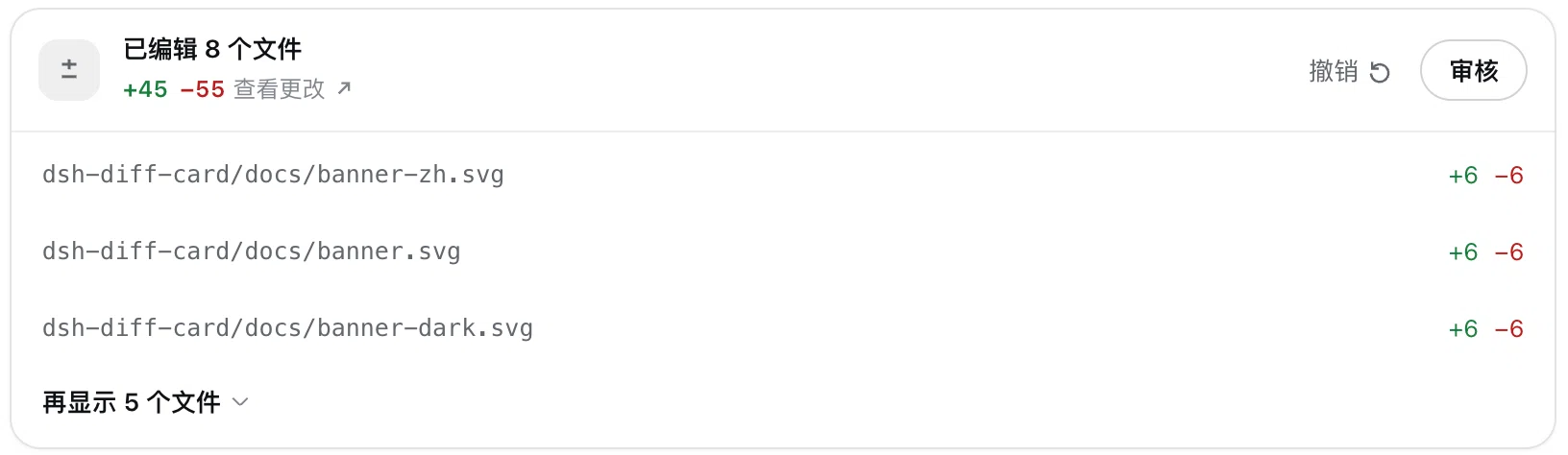
An agent can touch several files in a single turn, and the resulting diffs are scattered across multiple tool calls with no centralized place to review them all at once. dsh-diff-card collects every file edit made in a turn into one structured card right in the DSH Desktop chat, so you can see what changed and by how much at a glance.
Each edit or write line carries a +N −M badge, making a one-character tweak instantly distinguishable from a two-hundred-line rewrite. The turn-end card lists all touched files with a three-line preview by default and shows grand-total line deltas in the header. Click any row to expand or collapse that file’s diff; the View Changes button opens all diffs at once; Review mode walks through every change in the turn sequentially. If something looks off, Undo restores all files touched in that turn to their pre-edit state, and the button flips to Redo, which writes the undone edits back—both actions carry a lightweight confirmation prompt to guard against misclicks. A dropdown on each row offers Open with the system default app, Show in Folder, open in VS Code, and copy absolute or relative path, so you can jump straight from review to editing without leaving the chat window.
The plugin spans edit, write, str_replace_editor, and Code Dispatch sub-calls, covering the most common agent editing paths in DeepSeek Harness. UI text follows your interface language (Chinese or English), and file-open shortcuts work on both macOS and Windows. It is built for developers who want a reviewable, reversible loop around agent file editing: see what changed, confirm or roll back, and move on—all from a single card in the chat.
Screenshots
Use Cases
- After a multi-file agent turn, the card summarizes every edit with +N −M badges in one place
- A bad rewrite is rolled back in one click via Undo, then re-applied with Redo once the fix is confirmed
- Finish reviewing a diff and jump straight into VS Code from the row dropdown for fine-tuning
- Step through each file-level diff in Review mode before committing the batch of changes
Best For
- Developers using DSH Desktop for agent-assisted coding who want every edit reviewable and reversible
- Programmers who prefer to confirm, roll back, or tweak file changes without leaving the chat window
- Users on macOS or Windows who need to jump from a diff straight into an editor for further edits
Related Plugins
A service-oriented sidebar framework for DSH, offering a full workbench with file explorer, embedded browser, real terminal, Git panel, and extensible plugin services.

A beautiful, practical Claude Code-style TUI plugin with pixel whale top bar, flowing glow title, real-time status line, streaming thought expansion, time rewind, context progress bar and TPS gauge — zero core changes.

The plugin market for DeepSeek Harness: browse/search/one-click install community plugins and themes, with updates, backup/restore, hot disable, diagnostics, and AI fix.

A persistent whale widget on the DSH web UI that shows DeepSeek balance, today's usage, and per-turn cost, with drag-and-snap and sound effects.