dsh-chat-index
Run the following command in DeepSeek Harness:
dsh plugin install kk112222/dsh-chat-index
Paste the following prompt into your AI chat to install this plugin:
Run dsh plugin install kk112222/dsh-chat-index in your terminal to install the plugin; the source repository is available at https://github.com/kk112222/dsh-chat-index
About this plugin
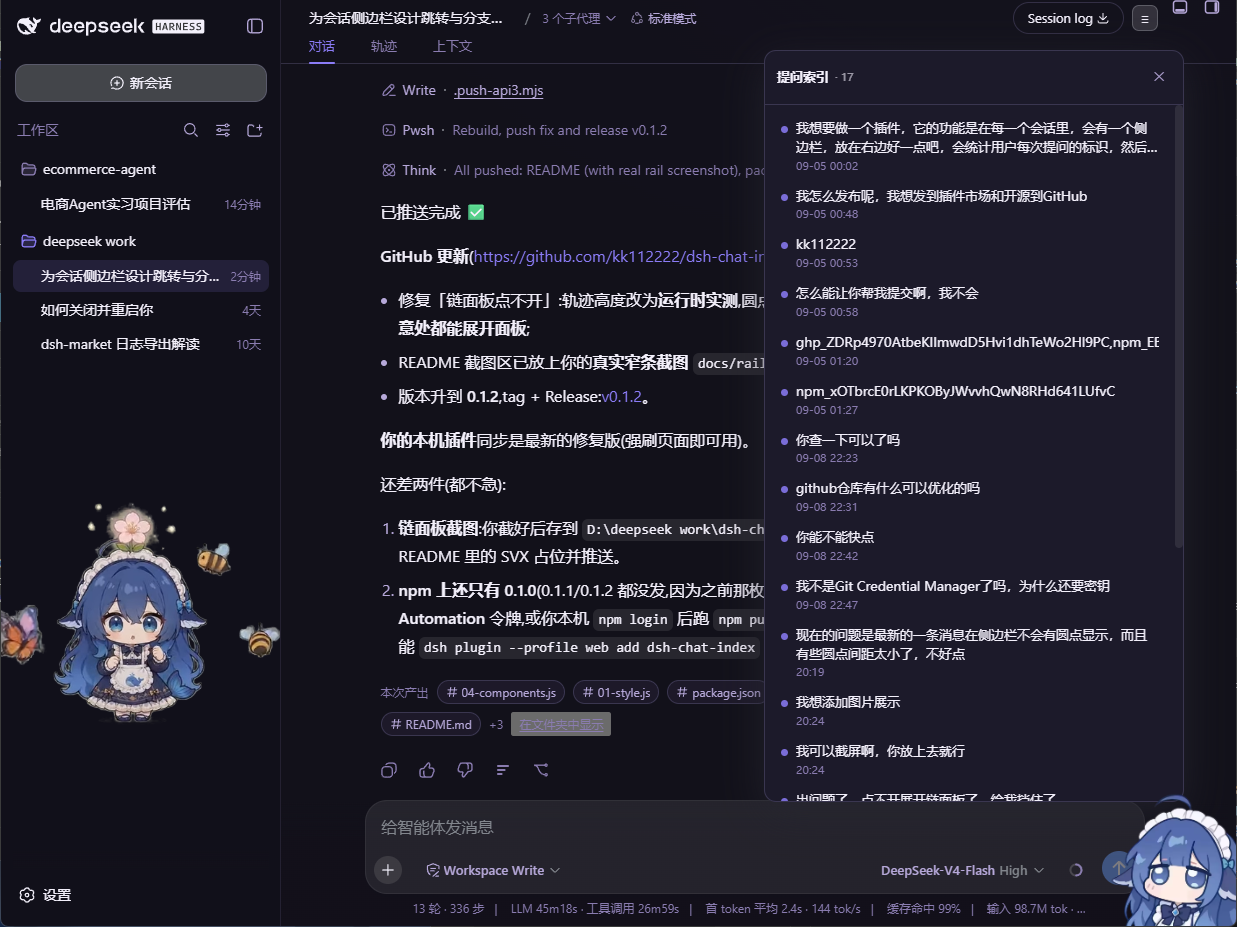
When a dsh web conversation stretches into dozens or even hundreds of turns, scrolling back to locate one particular question becomes tedious, and the headache multiplies the moment you start jumping between branch or subagent sessions. dsh-chat-index is a lightweight, purely front-end plugin for the DeepSeek Harness Web UI that overlays a visual question map on every session, turning endless scrolling into a single click.
Concretely, a thin dot rail appears on the right edge of the chat. Each user question gets one dot, spaced in true time-proportional order (earliest at the top, most recent at the bottom). Clicking a dot scrolls the chat to that message with a brief highlight; dragging the rail lets you sweep quickly, and a small summary tooltip fades in beside the pointer. A persistent toggle in the title bar or at the base of the rail opens a chain panel that lists every question with its summary and timestamp. Branch and subagent sessions render as child subtrees under the main conversation node; clicking a child node switches to that session first, then locates and highlights the target message. In empty sessions the rail stays hidden but the panel remains accessible with a placeholder notice. Because the plugin is entirely client-side, it requires no backend changes and takes effect the moment you refresh the page.
It is built for anyone who runs long, multi-turn conversations in dsh web, especially those who rely heavily on subagent or branch workflows and are tired of lost-in-scroll searches. The combination of a time-proportional dot rail, an expandable chain panel, and first-class branch-session subtrees sets it apart from other navigation helpers.
Screenshots
Use Cases
- Locate and highlight a specific historical question in a long conversation
- Jump between branch or subagent sessions with automatic context switching
- Sweep through the full conversation timeline by dragging the dot rail
Best For
- Users who routinely run multi-turn long conversations in dsh web
- Developers who rely heavily on subagent and branch session workflows
- Users who want zero-backend-enhanced session navigation in the dsh web UI
Related Plugins
A service-oriented sidebar framework for DSH, offering a full workbench with file explorer, embedded browser, real terminal, Git panel, and extensible plugin services.

A beautiful, practical Claude Code-style TUI plugin with pixel whale top bar, flowing glow title, real-time status line, streaming thought expansion, time rewind, context progress bar and TPS gauge — zero core changes.

The plugin market for DeepSeek Harness: browse/search/one-click install community plugins and themes, with updates, backup/restore, hot disable, diagnostics, and AI fix.

A persistent whale widget on the DSH web UI that shows DeepSeek balance, today's usage, and per-turn cost, with drag-and-snap and sound effects.