dsh-launcher
Run the following command in DeepSeek Harness:
dsh plugin install songer522/dsh-launcher
Paste the following prompt into your AI chat to install this plugin:
Run dsh plugin install songer522/dsh-launcher in your terminal to install this plugin; the full source repository is at https://github.com/songer522/dsh-launcher
About this plugin
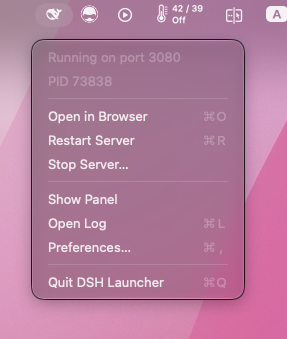
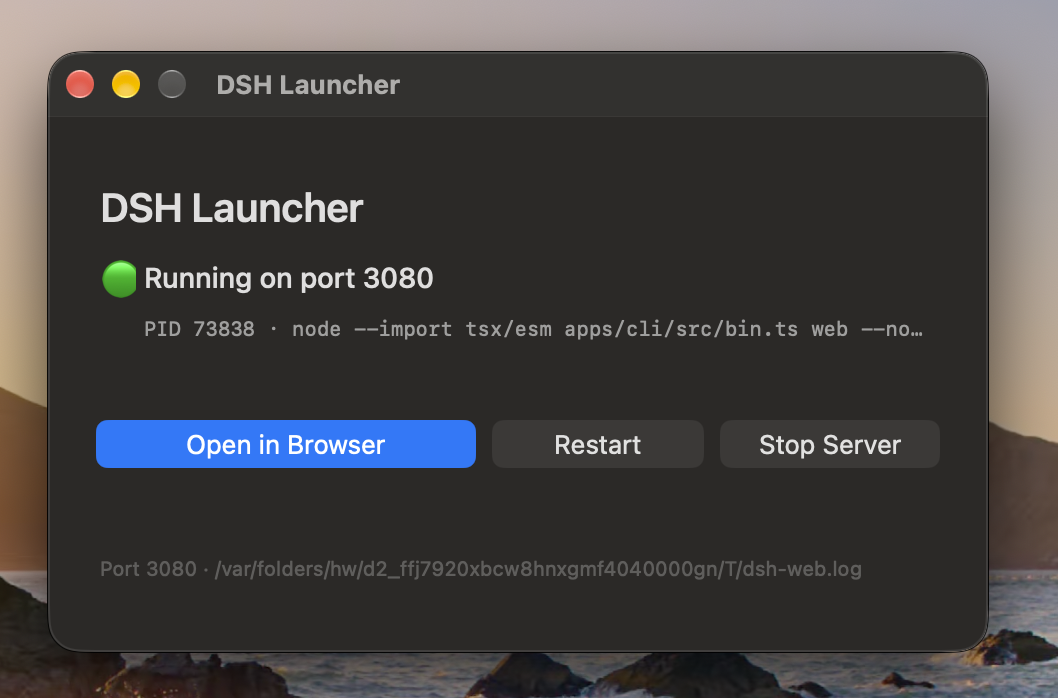
Every time you want to use DeepSeek Harness from source, the ritual is the same: open a terminal tab, type the command, dig the tokenized URL out of the logs, go back to the tab after a pull to kill and restart, and remember to stop the server when you are done. The terminal was never the point of the tool — it was just the tollbooth in front of the browser tab where the real work happens. dsh-launcher, paired with the macOS menu bar app in the same repository, collapses start, open-in-browser, restart, and stop into single clicks. The status icon reflects server state in real time, there is no Dock icon, and nothing sits in the way. Command, port, project directory, and target browser are all configurable, so it works just as well for vite, python -m http.server, or any other long-running local server.
The companion DSH host plugin runs inside the harness itself. Once the server begins listening it writes a small runtime.json containing the port, PID, and authenticated URL; when the server stops the file is removed. This means that even when you start the server from a terminal rather than from the menu bar app, the app can still open a browser tab with the correct launch token instead of hitting a 401. The plugin is optional — the app falls back to parsing its own startup log — but with it in place, managing servers across different launch sources becomes seamless.
Built for macOS developers who run DeepSeek Harness from source day to day, or anyone tired of context-switching between a browser tab and a terminal window to keep a local server alive. A single Swift file, zero dependencies, MIT licensed: compile, sign, done.
Screenshots
Use Cases
- Start, restart, or stop DeepSeek Harness from the menu bar without touching a terminal
- After pulling new code, click Restart and the app opens a browser tab with the correct authenticated URL
- Manage any long-running local dev server such as vite or a Python HTTP server
Best For
- macOS developers who run DeepSeek Harness from source daily
- Developers who prefer a GUI over terminal ceremony for managing local servers
- Anyone who frequently restarts a dev server after pulls and dreads copying tokenized URLs out of logs
Related Plugins
A service-oriented sidebar framework for DSH, offering a full workbench with file explorer, embedded browser, real terminal, Git panel, and extensible plugin services.

A beautiful, practical Claude Code-style TUI plugin with pixel whale top bar, flowing glow title, real-time status line, streaming thought expansion, time rewind, context progress bar and TPS gauge — zero core changes.

The plugin market for DeepSeek Harness: browse/search/one-click install community plugins and themes, with updates, backup/restore, hot disable, diagnostics, and AI fix.

A persistent whale widget on the DSH web UI that shows DeepSeek balance, today's usage, and per-turn cost, with drag-and-snap and sound effects.