dsh-tps-meter
Run the following command in DeepSeek Harness:
dsh plugin install looking321-rt/dsh-tps-meter
Paste the following prompt into your AI chat to install this plugin:
Run dsh plugin install looking321-rt/dsh-tps-meter in your DSH terminal to install the plugin; source code is available at https://github.com/looking321-rt/dsh-tps-meter .
About this plugin
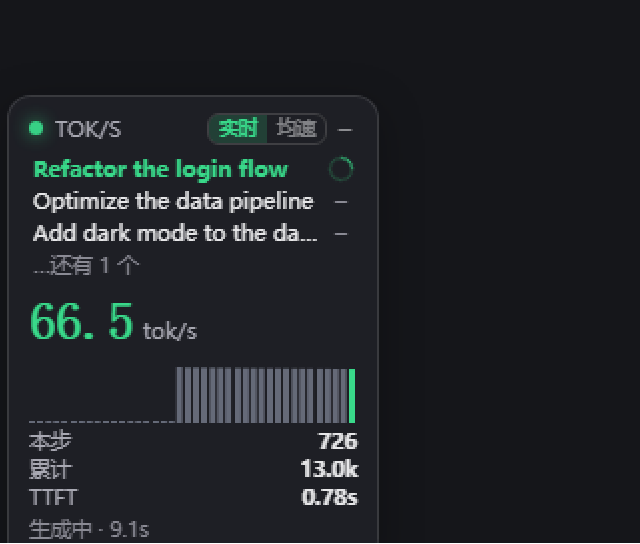
When juggling multiple sessions in DeepSeek Harness, it is hard to tell whether output is fast, whether the model has stalled, or how many tokens a step actually produced. dsh-tps-meter injects a draggable floating widget into the Web UI that converts the session event stream into live throughput numbers, turning gut-feel performance into observable data.
The widget shows tok/s in both real-time and average modes, a small waveform, per-step and cumulative token counts, TTFT, and a status line (generating, tool running, thinking). A compact session list sits below with green spinner for active work and a dash for finished turns. Each step-end uses the provider's exact usage.outputTokens to EMA-correct the character-based estimate, so the displayed value converges toward ground truth without any extra API calls or network access.
The plugin has zero third-party dependencies, never writes to session logs, and never issues model requests. All computation stays in local memory and is rendered purely in the browser. It is well suited for developers who run DSH's Web UI with several concurrent sessions or subagents and want an at-a-glance view of throughput bottlenecks.
Screenshots
Use Cases
- Instantly tell which concurrent session is producing tokens and which one has stalled
- Check whether generation speed meets your interactive latency budget
- Compare throughput differences across prompts or parameter settings
Best For
- Engineers who treat the DSH Web UI as their primary dev workbench
- Heavy users driving multiple sessions or subagents at once
- Performance engineers who need an at-a-glance view of throughput for tuning
Related Plugins
A service-oriented sidebar framework for DSH, offering a full workbench with file explorer, embedded browser, real terminal, Git panel, and extensible plugin services.

A beautiful, practical Claude Code-style TUI plugin with pixel whale top bar, flowing glow title, real-time status line, streaming thought expansion, time rewind, context progress bar and TPS gauge — zero core changes.

The plugin market for DeepSeek Harness: browse/search/one-click install community plugins and themes, with updates, backup/restore, hot disable, diagnostics, and AI fix.

A persistent whale widget on the DSH web UI that shows DeepSeek balance, today's usage, and per-turn cost, with drag-and-snap and sound effects.