dsh-setting-manager
Run the following command in DeepSeek Harness:
dsh plugin install coderHeJiyu/dsh-setting-manager
Paste the following prompt into your AI chat to install this plugin:
Run dsh plugin install coderHeJiyu/dsh-setting-manager in your DeepSeek Harness terminal to install the plugin; the source repository is https://github.com/coderHeJiyu/dsh-setting-manager .
About this plugin
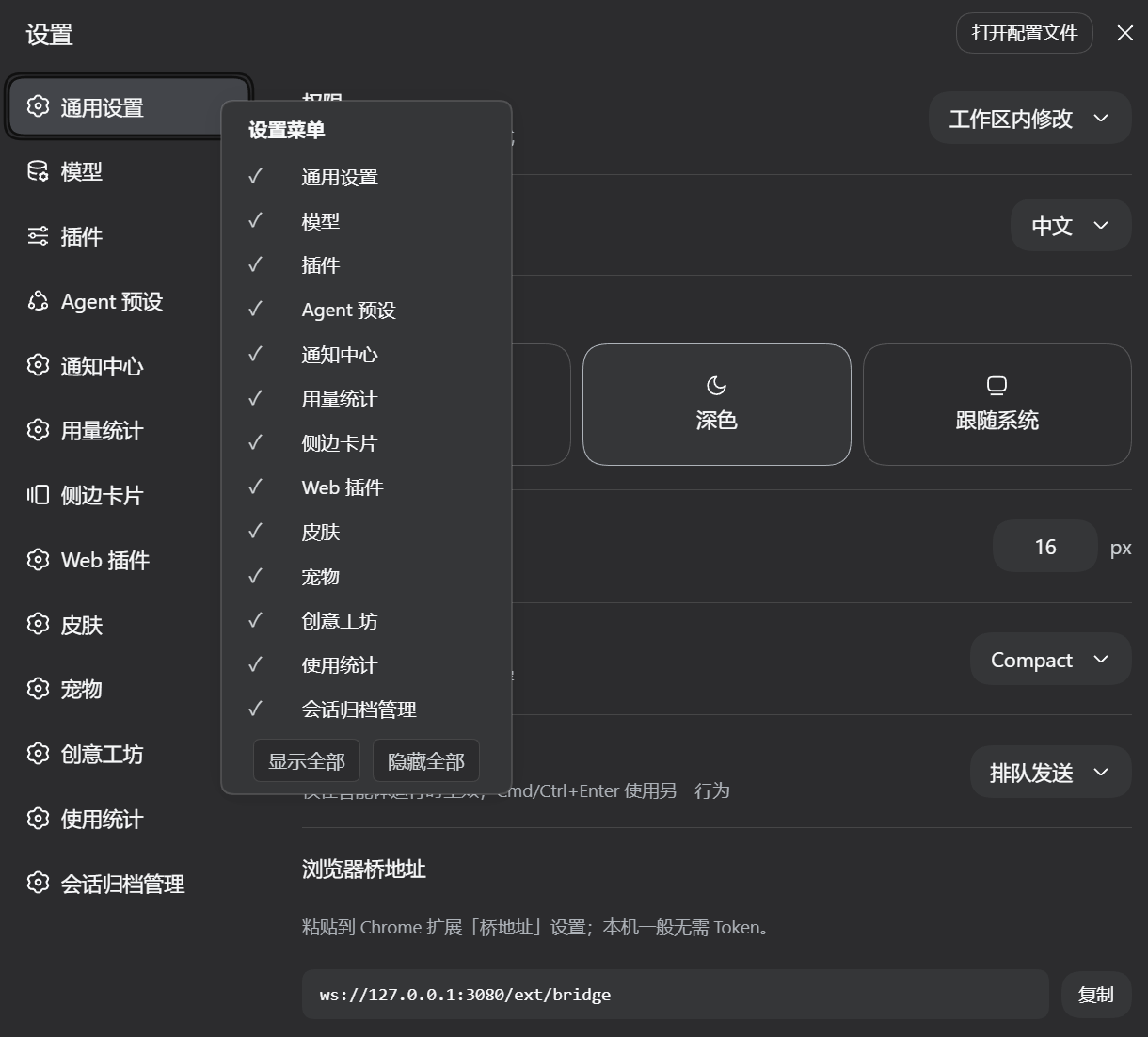
As you install more plugins, the left-hand section nav in DSH's settings page gets crowded. General, Models, Plugins, Agent Presets… a wall of section titles you have to glance through every time you open Settings. dsh-setting-manager lets you right-click once and hide the sections you do not need, leaving only the ones you care about.
The interaction is intentionally simple: right-click anywhere on the section nav (including the heading area) to open a checkbox overlay that lists every settings section in order. Click a row to toggle its visibility; the menu stays open so you can toggle several rows in sequence. Two batch buttons at the bottom let you show or hide everything at once. If you hide every section the menu displays a centered warning line, and the nav heading remains right-clickable to bring the menu back. The display state is persisted via a loopback API route to a single JSON file, shared across all browsers and tabs, and it automatically follows DSH's light or dark theme and language changes.
It is a good fit when you have installed a dozen or so plugins and accumulated many custom sections but only use three or four of them regularly. It also works nicely as a pre-configured lean view you can share with teammates so the settings page is not cluttered with irrelevant sections. Hiding is purely visual: keyboard shortcuts and programmatic APIs of hidden sections keep working exactly as before. They are simply out of sight, and one click brings them back.
Screenshots
Use Cases
- Settings section nav gets crowded after installing many plugins; hide the ones you rarely touch
- Pre-configure a lean default view for your team showing only core sections
- Quickly switch visible section combinations when jumping between different workflows
Best For
- DSH users with many plugins and a long settings section list
- Maintainers who want a pre-configured lean view for their team
- Developers who prefer a customized interface with less visual clutter
Related Plugins
A service-oriented sidebar framework for DSH, offering a full workbench with file explorer, embedded browser, real terminal, Git panel, and extensible plugin services.

A beautiful, practical Claude Code-style TUI plugin with pixel whale top bar, flowing glow title, real-time status line, streaming thought expansion, time rewind, context progress bar and TPS gauge — zero core changes.

The plugin market for DeepSeek Harness: browse/search/one-click install community plugins and themes, with updates, backup/restore, hot disable, diagnostics, and AI fix.

A persistent whale widget on the DSH web UI that shows DeepSeek balance, today's usage, and per-turn cost, with drag-and-snap and sound effects.