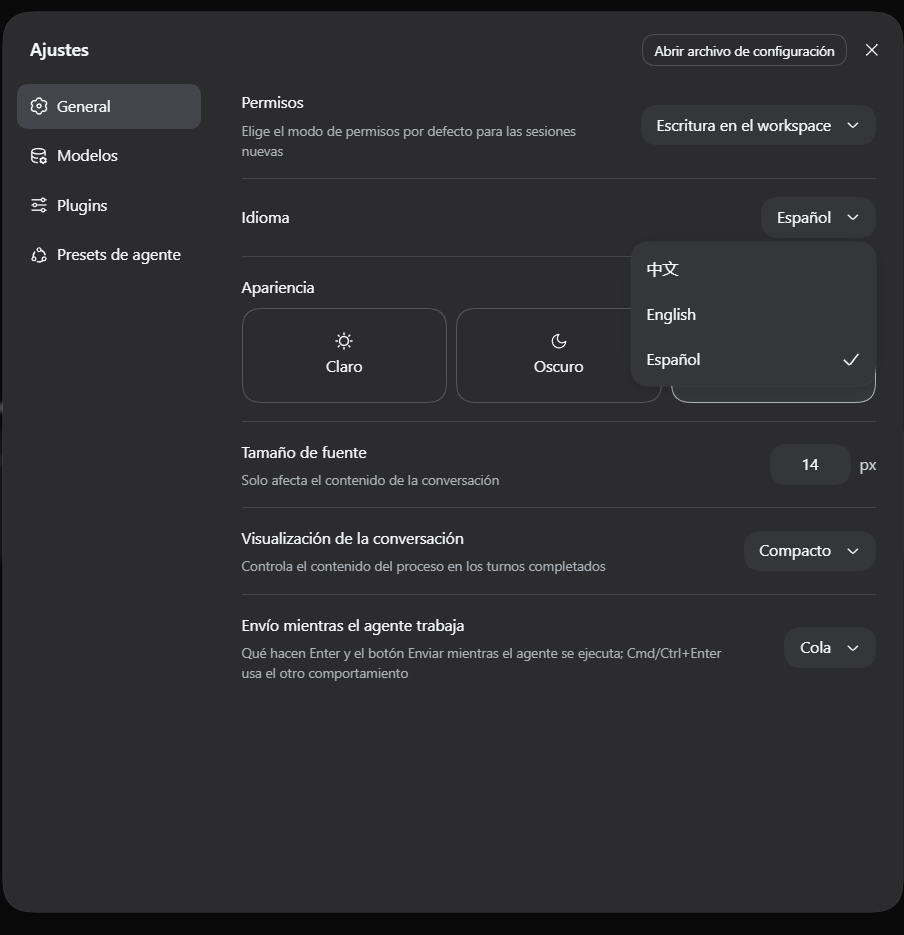
dsh-locale-es
Run the following command in DeepSeek Harness:
dsh plugin install GuidoMaxier/dsh-locale-es
Paste the following prompt into your AI chat to install this plugin:
Run dsh plugin install GuidoMaxier/dsh-locale-es in DeepSeek Harness to install; source at https://github.com/GuidoMaxier/dsh-locale-es
About this plugin
DeepSeek Harness ships its web UI with only English and Chinese built in, leaving Spanish speakers to read every menu, dialog, and settings panel in a second language. dsh-locale-es plugs a complete Spanish dictionary into DSH's official locale registration API, so the Language dropdown in Settings → General gains a full Español option. One click and every visible label—menus, buttons, settings rows, tool descriptions—renders in Spanish without touching node_modules or any DSH core code. Keys the pack does not cover fall back to English automatically, and upgrading DSH never breaks the interface because unknown keys are simply ignored and missing keys degrade gracefully.
The translation is broad and deliberate. The dictionary spans 47 namespaces covering shell, settings, chat, conversation, pluginManager, workspace, trajectory, approval, sidebar and more—1,626 keys from the current release plus 39 legacy keys that a previous DSH build still reads. A curated terminology table keeps developer-facing terms like workspace, plugin, prompt, and token in English where the Spanish-speaking dev community already uses them, and shortens UI labels so fixed-width buttons and sidebar rows do not overflow. The pack does not translate model output, permission-preset identifiers, or tool names; those are either prompt-controlled or technical identifiers where a translation would reduce clarity.
It is aimed at Spanish-speaking engineers who use DSH day-to-day and want the operating surface to feel native rather than a thin overlay of a dozen half-translated strings. If you already have a Spanish browser, DSH detects it and activates the locale without manual selection, so the experience is seamless from the first page load.
Screenshots
Use Cases
- Switch the DSH web UI to Spanish with one click
- Adapt DSH quickly in environments without built-in Spanish
- Auto-activate Spanish when the browser locale is already es
Best For
- Spanish-speaking engineers using DSH day-to-day
- Developers who want a native-language operating surface
- Instructors demonstrating DSH to Spanish-speaking audiences
Related Plugins
A service-oriented sidebar framework for DSH, offering a full workbench with file explorer, embedded browser, real terminal, Git panel, and extensible plugin services.

A beautiful, practical Claude Code-style TUI plugin with pixel whale top bar, flowing glow title, real-time status line, streaming thought expansion, time rewind, context progress bar and TPS gauge — zero core changes.

The plugin market for DeepSeek Harness: browse/search/one-click install community plugins and themes, with updates, backup/restore, hot disable, diagnostics, and AI fix.

A persistent whale widget on the DSH web UI that shows DeepSeek balance, today's usage, and per-turn cost, with drag-and-snap and sound effects.