dsh-plugin-followup
Run the following command in DeepSeek Harness:
dsh plugin install MasterZ9286/dsh-plugin-followup
Paste the following prompt into your AI chat to install this plugin:
Run dsh plugin install MasterZ9286/dsh-plugin-followup in DeepSeek Harness to activate the follow-up plugin (source: https://github.com/MasterZ9286/dsh-plugin-followup).
About this plugin
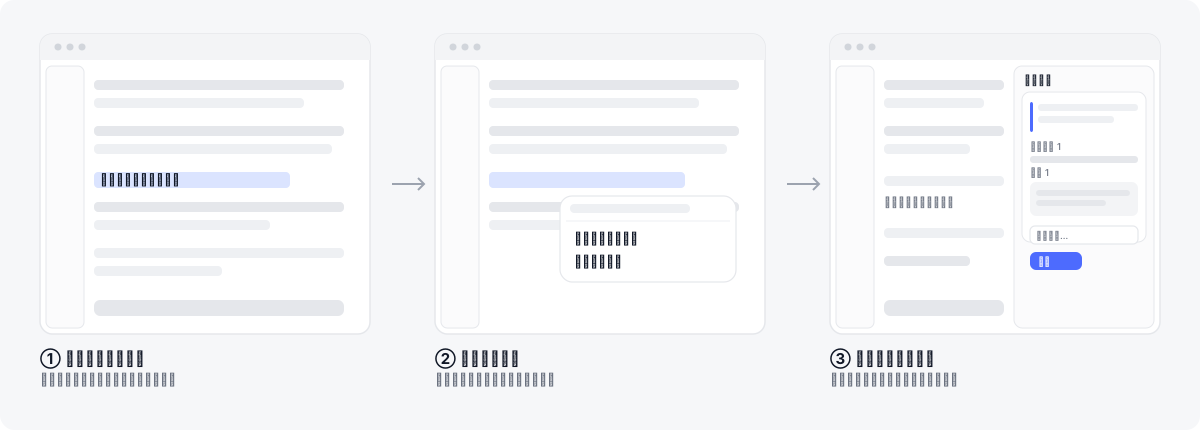
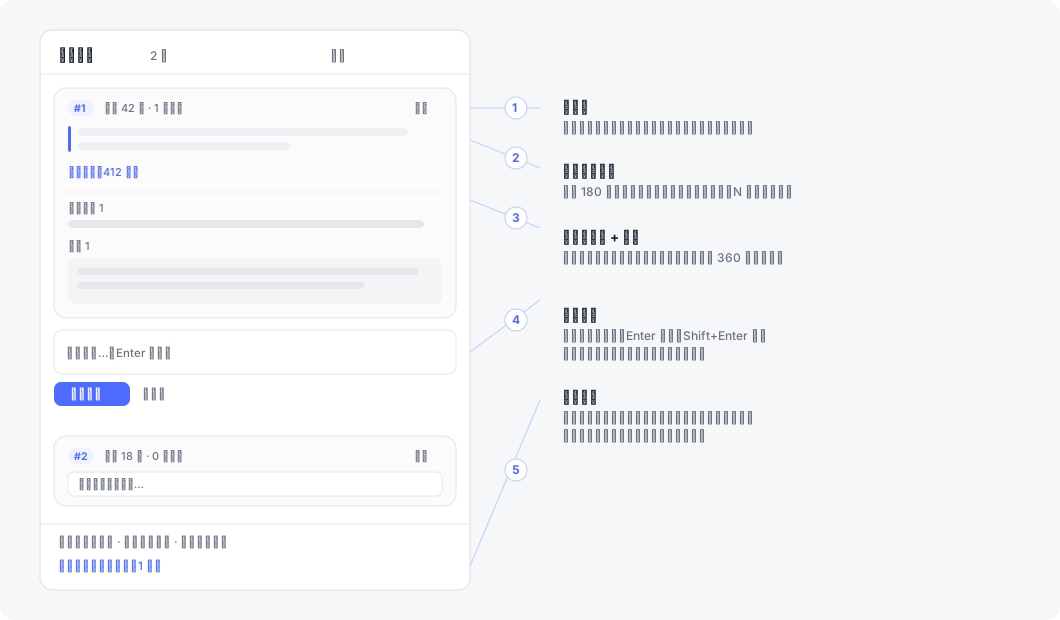
Reading a lengthy assistant reply in DeepSeek Harness and wanting to drill into a specific code block or conclusion? The usual workflow is clunky: you copy, paste, format the quote by hand, and the follow-up Q&A floods into the main thread, pushing the original text further out of view. dsh-plugin-followup cuts this to three actions — select text, right-click, ask — and keeps the entire Q&A thread in a right-side panel while the corresponding turn in the main conversation is hidden (not deleted), so the model retains full context.
The plugin is built for one scenario: asking targeted follow-up questions on any text fragment of a completed reply. It works with body text, code blocks, wide tables, and tool output. Each follow-up card is a tab-style thread — you can keep asking in the same tab or start a new one by selecting different text. Full answers are read from the turn-tail node without truncation, and a built-in zero-dependency Markdown renderer handles code fences, tables, lists, and more. In multi-workspace setups, cards are scoped by session ID so nothing bleeds across.
Ideally suited for developers and researchers who regularly read long technical answers and need to probe specific passages repeatedly, as well as power users juggling multiple sessions who want follow-ups out of the main flow. It is a pure client-side plugin — no server-side deployment required.
Screenshots
Use Cases
- Select a code block or table row in a long reply, right-click to drill in, and keep the main thread clean
- Iterate on the same passage across multiple follow-ups, with tab-style threads preserving the citation-ask-answer chain
- Run several workspaces in parallel; each keeps its own follow-up cards without cross-contamination
Best For
- Developers who regularly read long technical answers and probe specific passages repeatedly
- Power users juggling multiple sessions who want follow-ups out of the main reading flow
- Minimalists who prefer a pure client-side plugin over spinning up another server process
Related Plugins
A service-oriented sidebar framework for DSH, offering a full workbench with file explorer, embedded browser, real terminal, Git panel, and extensible plugin services.

A beautiful, practical Claude Code-style TUI plugin with pixel whale top bar, flowing glow title, real-time status line, streaming thought expansion, time rewind, context progress bar and TPS gauge — zero core changes.

The plugin market for DeepSeek Harness: browse/search/one-click install community plugins and themes, with updates, backup/restore, hot disable, diagnostics, and AI fix.

A persistent whale widget on the DSH web UI that shows DeepSeek balance, today's usage, and per-turn cost, with drag-and-snap and sound effects.