.dsh-plugin-installer
Run the following command in DeepSeek Harness:
dsh plugin install zhang66633/.dsh-plugin-installer
Paste the following prompt into your AI chat to install this plugin:
Run dsh plugin install zhang66633/.dsh-plugin-installer in your DeepSeek Harness terminal to install this plugin; source code at https://github.com/zhang66633/.dsh-plugin-installer
About this plugin
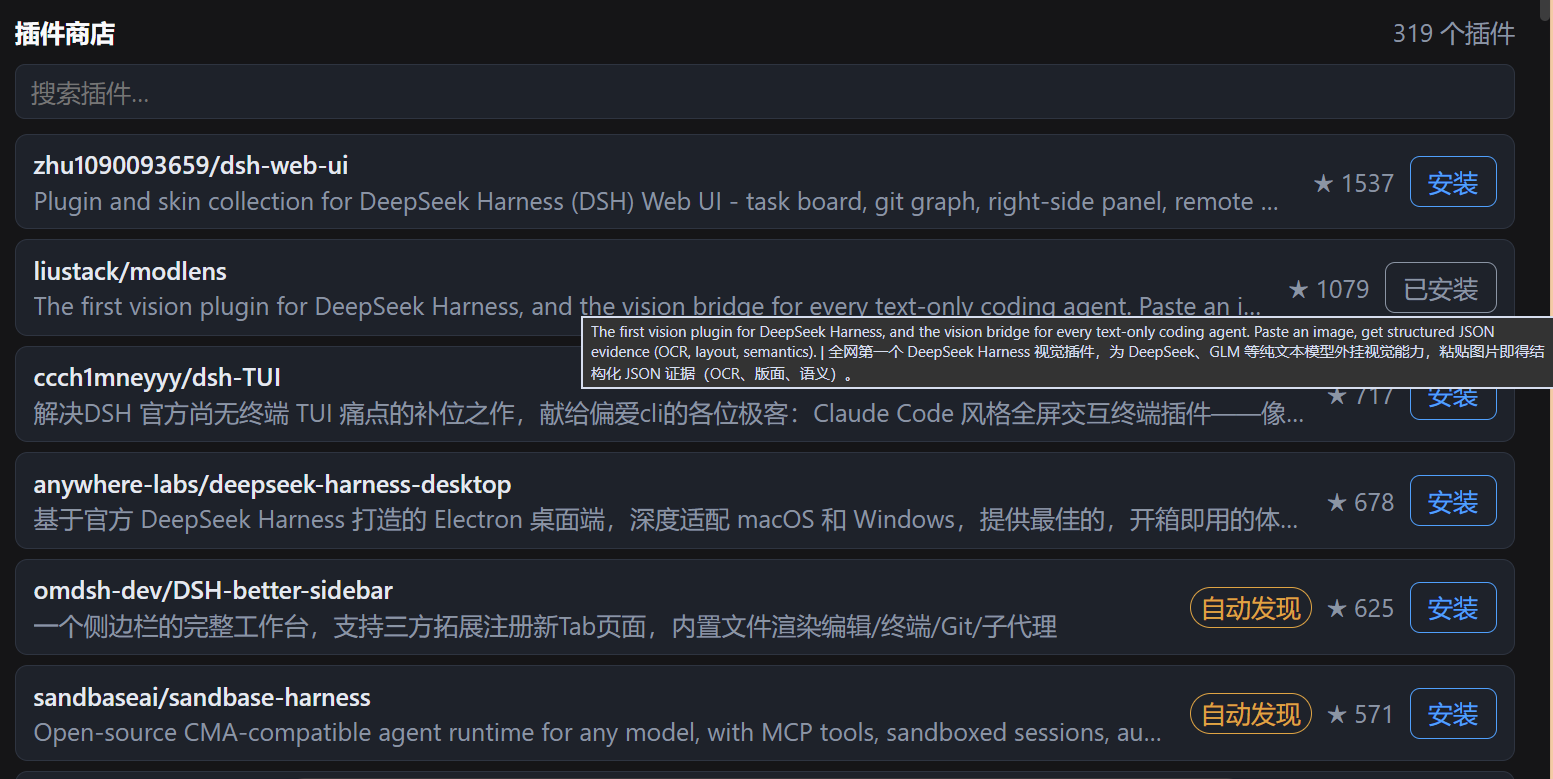
Installing plugins by typing a string of terminal commands is clunky and easy to mess up. dsh-plugin-installer moves that workflow into the Web GUI: a Plugin Store tab appears in the session view ring where you can browse and search the catalog, see the name, description, original link, and stars, then click Install. After a quick confirmation prompt, the current session\u0027s agent takes over the entire process — verifying the source, picking the install path, registering into the profile, and confirming the result. Every step is visible, interruptible, and reversible.
Beyond the storefront, the plugin ships a bundled install-assistant skill that the agent follows as a fixed, explainable procedure. If something goes wrong the agent reports it instead of failing silently. The small Refresh button in the store is another quality-of-life touch: it re-fetches the catalog snapshot and recomputes installed / update-available state in real time, so you can see the change immediately without restarting dsh web.
It is built for two audiences: users who want to discover and install dsh plugins through a clean UI, and developers who rely on the agent to handle installation and troubleshooting reliably, with every step explainable. The plugin only reads the catalog snapshot bundled in the package, makes no extra network calls at runtime, and collects no telemetry.
Screenshots
Use Cases
- Browse and search the plugin catalog in the Web GUI instead of typing terminal commands
- After clicking Install, the session agent verifies, registers, and confirms the result — every step visible and reversible
- Click the Refresh button after an install to see the updated status instantly without restarting dsh web
Best For
- Everyday dsh users who prefer a low-friction GUI to discover and install plugins
- Developers who need the agent to handle installation and troubleshooting with every step explainable
- Small teams that want a consistent plugin discovery and install workflow across members
Related Plugins
A service-oriented sidebar framework for DSH, offering a full workbench with file explorer, embedded browser, real terminal, Git panel, and extensible plugin services.

A beautiful, practical Claude Code-style TUI plugin with pixel whale top bar, flowing glow title, real-time status line, streaming thought expansion, time rewind, context progress bar and TPS gauge — zero core changes.

The plugin market for DeepSeek Harness: browse/search/one-click install community plugins and themes, with updates, backup/restore, hot disable, diagnostics, and AI fix.

A persistent whale widget on the DSH web UI that shows DeepSeek balance, today's usage, and per-turn cost, with drag-and-snap and sound effects.