dsh-notify-me
Run the following command in DeepSeek Harness:
dsh plugin install chromoany/dsh-notify-me
Paste the following prompt into your AI chat to install this plugin:
In DeepSeek Harness, visit the source at https://github.com/chromoany/dsh-notify-me and run dsh plugin install chromoany/dsh-notify-me to install the plugin.
About this plugin
In DSH's ask mode, every approval gate, plan review, or clarifying question forces you to wait, and that cost multiplies with each extra session. Switching to full access silences the wait, but it also surrenders the one thing you may want to keep: the pre-flight intercept. dsh-notify-me occupies the space in between and does one thing cleanly. It decouples supervision from staring at the screen, so you can stay in ask mode without paying a time tax for every pause.
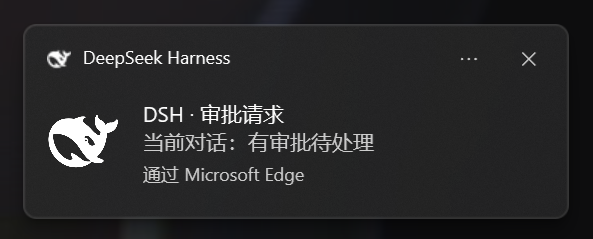
The moment the model genuinely needs your action -- an approval request, a plan review, or an ask-user-question -- or a background reply finishes while you are in another app, a three-channel alert pulls you back: a system Toast notification that brings DSH back to the foreground when clicked, a distinct WebAudio chime (different tones for action-needed versus done), and a small bell badge prefixed to the browser tab title. Every toggle, the volume, whether to also alert while the tab is in focus, and the notification language (follow UI / Simplified Chinese / English) live in DSH Settings under the Notifications section, complete with a one-click test button that fires an instant sample regardless of focus settings. The alerting core has zero third-party runtime dependencies. The optional settings panel is a thin React layer that registers only when the DSH web profile exposes the required slots and locale, and the plugin silently degrades to pure alerting when any of those capabilities are missing.
This is for anyone who runs ask mode, juggles multiple sessions, or frequently tabs away to other work. As long as the DSH page stays open -- minimized, in the background, whichever -- you no longer need to poll the screen. One system nudge, one chime, one tiny bell in the title bar is all it takes to bring you back exactly when a decision is on the table.
Screenshots
Use Cases
- Approval, plan review, or a question is pending — a toast, chime, and tab badge pull you back instantly
- You are in another app and a background DSH reply finishes, the notification lands without you having to glance over
- Juggling multiple ask-mode sessions, every decision point surfaces via system alert so you never miss a pause
Best For
- Users who stay in ask mode and want to keep the pre-flight approval gate as-is
- Users running several DSH sessions in parallel who do not want to poll each tab
- Users who frequently tab away to other work and need an active nudge to return to a pending decision
Related Plugins
A service-oriented sidebar framework for DSH, offering a full workbench with file explorer, embedded browser, real terminal, Git panel, and extensible plugin services.

A beautiful, practical Claude Code-style TUI plugin with pixel whale top bar, flowing glow title, real-time status line, streaming thought expansion, time rewind, context progress bar and TPS gauge — zero core changes.

The plugin market for DeepSeek Harness: browse/search/one-click install community plugins and themes, with updates, backup/restore, hot disable, diagnostics, and AI fix.

A persistent whale widget on the DSH web UI that shows DeepSeek balance, today's usage, and per-turn cost, with drag-and-snap and sound effects.