dsh-user-question-nav
Run the following command in DeepSeek Harness:
dsh plugin install xiaomujiang/dsh-user-question-nav
Paste the following prompt into your AI chat to install this plugin:
Run dsh plugin install xiaomujiang/dsh-user-question-nav in a terminal, or visit https://github.com/xiaomujiang/dsh-user-question-nav for a source-based install, then quit and restart DSH Desktop.
About this plugin
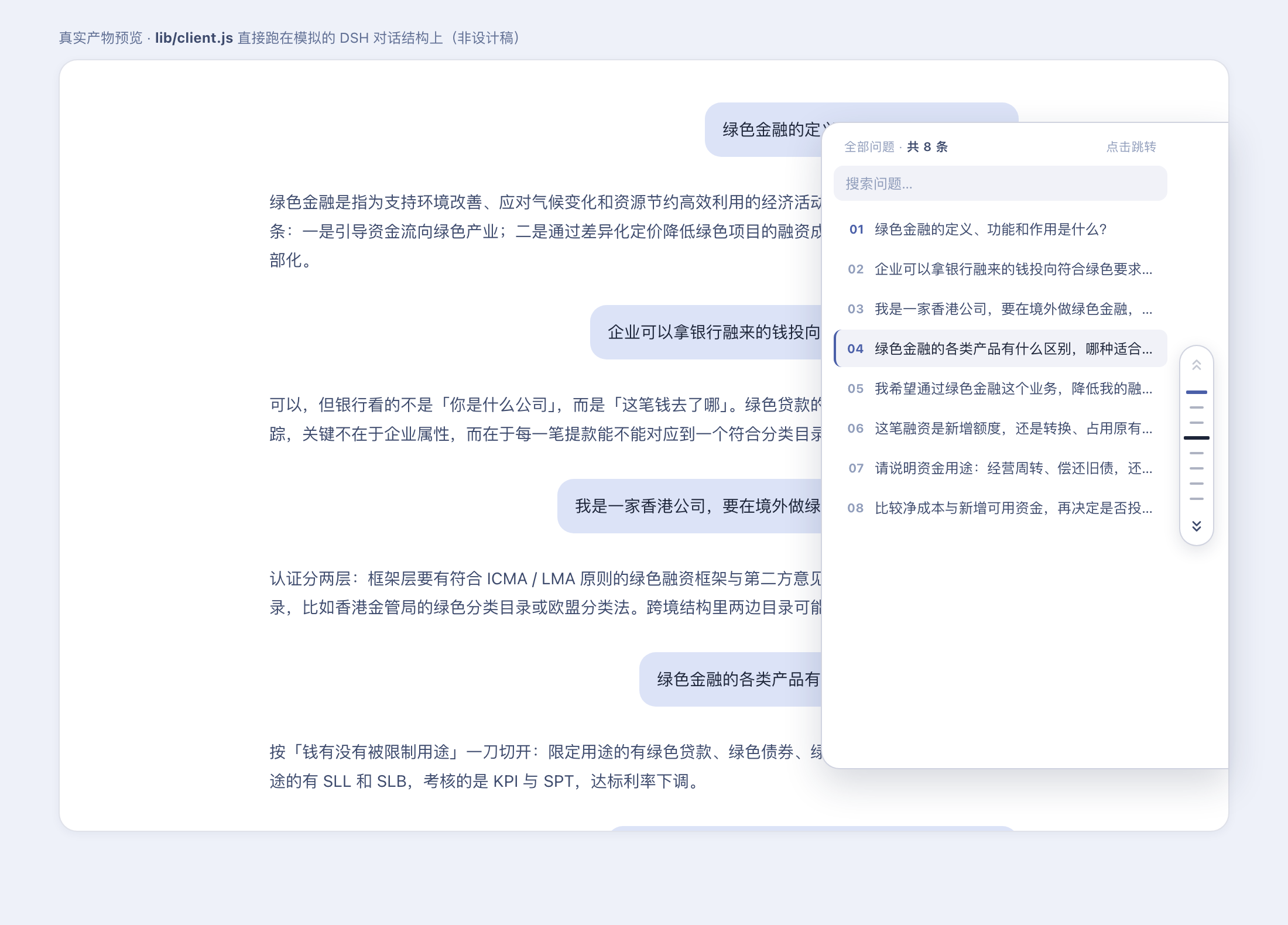
The deeper a DeepSeek Harness conversation grows, the harder it becomes to locate a question buried twelve scrolls back. dsh-user-question-nav draws a vertical capsule rail along the right edge of the chat area, one tick per user message. Hover and hold for a second and a side drawer slides out with a search box and the full question index; click any row and the view smooth-scrolls to that message, centered in the viewport. A blue progress bar fills beneath the ticks during the hover delay, giving clear visual feedback, while a quick flick past the rail never triggers the drawer by accident.
The drawer search box filters results in real time, swapping the count label between total and filtered results. The tick for the current message glows in brand blue and tracks live as you scroll; double arrows jump to the first or last question, dimming and showing a brief toast at the boundaries instead of silently disabling the control. When you switch conversations, a MutationObserver plus polling watchdog waits for the new scroll container and re-mounts automatically. A low-frequency timer watches for whole-area shifts caused by banners or collapsing panels and recalibrates the rail so ticks stay pixel-aligned with their messages. The double-arrow iconography deliberately distinguishes this plugin from DSH's built-in single-arrow back-to-bottom button.
It is built for heavy users whose sessions run long: debugging loops where you keep referencing that earlier error dump, multi-turn architecture debates where you need to jump back to the initial constraint, or anyone who simply wants conversation navigation without reaching for another tool. Once installed, the quiet tick rail on the right side of your chat becomes a living map of every question you have asked.
Screenshots
Use Cases
- Jump back to the original error-dump question mid-debugging
- Return to the first constraint in a multi-turn architecture debate
- Search by keyword and jump to a specific prompt in a long session
Best For
- Heavy users whose sessions span dozens of turns
- Developers who frequently reference earlier prompts
- Anyone who wants fast in-app navigation of long conversations without external tools
Related Plugins
A service-oriented sidebar framework for DSH, offering a full workbench with file explorer, embedded browser, real terminal, Git panel, and extensible plugin services.

A beautiful, practical Claude Code-style TUI plugin with pixel whale top bar, flowing glow title, real-time status line, streaming thought expansion, time rewind, context progress bar and TPS gauge — zero core changes.

The plugin market for DeepSeek Harness: browse/search/one-click install community plugins and themes, with updates, backup/restore, hot disable, diagnostics, and AI fix.

A persistent whale widget on the DSH web UI that shows DeepSeek balance, today's usage, and per-turn cost, with drag-and-snap and sound effects.