dsh-livechat
Run the following command in DeepSeek Harness:
dsh plugin install huashenglian/dsh-livechat
Paste the following prompt into your AI chat to install this plugin:
Run dsh plugin install huashenglian/dsh-livechat in a terminal to install the plugin (source: https://github.com/huashenglian/dsh-livechat); after installing, restart the dsh web service to see the danmaku overlay.
About this plugin
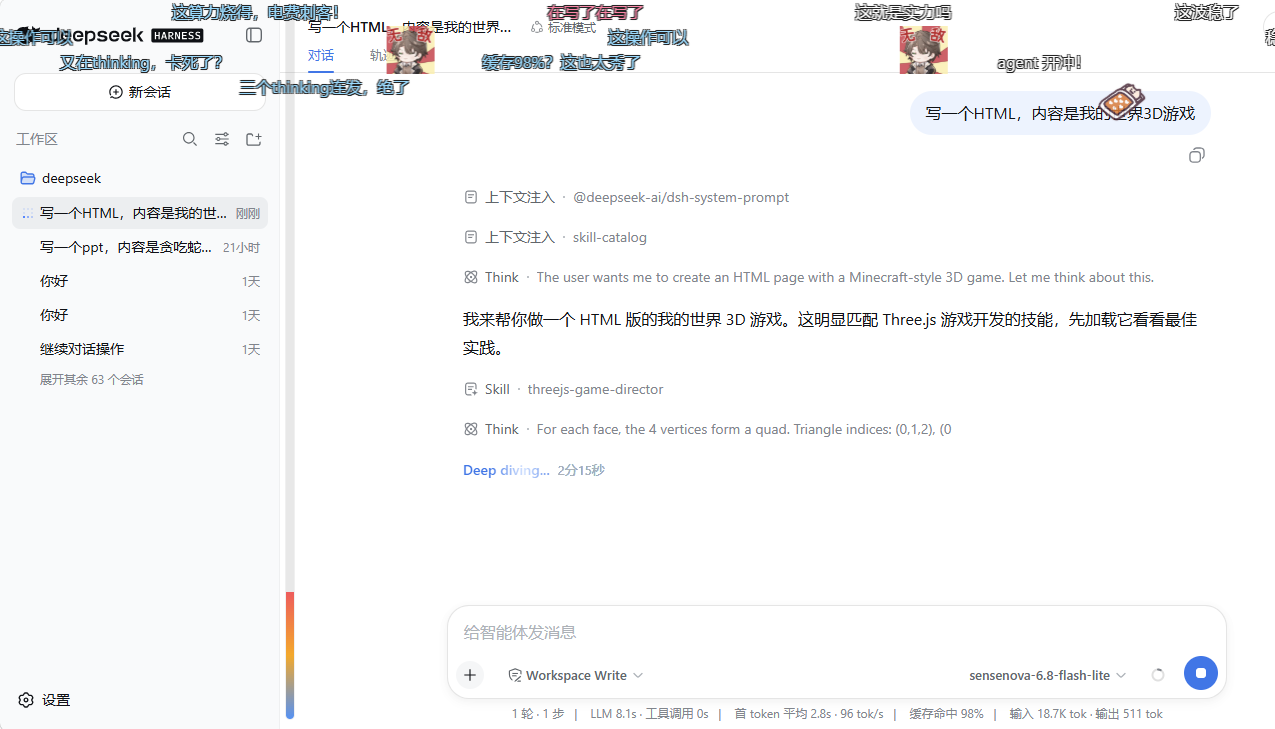
Running agents through DeepSeek Harness means staring at a mostly silent web chat pane while text trickles in. There is little visual feedback to tell you whether the agent is calling a tool or simply thinking. dsh-livechat overlays a Bilibili-style danmaku layer above the conversation area, so every message, tool call, and task completion becomes a stream of horizontally scrolling comments — turning the wait into something that feels more like spectating a livestream than watching a terminal.
The plugin ships three mood presets (general, coding, chitchat) and can optionally call an LLM to generate context-aware quips on a throttle; if generation fails it silently falls back to presets with no error dialog. Danmaku support three layouts (scroll, top-fixed, bottom-fixed) with multi-track collision avoidance and an auto-dim overlay while you are reading. A floating drag ball covers quick controls, hovering pauses a comment in place, and clicking one lets you copy, mute, or delete it. Per-session danmaku pools let you replay favourites, auto-clean on session deletion, and all settings persist across restarts via a dual-write of a local mirror file and the settings.yaml section.
If you regularly debug agents, run long tasks, or simply find the silent wait between replies a bit too quiet, this plugin is near-zero-friction: a self-activating bundle that appears after one install command and a web restart. It suits anyone who loves Bilibili danmaku culture and wants a little levity inside their DeepSeek Harness workflow.
Screenshots

Use Cases
- Watching a long agent run without visual feedback
- Adding a fun Bilibili-style layer during a dsh demo
- Tracing every tool-call trigger while debugging an agent
Best For
- Developers who run agents in dsh daily
- Fans of Bilibili danmaku culture
- dsh users who find the silent reply-wait a bit too quiet
Related Plugins

whale-girl is a desktop pet in the DSH Web GUI (bottom-right for instant companionship) — draggable, feedable, playable; completed tasks, sessions and companionship time accrue into seniority levels, titles, and memories.

Renders your local Wallpaper Engine wallpapers as the DSH web background, supporting video, web, and scene wallpapers with a liquid-glass effect and rich customization.

A WebGPU ocean skin for DeepSeek Harness with five-wave Gerstner waves, translucent theme, day/night cycle, and quick controls, installable as plugin or extension.

A Galgame-style conversation view and visual scene editor for DSH web sessions, with a real-time editing mode.