dsh-bg-new
Run the following command in DeepSeek Harness:
dsh plugin install sz1698/dsh-bg-new
Paste the following prompt into your AI chat to install this plugin:
Run dsh plugin install sz1698/dsh-bg-new in the DeepSeek Harness terminal to install the plugin; the source code is hosted at https://github.com/sz1698/dsh-bg-new. After installation, restart the app or the dsh web service and hard-refresh the browser to see the changes.
About this plugin
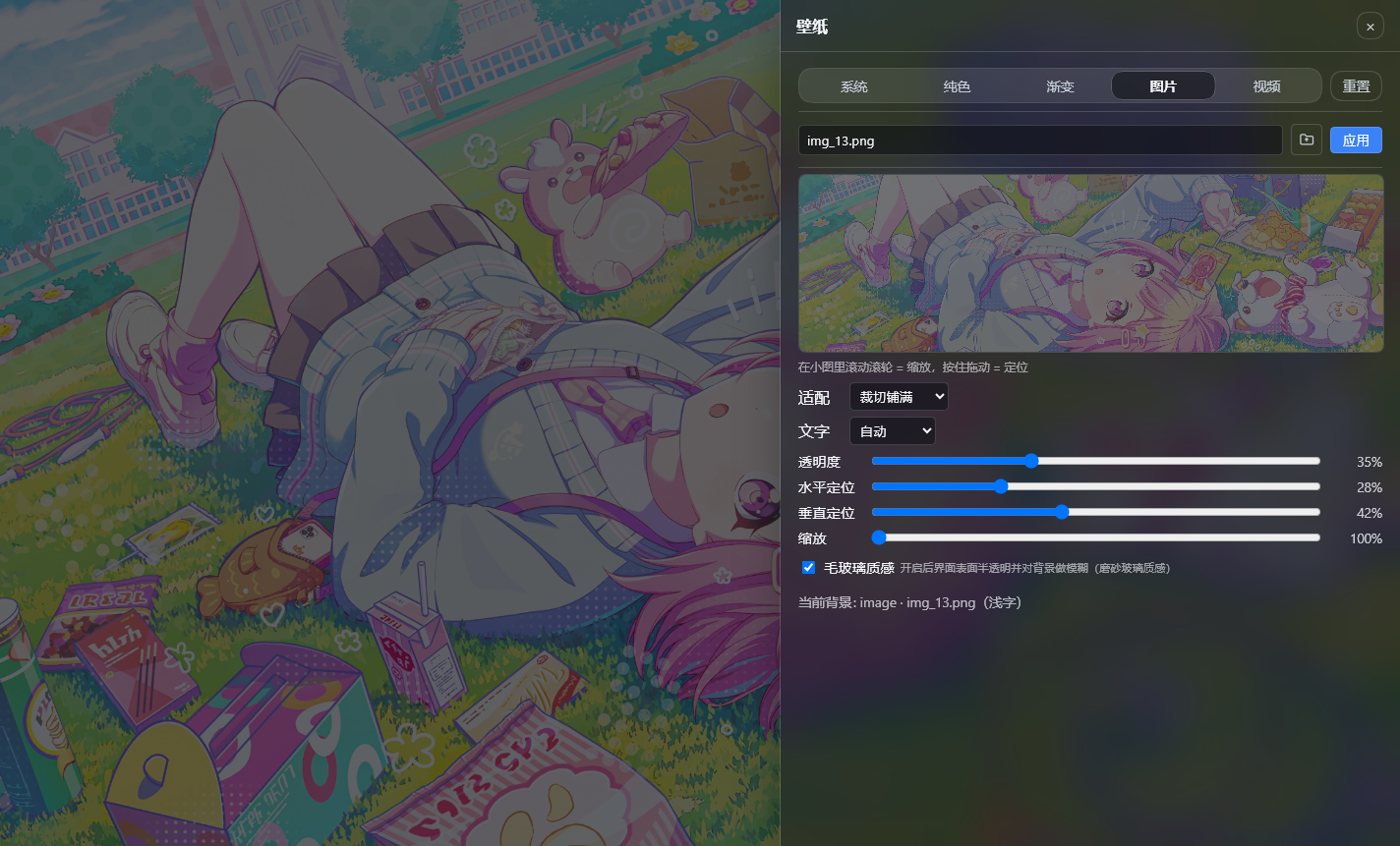
The default backdrop in the DSH web UI is fairly plain, and changing it means digging into Settings, hunting for the right option, and refreshing the page. dsh-bg-new collapses all of that into a single click: hit the Wallpaper button on the sidebar, a drawer slides in from the right, and you can switch among five modes—system presets, solid colors, gradients, images, and looping video—at last. Changes apply instantly on desktop and survive restarts with no page reload.
The preview thumbnail serves dual duty as both zoom and pan control: scroll to scale, drag to reposition, with a two-second grace period before the grip is released. Five fit modes (fill, cover, contain, and more) pair with independent horizontal and vertical focal offsets, plus free-scale and zoom-to-region options. A frosted-glass overlay can be toggled to turn panels, chat bubbles, and the input bar into translucent, blurred surfaces. Animated wallpapers play local MP4 clips in a loop with mute and volume controls, and there is no file-size cap. Text color adapts automatically to background luminance or can be locked to a light or dark scheme.
You do not even need to open the drawer. Just tell the model "switch the background to deep blue" or "use this image as the wallpaper" and the bg_apply tool handles the rest. Every uploaded image and video stays in the local data directory, served by the plugin's own HTTP route with Range support for seamless video seeking, and is never sent to any cloud service. Ideal for DSH users who want a personalized backdrop, enjoy a living wallpaper without spinning up a separate media server, and like having the AI conversation itself participate in the dress-up.
Screenshots
Use Cases
- Change the DSH web UI backdrop to a favorite image
- Set a local MP4 as a looping animated wallpaper
- Ask the AI in chat to switch the background to a specific color or gradient
Best For
- DSH daily users who enjoy a personalized web UI
- Developers who want a video wallpaper without spinning up a separate media server
- Tech enthusiasts who like having the AI conversation participate in UI customization
Related Plugins

whale-girl is a desktop pet in the DSH Web GUI (bottom-right for instant companionship) — draggable, feedable, playable; completed tasks, sessions and companionship time accrue into seniority levels, titles, and memories.

Renders your local Wallpaper Engine wallpapers as the DSH web background, supporting video, web, and scene wallpapers with a liquid-glass effect and rich customization.

A WebGPU ocean skin for DeepSeek Harness with five-wave Gerstner waves, translucent theme, day/night cycle, and quick controls, installable as plugin or extension.

A Galgame-style conversation view and visual scene editor for DSH web sessions, with a real-time editing mode.