dsh_session_folders
Run the following command in DeepSeek Harness:
dsh plugin install EugeneVl/dsh_session_folders
Paste the following prompt into your AI chat to install this plugin:
In DeepSeek Harness, you can install this plugin by running the command 'dsh plugin install EugeneVl/dsh_session_folders' or by manually downloading it from the GitHub repository at https://github.com/EugeneVl/dsh_session_folders.
About this plugin
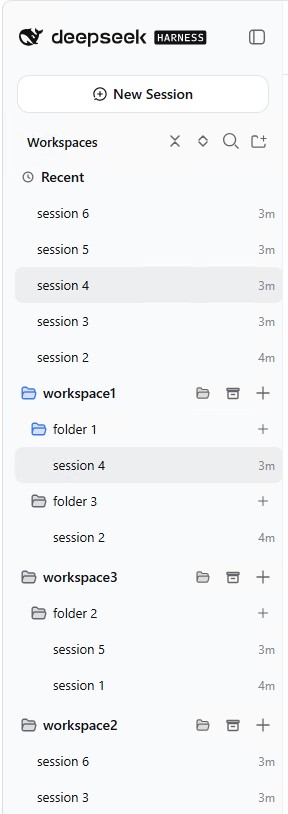
When using DeepSeek Harness for daily session interactions, users often struggle with cluttered session lists that hinder quick navigation, especially as the volume of conversations grows. The dsh_session_folders plugin solves this by introducing a folder system for each workspace, providing a structured way to categorize and access sessions, thereby transforming the overall organization experience.
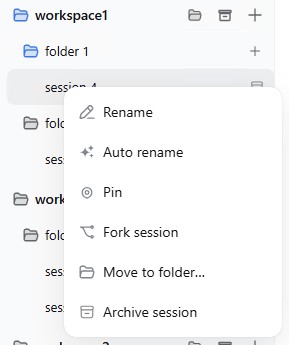
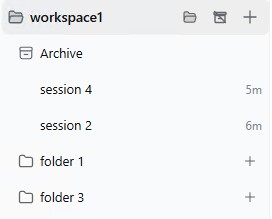
At its core, the plugin offers flexible folder management: users can move sessions via drag-and-drop or context menus, with support for creating, renaming, and deleting folders. It also includes archive and restore features to safely store inactive sessions and retrieve them on demand. All changes are persisted server-side, ensuring data durability across page reloads while maintaining seamless integration with the built-in session browser.
Designed for power users of DeepSeek Harness, such as developers, researchers, or knowledge workers, this plugin is a valuable productivity tool. It excels in scenarios like personal project tracking, team collaboration, or knowledge management, helping users maintain a tidy workspace and save time by optimizing their workflow. By enhancing organizational capabilities, dsh_session_folders makes session interactions more efficient and enjoyable.
Screenshots
Use Cases
- Managing session lists across multiple projects.
- Quickly archiving old conversations to keep workspaces tidy.
- Organizing dialogues in shared workspaces during team collaboration.
Best For
- Developers who frequently use DeepSeek Harness.
- Researchers needing knowledge management.
- Knowledge workers seeking productivity boosts.
Related Plugins
A service-oriented sidebar framework for DSH, offering a full workbench with file explorer, embedded browser, real terminal, Git panel, and extensible plugin services.

A beautiful, practical Claude Code-style TUI plugin with pixel whale top bar, flowing glow title, real-time status line, streaming thought expansion, time rewind, context progress bar and TPS gauge — zero core changes.

The plugin market for DeepSeek Harness: browse/search/one-click install community plugins and themes, with updates, backup/restore, hot disable, diagnostics, and AI fix.

A persistent whale widget on the DSH web UI that shows DeepSeek balance, today's usage, and per-turn cost, with drag-and-snap and sound effects.