dsh-stardew-theme
Run the following command in DeepSeek Harness:
dsh plugin install JefferyShaw/dsh-stardew-theme
Paste the following prompt into your AI chat to install this plugin:
Run dsh plugin install JefferyShaw/dsh-stardew-theme in the DeepSeek Harness terminal to install this theme plugin; the source repository is available at https://github.com/JefferyShaw/dsh-stardew-theme.
About this plugin
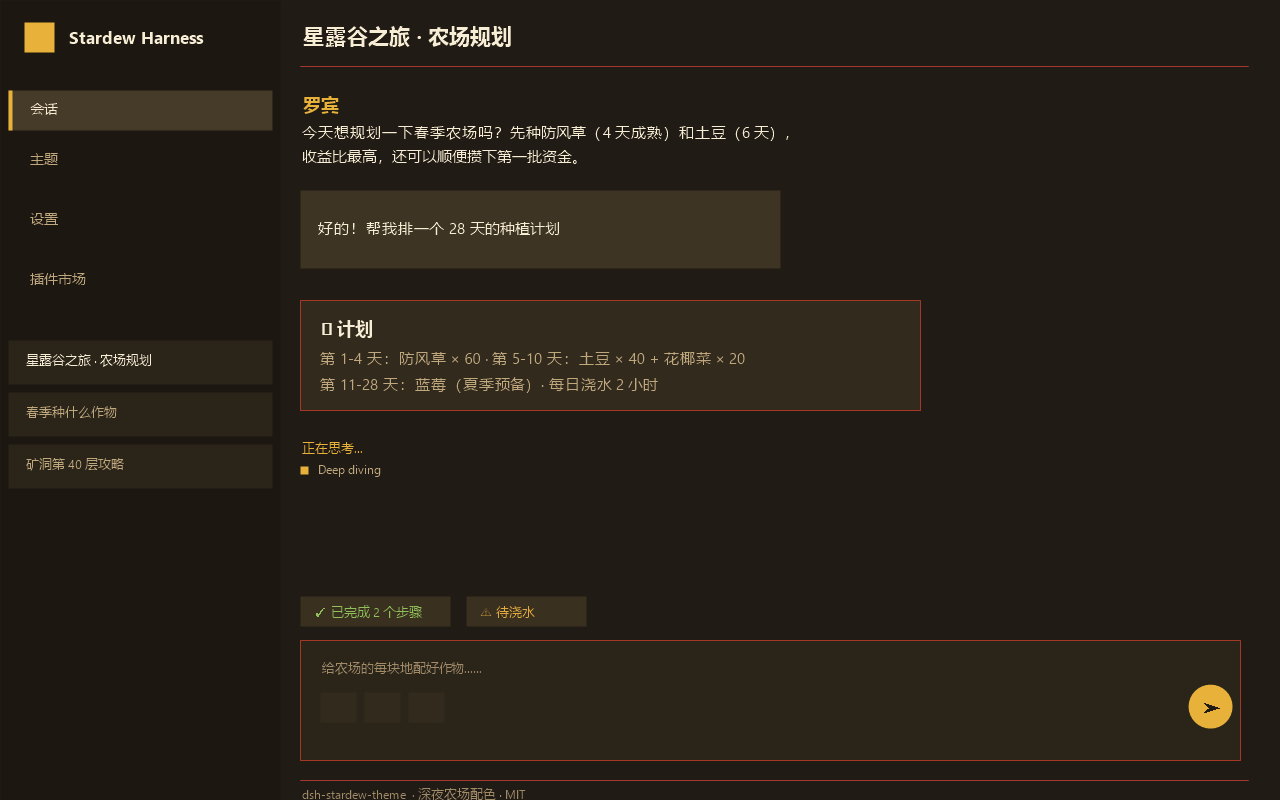
Out of the box, the DeepSeek Harness Web UI ships with a neutral dark palette that is functional but feels impersonal. dsh-stardew-theme re-skins the entire interface with a Stardew Valley-inspired warm dark scheme: layered soil-brown backgrounds, a harvest-gold primary, cream-toned body text, grass-green success states and clay-red errors. The result is a cozy, late-night-farmhouse atmosphere that makes each time you switch to the tab feel like pushing open a door with warm light spilling through.
Under the hood the plugin is a pure client-side theme bundle. On load it registers a full set of --dsw-alias- and --dsw-specific- token overrides via ctx.theme.register, then activates them with a single ctx.theme.setTheme call. Switching, deactivating and uninstalling are all one-click actions in the plugin market, and because the theme service folds the tokens into the active snapshot, the visual change is instant and fully reversible upon uninstall. The bundle also self-re-activates on every page load, so your choice persists across restarts without any manual re-selection.
If you prefer a warm, game-adjacent dark palette over a cold terminal look, or your team wants a recognizable visual identity to differentiate workstations, this theme slots in cleanly with zero server-side changes and can be removed just as easily whenever you are done.
Screenshots
Use Cases
- You want a warm dark palette instead of a cold terminal look
- Your team needs a recognizable visual identity across workstations
- You grew up with Stardew Valley tones and want to carry that vibe into daily tools
Best For
- Users who prefer warm dark palettes over cold terminal aesthetics
- Developers drawn to indie-game aesthetics and interface atmosphere
- Teams that need one-click theme switch and uninstall without server-side changes
Related Plugins
A service-oriented sidebar framework for DSH, offering a full workbench with file explorer, embedded browser, real terminal, Git panel, and extensible plugin services.

A beautiful, practical Claude Code-style TUI plugin with pixel whale top bar, flowing glow title, real-time status line, streaming thought expansion, time rewind, context progress bar and TPS gauge — zero core changes.

The plugin market for DeepSeek Harness: browse/search/one-click install community plugins and themes, with updates, backup/restore, hot disable, diagnostics, and AI fix.

A persistent whale widget on the DSH web UI that shows DeepSeek balance, today's usage, and per-turn cost, with drag-and-snap and sound effects.