dsh-client-ui-thinking-stats
Run the following command in DeepSeek Harness:
dsh plugin install Six6stRINgs/dsh-client-ui-thinking-stats
Paste the following prompt into your AI chat to install this plugin:
Install the plugin in DeepSeek Harness by running dsh plugin install Six6stRINgs/dsh-client-ui-thinking-stats; the source repository is https://github.com/Six6stRINgs/dsh-client-ui-thinking-stats . After installation, restart dsh web and reload the page to see the readouts appear.
About this plugin
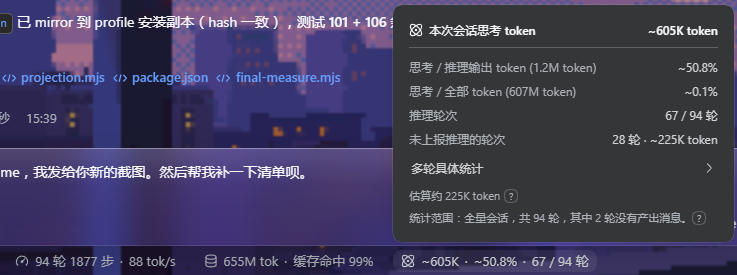
When working with reasoning-capable models, the volume of thinking tokens and their share of the overall budget often remain opaque numbers buried in a usage log. dsh-client-ui-thinking-stats brings that figure directly into the interface: a cumulative readout in the bottom Composer Dock for the entire session, and a per-turn readout appended to each assistant reply's timing strip, so you can see at a glance how much of every response was spent on internal reasoning.
Each readout displays, left to right, a brain glyph, the thinking-token count, its percentage of all tokens, and its percentage of output tokens, all to one decimal place. Counting prefers the provider-reported reasoningTokens field when available (DeepSeek, OpenAI o-series, Anthropic, and others); if the API returns reasoning text without an explicit count, it falls back to the harness' fixed four-characters-per-token heuristic, so every finalized message contributes a consistent figure regardless of provider.
The plugin is entirely client-side and read-only: it consumes the existing conversation snapshot, adds no service, projection, tool, or RPC call, and depends on no other plugin. When no thinking has occurred, both readouts render nothing, incurring zero DOM or layout cost. Colors follow the --dsw-alias-* theme tokens for automatic light and dark mode support. It is well suited for DSH users who want a lightweight, zero-overhead view of thinking-token share without committing any server-side resources.
Screenshots
Use Cases
- When working with DeepSeek, OpenAI o-series, or Anthropic, see per-turn and session-wide thinking token counts and shares at a glance
- When evaluating token budget allocation, quickly understand what share of output tokens is spent on internal reasoning
- When you want a zero-server-cost, dependency-free readout in the DSH interface without adding any service or RPC
Best For
- DSH users working with reasoning-capable models
- Teams that track token costs and reasoning efficiency
- Developers who prefer zero-overhead, front-end-only plugins
Related Plugins
A service-oriented sidebar framework for DSH, offering a full workbench with file explorer, embedded browser, real terminal, Git panel, and extensible plugin services.

A beautiful, practical Claude Code-style TUI plugin with pixel whale top bar, flowing glow title, real-time status line, streaming thought expansion, time rewind, context progress bar and TPS gauge — zero core changes.

The plugin market for DeepSeek Harness: browse/search/one-click install community plugins and themes, with updates, backup/restore, hot disable, diagnostics, and AI fix.

A persistent whale widget on the DSH web UI that shows DeepSeek balance, today's usage, and per-turn cost, with drag-and-snap and sound effects.