dsh-mcp-manage
Run the following command in DeepSeek Harness:
dsh plugin install null119/dsh-mcp-manage
Paste the following prompt into your AI chat to install this plugin:
Run dsh plugin install null119/dsh-mcp-manage in your DeepSeek Harness terminal to install this plugin, then restart dsh web to access the MCP Management page under Settings; the repository is available at https://github.com/null119/dsh-mcp-manage.
About this plugin
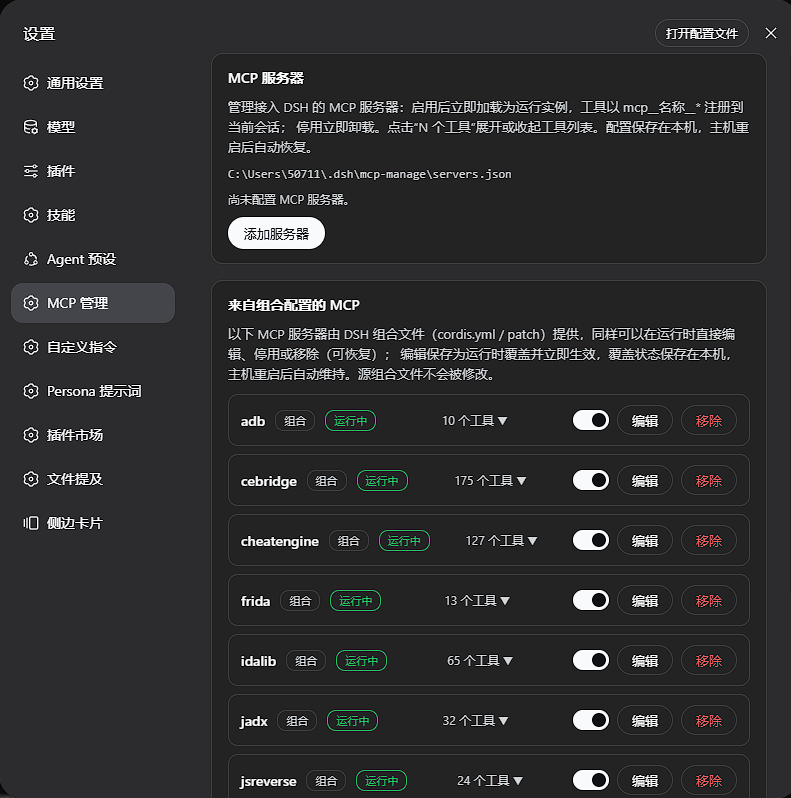
Managing MCP servers under DSH (DeepSeek Harness) used to mean a tedious loop: edit a config file, restart the host, then verify. A single URL change or a misbehaving server forced you out of the browser, into a YAML file, and back into a wait for everything to come back. dsh-mcp-manage eliminates that friction entirely — open Settings, click MCP Management, and every enabled server appears with a clickable tool count that expands to reveal its full mcp__* tool list.
The plugin covers the complete lifecycle: add servers via stdio (command, args, env, cwd) or streamable-http (URL, headers); edit any field and the instance restarts under the new config automatically; delete to dispose the live instance and remove the persisted record; toggle enable or disable in one click, with immediate unload or load. Rows provided by the composition (cordis.yml or patches) are first-class citizens too — their configs can be edited at runtime, toggled, removed, or restored. Edits persist as local overrides that survive host restarts and hot reloads, while the source composition files are never modified. A failed startup surfaces a clear error message instead of silently retrying in the background.
This plugin is for developers and platform operators who run multiple MCP servers under DSH and need to debug, hot-swap, or disable servers without restarting the entire host or juggling between terminal and browser tabs.
Screenshots
Use Cases
- Add, edit, toggle, or remove MCP servers from the DSH settings page
- Edit composition-provided MCP rows at runtime without touching source files
- Debug a failing MCP server and surface its startup error
Best For
- Developers running multiple MCP servers under DSH
- Operators who need to hot-swap servers without a host restart
- DSH users on a dsh-web-app composition
Related Plugins
A service-oriented sidebar framework for DSH, offering a full workbench with file explorer, embedded browser, real terminal, Git panel, and extensible plugin services.

A beautiful, practical Claude Code-style TUI plugin with pixel whale top bar, flowing glow title, real-time status line, streaming thought expansion, time rewind, context progress bar and TPS gauge — zero core changes.

The plugin market for DeepSeek Harness: browse/search/one-click install community plugins and themes, with updates, backup/restore, hot disable, diagnostics, and AI fix.

A persistent whale widget on the DSH web UI that shows DeepSeek balance, today's usage, and per-turn cost, with drag-and-snap and sound effects.