dsh-tray-launcher
Run the following command in DeepSeek Harness:
dsh plugin install fancr-code/dsh-tray-launcher
Paste the following prompt into your AI chat to install this plugin:
In DeepSeek Harness, use the command 'dsh plugin install fancr-code/dsh-tray-launcher' to install this plugin, with the source code available at https://github.com/fancr-code/dsh-tray-launcher.
About this plugin
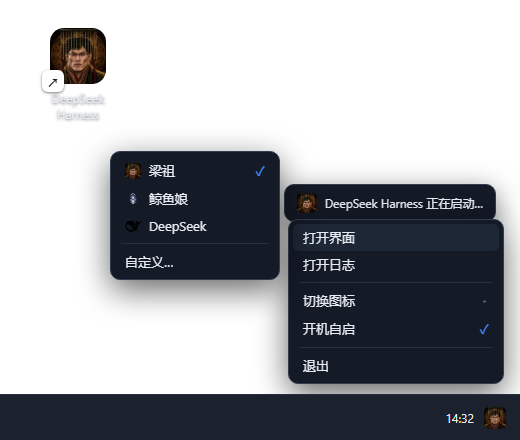
DeepSeek Harness typically runs dsh web in a terminal window, requiring users to keep the console open, which is inconvenient if accidentally closed, disrupting the service. dsh-tray-launcher solves this by transforming Harness into a standard Windows system tray application. With a simple double-click on the desktop shortcut, it starts windowless, with a tray icon for constant management, one-click access to the interface or logs, auto-opens the browser when ready, and allows complete exit with a single command.
Key capabilities include lightweight design (pure PowerShell script, no runtime), system tray residency with bubble notifications, and a tray menu for opening the interface, logs, switching icons, and enabling auto-start. It also features single-instance protection to prevent duplicates, along with a built-in usage meter and self-update mechanisms for convenience and reliability.
This tool is ideal for all Windows users, especially developers and regular users of DeepSeek Harness. It eliminates the dependency on terminal windows, offering a more convenient and unobtrusive experience for launching and managing Harness effortlessly and efficiently.
Screenshots
Use Cases
- Starting DeepSeek Harness service windowlessly on Windows
- Quickly accessing interface, logs, and settings via tray icon
- Configuring auto-start for automated Harness management
Best For
- Windows users seeking a convenient launcher and manager for dsh web
- Developers frequently using DeepSeek Harness who need an unobtrusive experience
- System administrators looking for lightweight and windowless solutions
Related Plugins
A service-oriented sidebar framework for DSH, offering a full workbench with file explorer, embedded browser, real terminal, Git panel, and extensible plugin services.

A beautiful, practical Claude Code-style TUI plugin with pixel whale top bar, flowing glow title, real-time status line, streaming thought expansion, time rewind, context progress bar and TPS gauge — zero core changes.

The plugin market for DeepSeek Harness: browse/search/one-click install community plugins and themes, with updates, backup/restore, hot disable, diagnostics, and AI fix.

A persistent whale widget on the DSH web UI that shows DeepSeek balance, today's usage, and per-turn cost, with drag-and-snap and sound effects.