dsh-git
Run the following command in DeepSeek Harness:
dsh plugin install EasyTZ/dsh-git
Paste the following prompt into your AI chat to install this plugin:
Run dsh plugin install EasyTZ/dsh-git in the DeepSeek Harness terminal to install; the source code is at https://github.com/EasyTZ/dsh-git
About this plugin
If you have ever finished editing a batch of files and immediately alt-tabbed to a terminal for git status, git add, git commit, you know the friction.
dsh-git removes that round-trip: it folds everyday Git operations into a single panel in the DeepSeek Harness sidebar, so you can review changes, stage files, write a commit message, push, switch branches, and inspect history all without leaving your current session.
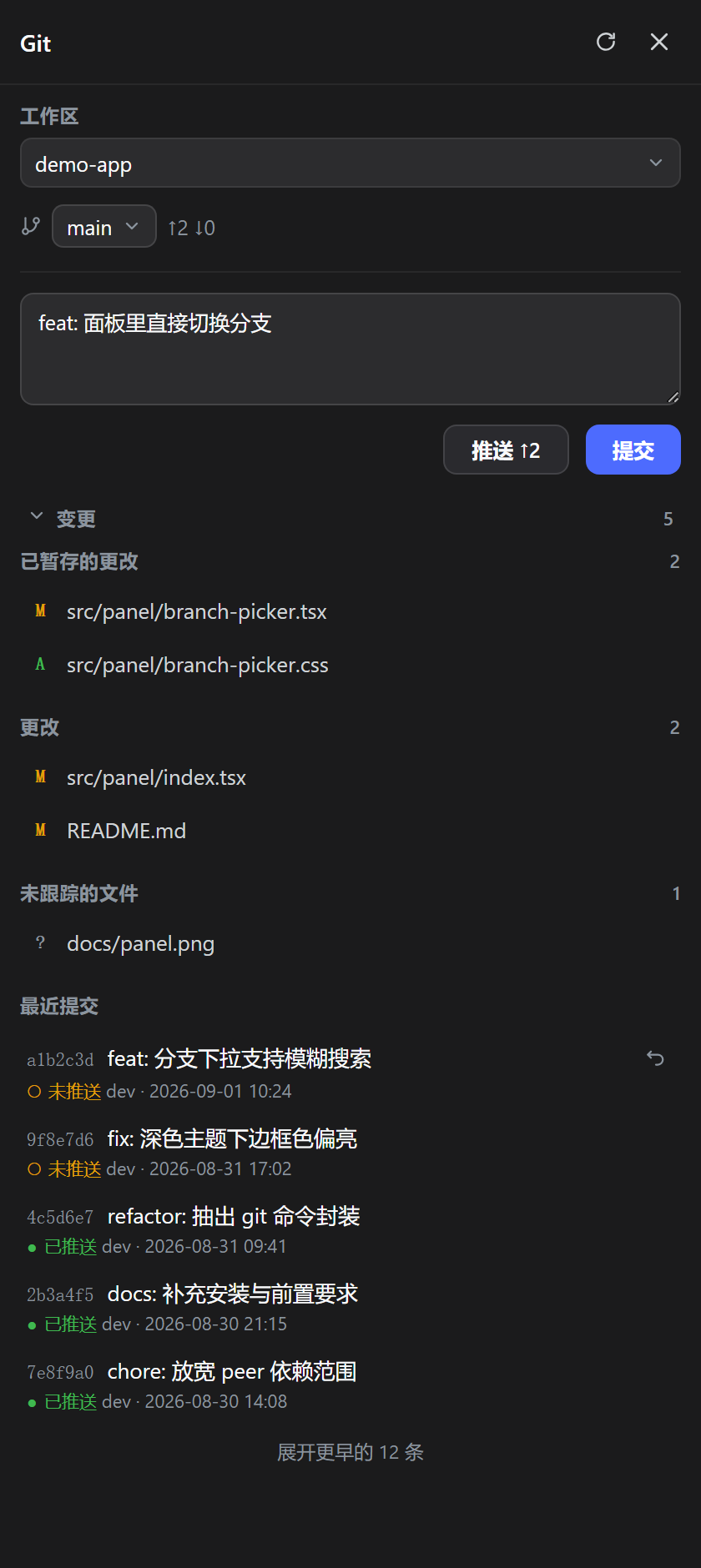
The panel puts the commit flow in the most natural spot. Each entry under Changes gets a + button to stage and a − to unstage; untracked files are never picked up automatically, you have to click + on each one, a deliberate guard against accidental commits. Below the list sits the message box and the Commit button. The Push button labels how many commits you are ahead of the remote and greys out when there is nothing to push. The branch row is a dropdown with ahead and behind counts alongside it. Recent commits are listed newest-first, each tagged unpushed or pushed; clicking any row opens the full message, the changed files, and per-file insertions and deletions. The most recent commit carries an Undo button: one click arms it, a second click within three seconds executes, running reset --mixed when unpushed so changes return to the working tree, or a revert commit when already pushed.
If you code inside DeepSeek Harness and find yourself reflexively opening a terminal after every save, dsh-git turns that habit into a few clicks. It also handles the case where a workspace root is not itself a repository but its immediate subdirectories each are, scanning one level deep and letting you pick which repo to operate on; your choice is remembered for next time. The code has no platform-specific branches; it is verified on Windows and macOS and uses the same Git command interface on Linux.
Screenshots
Use Cases
- Stage files one by one, write a message, commit and push right after editing without leaving the editor
- Switch branches with an at-a-glance ahead/behind count to decide whether to pull first
- Accidentally reverted an unpushed commit and restored it to the working tree with two clicks in the panel
Best For
- Senior developers who commit frequently and live inside DeepSeek Harness all day
- Efficiency-minded engineers who want Git reduced from CLI commands to a few panel clicks
- Teams juggling multiple repositories in one workspace and needing fast context switching
Related Plugins
A service-oriented sidebar framework for DSH, offering a full workbench with file explorer, embedded browser, real terminal, Git panel, and extensible plugin services.

A beautiful, practical Claude Code-style TUI plugin with pixel whale top bar, flowing glow title, real-time status line, streaming thought expansion, time rewind, context progress bar and TPS gauge — zero core changes.

The plugin market for DeepSeek Harness: browse/search/one-click install community plugins and themes, with updates, backup/restore, hot disable, diagnostics, and AI fix.

A persistent whale widget on the DSH web UI that shows DeepSeek balance, today's usage, and per-turn cost, with drag-and-snap and sound effects.