dsh-monitor
Run the following command in DeepSeek Harness:
dsh plugin install iambbp/dsh-monitor
Paste the following prompt into your AI chat to install this plugin:
Install this plugin in DeepSeek Harness using the command `dsh plugin install iambbp/dsh-monitor`. Source: https://github.com/iambbp/dsh-monitor
About this plugin
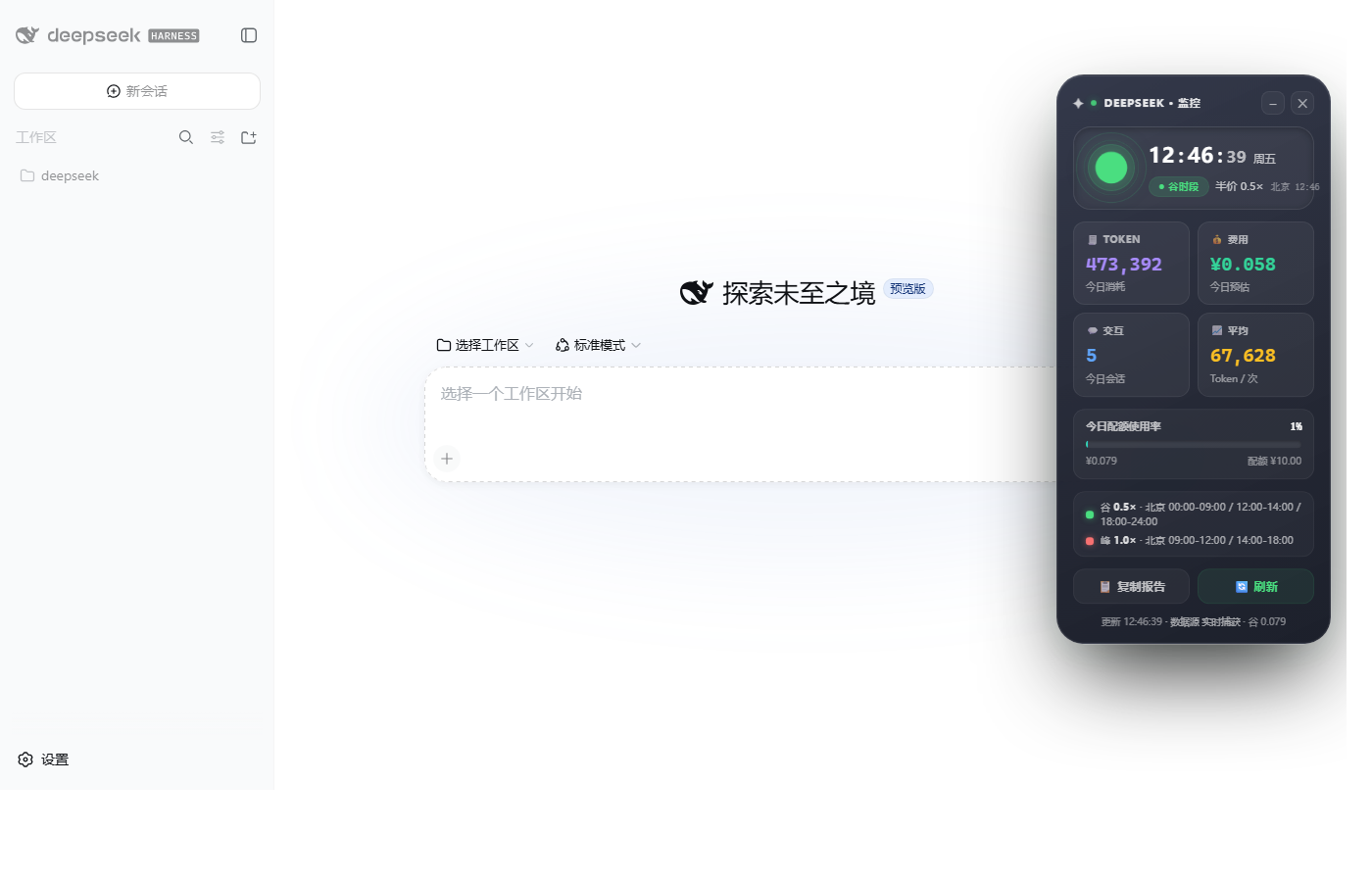
In the DSH environment leveraging DeepSeek models, users often find it challenging to track token consumption and costs in real-time, especially with DeepSeek's peak-valley pricing that adds complexity to cost calculations. The dsh-monitor plugin addresses this by monitoring server-side session events, offering transparent and accurate insights to help users understand each interaction's true consumption and avoid budget overruns.
Its core capabilities include real-time daily token accumulation (input, cache hits, and output) with automatic cost calculation based on official peak-valley rules (weekends at half price). A sleek floating window in the top-right corner displays expenses, interaction counts, quota progress, and more, supporting drag, collapse, and one-click report copying for easy use.
dsh-monitor is ideal for developers, AI researchers, and anyone using DSH who needs precise DeepSeek API cost tracking. It simplifies expense monitoring, enabling users to focus on optimizing usage strategies and boosting efficiency, particularly in scenarios requiring meticulous budget management.
Screenshots
Use Cases
- Tracking API call expenses during daily development.
- Optimizing budget for DeepSeek model usage.
- Conducting detailed cost analysis in the DSH environment.
Best For
- Developers using DSH.
- AI researchers concerned about API costs.
- Technical managers needing to monitor model usage.
Related Plugins
A service-oriented sidebar framework for DSH, offering a full workbench with file explorer, embedded browser, real terminal, Git panel, and extensible plugin services.

A beautiful, practical Claude Code-style TUI plugin with pixel whale top bar, flowing glow title, real-time status line, streaming thought expansion, time rewind, context progress bar and TPS gauge — zero core changes.

The plugin market for DeepSeek Harness: browse/search/one-click install community plugins and themes, with updates, backup/restore, hot disable, diagnostics, and AI fix.

A persistent whale widget on the DSH web UI that shows DeepSeek balance, today's usage, and per-turn cost, with drag-and-snap and sound effects.