dsh-keep-awake
Run the following command in DeepSeek Harness:
dsh plugin install bearice/dsh-keep-awake
Paste the following prompt into your AI chat to install this plugin:
Run dsh plugin install bearice/dsh-keep-awake in DeepSeek Harness to install this plugin; source: https://github.com/bearice/dsh-keep-awake.
About this plugin
Firing up a primary agent, spawning a few subagents, and queuing background commands in DeepSeek Harness can keep a session busy for tens of minutes or even hours. The operating system, however, is indifferent to all that work. When its timer hits, it puts the machine to sleep, interrupting tasks, losing context, and discarding results. dsh-keep-awake bridges that gap: as long as any agent is running or any background task is still active, the system stays awake.
The plugin polls agent and job state every five seconds and also listens for agent/status, subagent start/end, and job-set-change events for instant re-scans. Upon detecting activity it spawns a platform-specific helper process—SetThreadExecutionState on Windows, caffeinate on macOS, systemd-inhibit on Linux—to hold the sleep flag. Once every task finishes, a configurable grace period (60 s by default, adjustable from 15 s to 5 min) kicks in; after it elapses the helper exits and the sleep policy is released automatically, so you are not needlessly locking down power management.
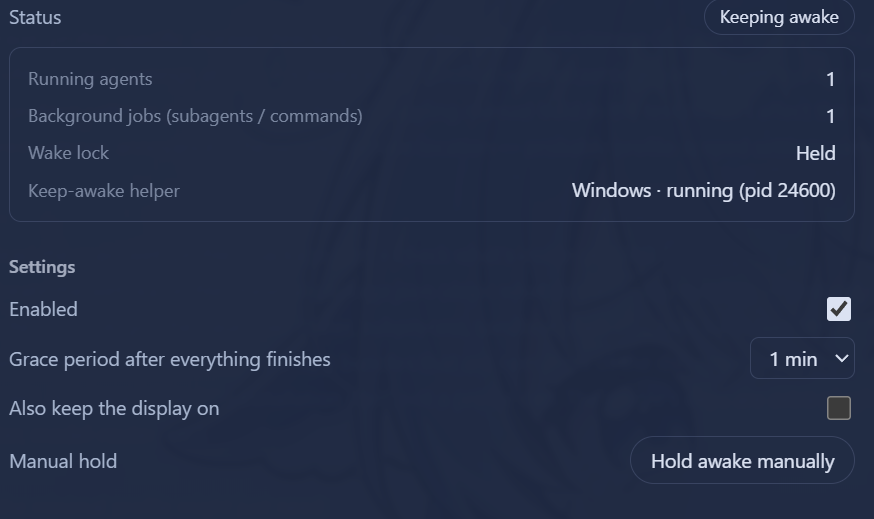
Beyond the automated guard, the settings page offers a manual hold toggle, an optional display-sleep block, and a live status panel showing running agent count, active background tasks, helper process PID, and more. Configuration persists in the profile settings.yaml, and the UI follows the global DSH language setting with instant switching. For developers who routinely run long-duration agentic workflows on a local machine, the plugin is install-and-forget—no more remembering to run caffeinate or tweak power plans by hand.
Screenshots
Use Cases
- Auto-prevents system sleep while long-running agent workflows or background tasks are active
- Keeps the machine awake during concurrent multi-subagent executions
- Manually locks system sleep or display off during development and debugging
Best For
- Developers running long-duration agentic workflows on a local machine
- Engineers orchestrating multi-agent pipelines with DeepSeek Harness
- Local users who need consistent power-policy control across Windows, macOS, and Linux
Related Plugins
A service-oriented sidebar framework for DSH, offering a full workbench with file explorer, embedded browser, real terminal, Git panel, and extensible plugin services.

A beautiful, practical Claude Code-style TUI plugin with pixel whale top bar, flowing glow title, real-time status line, streaming thought expansion, time rewind, context progress bar and TPS gauge — zero core changes.

The plugin market for DeepSeek Harness: browse/search/one-click install community plugins and themes, with updates, backup/restore, hot disable, diagnostics, and AI fix.

A persistent whale widget on the DSH web UI that shows DeepSeek balance, today's usage, and per-turn cost, with drag-and-snap and sound effects.