dsh-ui-balance
Run the following command in DeepSeek Harness:
dsh plugin install EasyTZ/dsh-ui-balance
Paste the following prompt into your AI chat to install this plugin:
Search balance in the Discover page of DeepSeek Harness, or run dsh plugin install EasyTZ/dsh-ui-balance to install (source: https://github.com/EasyTZ/dsh-ui-balance).
About this plugin
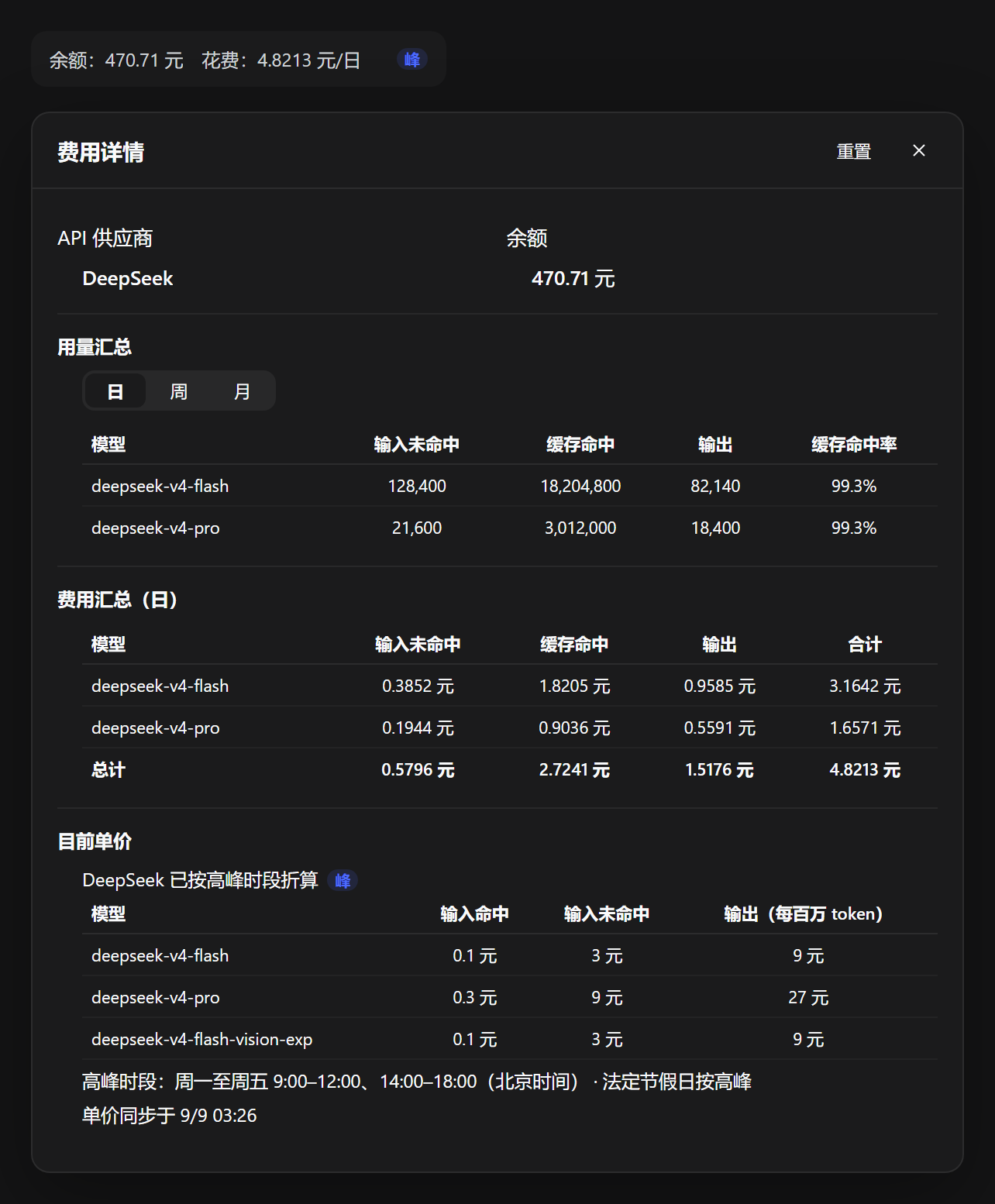
Developers who hit LLM APIs daily know the interruption: mid-conversation you need to check your balance or how much this round cost, but the billing page is three tabs away. dsh-ui-balance pulls that information right next to your chat — a single sidebar row shows live account balance, session spend, and whether you are in a peak or off-peak pricing window, so the flow never breaks.
Click the row and a full cost panel unfolds: provider identity and balance (direct lookup for DeepSeek and Moonshot/Kimi), per-model token breakdown with cache-hit ratios, a usage and cost summary toggleable across day / week / month (including a live estimate for in-flight messages), and a normalised per-million-token price sheet for every configured model, with peak/off-peak adjustments applied. DeepSeek official prices auto-sync from the pricing page every half-day. Providers such as OpenAI, Claude, and Gemini are supported for cost tracking and pricing (balance endpoint not yet available).
It is built for anyone juggles multiple models or vendors and wants to track real spend continuously rather than reconciling bills after the fact. Pure web UI with HTTP routes, verified on Windows desktop and TUI profiles alike.
Screenshots
Use Cases
- Track token spend in real time during long sessions
- Break down usage by model when running multiple in parallel
- Switch between day/week/month to reconcile bills
Best For
- Developers who call LLM APIs frequently
- Teams managing multi-vendor API quotas
- Indie devs needing balance checks mid-session
Related Plugins
A service-oriented sidebar framework for DSH, offering a full workbench with file explorer, embedded browser, real terminal, Git panel, and extensible plugin services.

A beautiful, practical Claude Code-style TUI plugin with pixel whale top bar, flowing glow title, real-time status line, streaming thought expansion, time rewind, context progress bar and TPS gauge — zero core changes.

The plugin market for DeepSeek Harness: browse/search/one-click install community plugins and themes, with updates, backup/restore, hot disable, diagnostics, and AI fix.

A persistent whale widget on the DSH web UI that shows DeepSeek balance, today's usage, and per-turn cost, with drag-and-snap and sound effects.