dsh-sidebar-vscode
Run the following command in DeepSeek Harness:
dsh plugin install chendefine/dsh-sidebar-vscode
Paste the following prompt into your AI chat to install this plugin:
Run dsh plugin install chendefine/dsh-sidebar-vscode in the DeepSeek Harness terminal to install this plugin; source: https://github.com/chendefine/dsh-sidebar-vscode
About this plugin
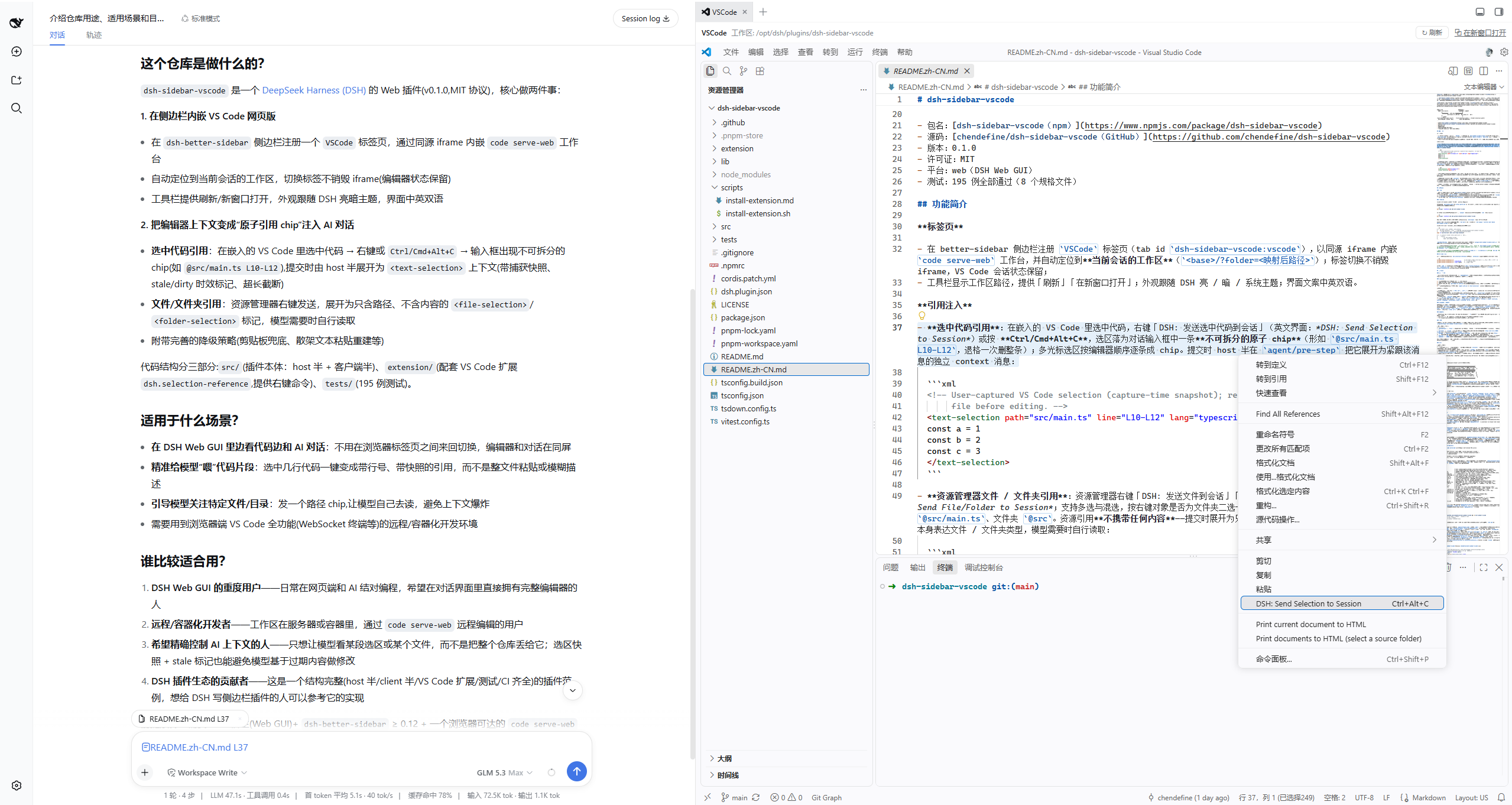
Referencing code in a DSH conversation used to mean copy-pasting into the composer, where multi-file and multi-line selections quickly lose context; file links in chat had no editor behind them, and on headless containers the OS file opener was simply absent. dsh-sidebar-vscode embeds a VS Code web workbench inside the DSH sidebar so that code browsing and AI conversation share one window.
The core workflow is atomic reference chips. Select code in the embedded editor, hit a shortcut, and a single chip (for example @src/main.ts L10-L12) appears in the composer; one backspace removes it whole. Right-click a file or folder in the explorer and you get the same treatment. On submit the host expands each chip into a standalone context message right after the citing one. Chips carry no content, so the model reads bytes only when it actually needs them. A reference-management rail above the composer groups chips by reference, shows occurrence counts, and removes all chips of one reference with a single click. Produced-file chips in chat, tool-row path links, and prose file mentions are all rerouted into the embedded VS Code without a workbench reload; binary types such as pdf and docx fall back to the DSH built-in file viewer. The settings-page open-configuration-file button is rerouted through the same channel, fixing the dead end caused by a missing OS opener in container environments.
This plugin is for developers who reference code lines and files frequently in DSH, work in headless or containerized setups, and want code browsing and AI conversation to close the loop in one window.
Screenshots
Use Cases
- Select code in the embedded editor and turn it into an atomic reference chip in the DSH composer
- Click a file link in chat on a headless container and open it directly in the embedded VS Code
- Right-click a file in the explorer and submit it as a content-less reference the model reads on demand
Best For
- Developers who reference code lines and files frequently in DSH conversations
- Engineers working in headless containers or behind a remote gateway
- Users who want code browsing and AI dialogue in one unified window
Related Plugins
A service-oriented sidebar framework for DSH, offering a full workbench with file explorer, embedded browser, real terminal, Git panel, and extensible plugin services.

A beautiful, practical Claude Code-style TUI plugin with pixel whale top bar, flowing glow title, real-time status line, streaming thought expansion, time rewind, context progress bar and TPS gauge — zero core changes.

The plugin market for DeepSeek Harness: browse/search/one-click install community plugins and themes, with updates, backup/restore, hot disable, diagnostics, and AI fix.

A persistent whale widget on the DSH web UI that shows DeepSeek balance, today's usage, and per-turn cost, with drag-and-snap and sound effects.