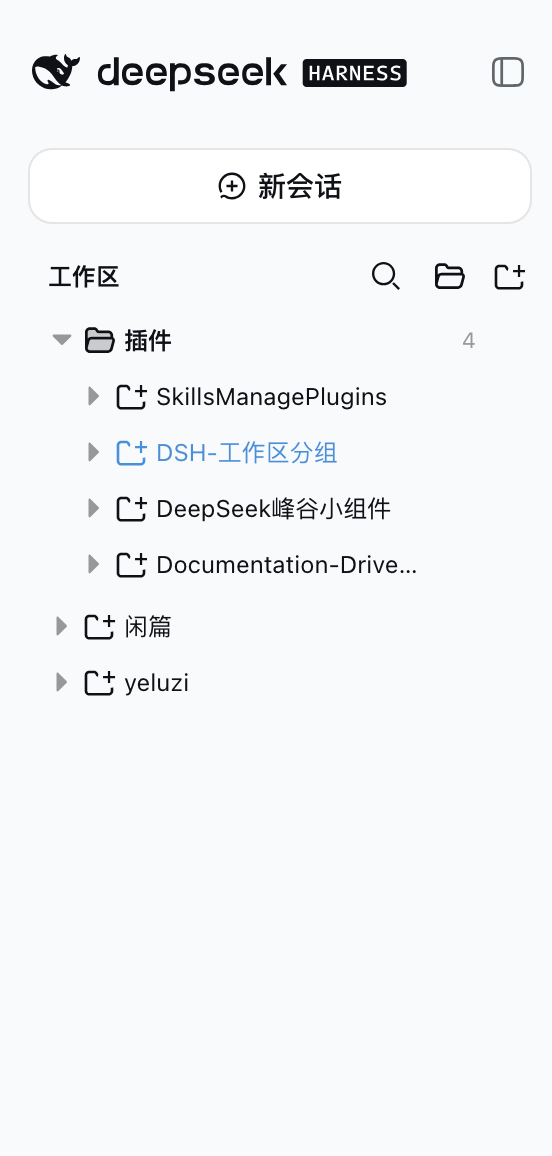
dsh-workspace-groups
Run the following command in DeepSeek Harness:
dsh plugin install z-col/dsh-workspace-groups
Paste the following prompt into your AI chat to install this plugin:
In DeepSeek Harness, install the plugin by running the command dsh plugin install z-col/dsh-workspace-groups, with the complete source code available at https://github.com/z-col/dsh-workspace-groups.
About this plugin
DeepSeek Harness's default workspace list is limited to two levels, which can become cluttered and inefficient as projects grow. The dsh-workspace-groups plugin transforms the interface into a three-level tree: category folders, project folders, and sessions, allowing you to organize everything like a file system. Key features include manual group creation, drag-and-drop sorting for projects and groups, and rule-based auto-classification using path or name patterns—all updates are immediate and persistent, with no risk of data loss. Search also adopts a tree structure for quick location of specific sessions. This plugin is ideal for developers, team collaborators, and project managers who need to efficiently manage multiple workspaces and enhance their daily workflow. With its zero-intrusion design, it ensures safety and stability without disrupting official data.
Screenshots
Use Cases
- Quickly grouping and sorting workspaces when managing multiple projects.
- Automatically organizing workspaces by rules to improve search efficiency.
- Flexibly adjusting project structures in team collaboration without data loss.
Best For
- Developers who need to efficiently manage multiple workspaces.
- Project managers seeking clear organizational structures for projects.
- Power users who want to customize workspace layouts to boost productivity.
Related Plugins
A service-oriented sidebar framework for DSH, offering a full workbench with file explorer, embedded browser, real terminal, Git panel, and extensible plugin services.

A beautiful, practical Claude Code-style TUI plugin with pixel whale top bar, flowing glow title, real-time status line, streaming thought expansion, time rewind, context progress bar and TPS gauge — zero core changes.

The plugin market for DeepSeek Harness: browse/search/one-click install community plugins and themes, with updates, backup/restore, hot disable, diagnostics, and AI fix.

A persistent whale widget on the DSH web UI that shows DeepSeek balance, today's usage, and per-turn cost, with drag-and-snap and sound effects.