dsh-memo-notebook
Run the following command in DeepSeek Harness:
dsh plugin install SeanWang114514/dsh-memo-notebook
Paste the following prompt into your AI chat to install this plugin:
Run dsh plugin install SeanWang114514/dsh-memo-notebook in your terminal (source: https://github.com/SeanWang114514/dsh-memo-notebook), then restart dsh web and refresh the browser to activate the plugin.
About this plugin
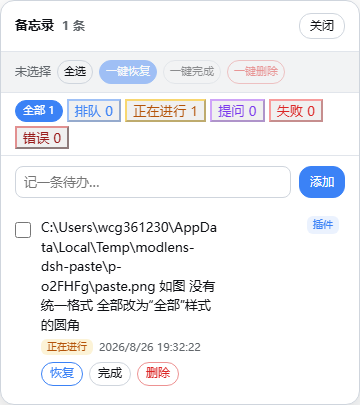
Long, multi-task sessions in DeepSeek Harness quickly become a juggling act. Prompts pile up in the queue, a fresh message sidetracks the one still running, and once the scroll buffer moves on there is no reliable way to remember where each task stood. memo-notebook turns that invisible context into a small, draggable panel anchored in the browser corner. Every instruction you send is captured the moment it is queued, follows a clear state path—queued, running, asking, interrupted, completed—and, if it was bumped by a newer prompt, can be resumed with one click back to the exact status it held before the interruption.
The state loop is deliberate. A new prompt enters the queue and flows into running as the agent works; it pauses at asking whenever the agent needs your input; it settles into a strikethrough-complete state the instant the agent finishes cleanly. When an incoming prompt preempts an active one, the older entry is badged as interrupted and the previous status is recorded. Hitting resume restores that prior status precisely: a queued task returns to the queue, a running task picks up execution where it stopped. Every mutation is written synchronously to a local JSON file, so closing the browser or restarting the process never loses data, and multiple open tabs stay in step through a lightweight SSE feed.
This plugin is aimed at people who run dsh as a long-lived collaborator—multi-step build-and-iterate workflows, heavy context-switching between parallel tasks, or any session in which scrolling back up to re-read "what did I just ask it to do" has broken your flow more than once. If you would rather see that context pinned at the edge of your viewport than buried somewhere in the scrollback, memo-notebook is a small, zero-dependency panel that restores it.
Screenshots
Use Cases
- Multiple prompts queued in a long session; glance at each one's status without scrolling back through history
- A new message interrupts an active task; resume it with one click and it continues from the exact prior state
- After restarting the browser or dsh process, all previously recorded tasks and their states remain intact
Best For
- dsh daily users who juggle many concurrent tasks and want at-a-glance progress tracking
- Power users of long multi-step session workflows such as iterative build-and-debug cycles
- Developers who need task state to survive browser or process restarts reliably
Related Plugins
A service-oriented sidebar framework for DSH, offering a full workbench with file explorer, embedded browser, real terminal, Git panel, and extensible plugin services.

A beautiful, practical Claude Code-style TUI plugin with pixel whale top bar, flowing glow title, real-time status line, streaming thought expansion, time rewind, context progress bar and TPS gauge — zero core changes.

The plugin market for DeepSeek Harness: browse/search/one-click install community plugins and themes, with updates, backup/restore, hot disable, diagnostics, and AI fix.

A persistent whale widget on the DSH web UI that shows DeepSeek balance, today's usage, and per-turn cost, with drag-and-snap and sound effects.