
dsh-balance-pill
Run the following command in DeepSeek Harness:
dsh plugin install ivbrajkovic/dsh-balance-pill
Paste the following prompt into your AI chat to install this plugin:
Run dsh plugin install ivbrajkovic/dsh-balance-pill in your terminal to install; the source is available at https://github.com/ivbrajkovic/dsh-balance-pill
About this plugin
When you build with the DeepSeek API, balance and peak-hour info lives in the console or on another tab, and hopping over to check it keeps breaking your flow. dsh-balance-pill condenses the balance into a small, always-present pill that sits in the Harness Web UI within your peripheral vision, so you read it in passing without ever leaving your current task.
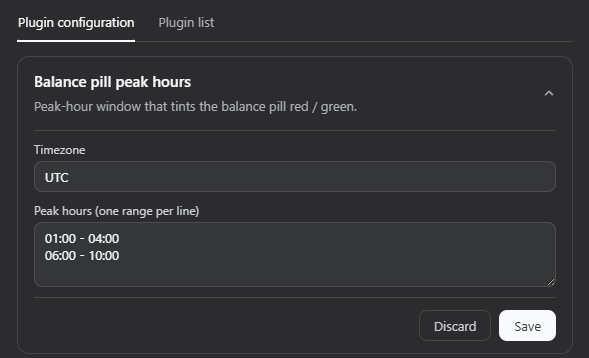
With a chat session open the pill blends into the session header toolbar; without one it pins to the top-right corner of the window. The two placements are mutually exclusive, so it never overlaps or duplicates. The balance auto-refreshes every 60 seconds and on click; a loading state shows an ellipsis, and any failure quietly renders a dash with no error dialog or noise. The most practical feature is peak-hour tinting: set a timezone and one or more HH:MM ranges in the plugin settings card, and the whole pill shifts to a subtle red during peak windows and a subtle green off-peak. Ranges can wrap past midnight, DST boundaries are resolved via the browser Intl API, and the tint recalculates on mount, on each 60-second tick, and the moment you save a new config.
If you work in the DeepSeek Harness Web GUI daily, driving projects or agents, and want balance and peak status in your peripheral vision without a dashboard, charts, or an extra settings page, this pill quietly fills that gap—just a calm colored dot you glance at only when it matters.
Screenshots
Use Cases
- Glance at the pill color mid-session to see if it is peak hour before kicking off a heavy batch of calls
- Check remaining balance at a glance before running long agent loops instead of switching to the console or another tab
- Confirm the pill shows green off-peak before firing late-night or early-morning requests for a cost-conscious workflow
Best For
- Developers who build projects and drive agents in the DeepSeek Harness Web UI daily
- Independent developers who call the API frequently and want to minimize tab or window switching
- Self-serve users who track usage cost and want balance and peak status visible at a glance
Related Plugins
A service-oriented sidebar framework for DSH, offering a full workbench with file explorer, embedded browser, real terminal, Git panel, and extensible plugin services.

A beautiful, practical Claude Code-style TUI plugin with pixel whale top bar, flowing glow title, real-time status line, streaming thought expansion, time rewind, context progress bar and TPS gauge — zero core changes.

The plugin market for DeepSeek Harness: browse/search/one-click install community plugins and themes, with updates, backup/restore, hot disable, diagnostics, and AI fix.

A persistent whale widget on the DSH web UI that shows DeepSeek balance, today's usage, and per-turn cost, with drag-and-snap and sound effects.