dsh-edit-guardian
Run the following command in DeepSeek Harness:
dsh plugin install LWLAymh/dsh-edit-guardian
Paste the following prompt into your AI chat to install this plugin:
Run dsh plugin install LWLAymh/dsh-edit-guardian in your DeepSeek Harness Web profile to install this plugin; the source is available at https://github.com/LWLAymh/dsh-edit-guardian. Restart the Web process after installation.
About this plugin
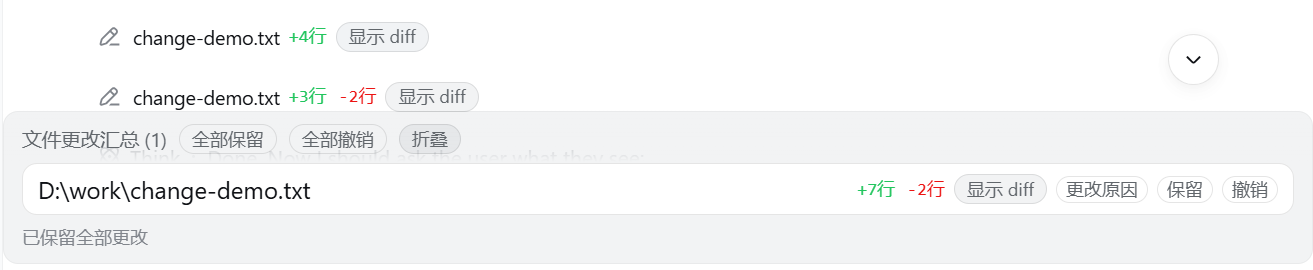
When an agent starts modifying files and running shell commands on your behalf, the few lines of tool-call logs in the browser rarely tell you what actually happened: how many lines changed, whether the edit is reversible, or whether an rm should go through at all. dsh-edit-guardian fills that missing interaction layer in the DeepSeek Harness Web UI, making every file change visible, controllable, and revertible.
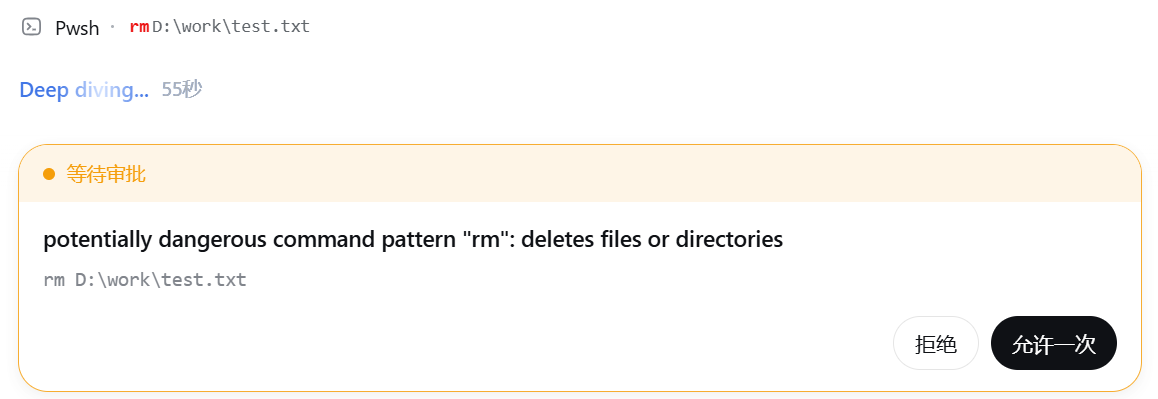
The plugin delivers three tightly integrated capabilities. First, a file-change bar: after write, edit, or str_replace_editor runs, the tool row shows +N and -M line counts with an inline, context-aware diff toggle so you can review changes without leaving the conversation. Second, a persistent change summary: a collapsible bar above the composer lists every file change that has not yet been kept, updating in real time even while the agent is still working; each file has keep and undo buttons, and the header offers keep-all or undo-all, backed by the host-side /undo command. Third, a dangerous-command approval gate: when bash or pwsh output matches destructive patterns such as rm, git push --force, curl|sh, or format, execution is blocked and a browser approval prompt appears; the matched text is highlighted in red, and any sandbox permission escalation call flags the affected path in red as well.
It is ideal for developers who let an agent operate directly on workspace files and the shell but want a clear audit trail, step-by-step approval, and one-click rollback right inside the browser. The plugin targets the Web profile; in headless or TUI environments only the host-side gate and /undo remain active, as there is no approval UI or tool-view surface.
Screenshots
Use Cases
- Review per-file diffs after the agent batch-edits multiple files
- Intercept destructive commands like rm or git push --force before execution
- Keep-all or undo-all across multiple changed files with a single click
Best For
- Developers who let an agent modify workspace files and run shell commands directly
- Users who need browser-side approval for risky shell commands
- DeepSeek Harness Web users who want gradual rollback of agent edits
Related Plugins
A service-oriented sidebar framework for DSH, offering a full workbench with file explorer, embedded browser, real terminal, Git panel, and extensible plugin services.

A beautiful, practical Claude Code-style TUI plugin with pixel whale top bar, flowing glow title, real-time status line, streaming thought expansion, time rewind, context progress bar and TPS gauge — zero core changes.

The plugin market for DeepSeek Harness: browse/search/one-click install community plugins and themes, with updates, backup/restore, hot disable, diagnostics, and AI fix.

A persistent whale widget on the DSH web UI that shows DeepSeek balance, today's usage, and per-turn cost, with drag-and-snap and sound effects.